Terraform Management
Yellow.ai's integration with Terraform (HCP Terraform) lets your agent manage cloud infrastructure directly from a conversation — without anyone logging into Terraform manually. Your agent can create workspaces, trigger deployments, manage variables, check run statuses, and more.
Common use cases include a DevOps helpdesk agent (check run status, cancel stuck runs), an infrastructure provisioning agent (create workspaces, set variables, trigger runs), and an ops monitoring agent (list resources, get state versions, view workspace details).
Supported Actions
| Action | Description |
|---|---|
| Get Organization | Fetches details of your Terraform organization. |
| Get Workspace | Fetches details of a specific workspace by name. |
| List Workspaces | Lists all workspaces in your organization. |
| Create Workspace | Creates a new workspace in Terraform. |
| Update Workspace | Updates settings of an existing workspace. |
| Delete Workspace | Deletes a workspace permanently. |
| Lock Workspace | Locks a workspace to prevent new runs. |
| Unlock Workspace | Unlocks a workspace so runs can proceed. |
| Create Configuration Version | Creates a configuration version — a required step before triggering a run. |
| Get Configuration Version | Fetches the status of a configuration version by ID. |
| Create Run | Triggers a plan/apply run in a workspace. |
| Get Run | Fetches details and current status of a run. |
| List Runs in Workspace | Lists runs in a workspace, with optional status filter. |
| Apply Run | Approves and applies a run that is waiting for confirmation. |
| Cancel Run | Cancels an in-progress run. |
| Discard Run | Discards a planned run without applying it. |
| Create Workspace Variable | Creates a variable (Terraform or environment) in a workspace. |
| List Workspace Variables | Lists all variables in a workspace. |
| Update Workspace Variable | Updates an existing variable's value or settings. |
| Delete Workspace Variable | Deletes a variable from a workspace. |
| Get Current State Version | Fetches the latest Terraform state for a workspace. |
| List Workspace Resources | Lists all managed resources in a workspace. |
Before You Begin — Key Concepts
Think of Terraform like a construction project manager:
- A Workspace is like a project folder — it holds your infrastructure configuration and state.
- A Run is like a work order — it tells Terraform to plan and/or apply changes to your infrastructure.
- A Configuration Version is the blueprint you upload before a run. Without it, Terraform doesn't know what to build.
- A Variable is a setting you pass in — like
AWS_REGION = us-east-1. - A State Version is a snapshot of what infrastructure currently exists.
Typical Deployment Flow
Create Workspace → Add Variables → Create Configuration Version → Create Run → (Apply Run if needed)
Workspace ID (ws-xxxxx) and Configuration Version ID (cv-xxxxx) are different from Workspace Name. Many nodes require the ID, not the name. Always store these IDs when you create a workspace or configuration version.
Integrating Terraform with Yellow.ai
In a two-tier environment, connect the integration in the Development environment. In a three-tier environment, connect it in Staging or Sandbox. All connected integrations are automatically available in the live environment.
-
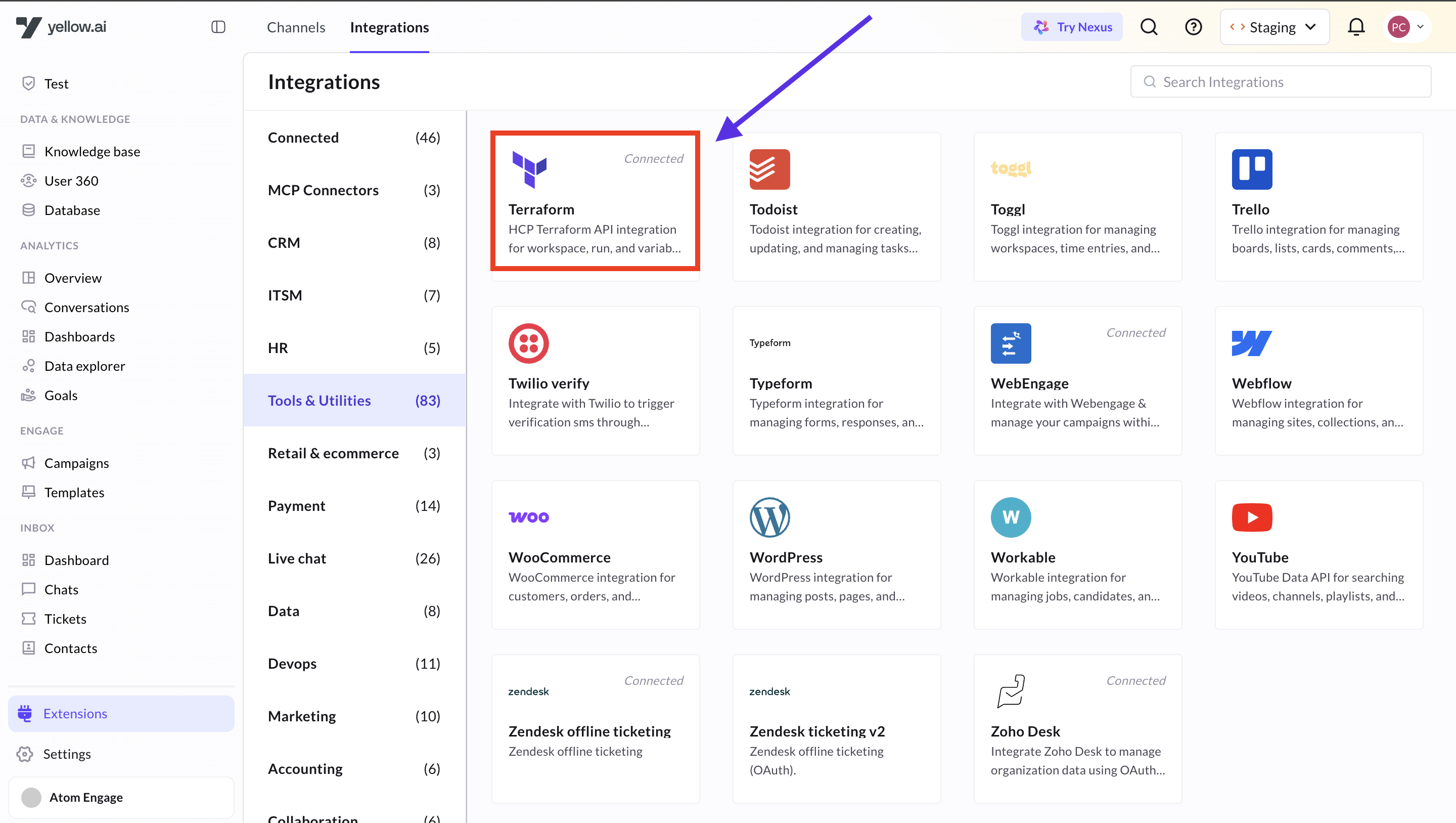
Switch to the Development/Staging environment and go to Extensions > Integrations > Tools > Terraform Management. Alternatively, use the Search box.
-
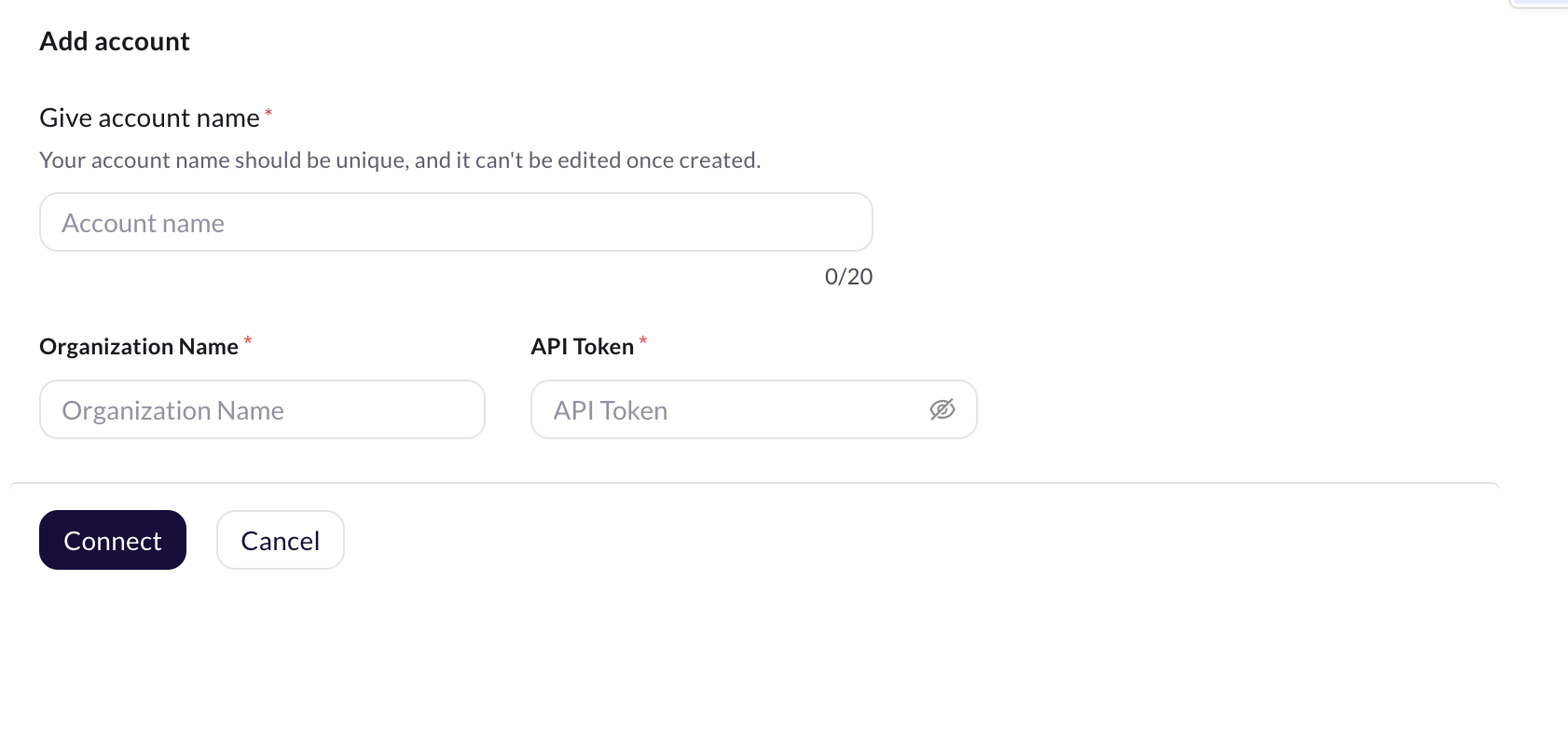
In Give account name, enter a unique name for this integration account (lowercase letters, numbers, and underscores only).
-
Enter your Organization Name. This is the name visible in your HCP Terraform URL — for example, if your URL is
https://app.terraform.io/app/my-company/workspaces, your organization name ismy-company. -
Enter your API Token. To generate one:
- Log in to app.terraform.io
- Click your profile icon (top right) → User Settings → Tokens
- Click Create an API token, give it a name, and copy the token value
noteThe API token must have sufficient permissions to manage workspaces and runs in your organization.
-
Click Connect.
-
To connect another account, click +Add Account and repeat the steps. You can add a maximum of 15 accounts.
Accessing Terraform Functions via Agent Flow
Once connected, you can add Terraform action nodes anywhere in your agent flows.
- Go to Automation and create or open a flow.
- At the point where you want to trigger a Terraform action, click Add Node → Integrations → Terraform Management.
- Select the action you want from the dropdown.
When multiple accounts are connected, select the appropriate one for each node.
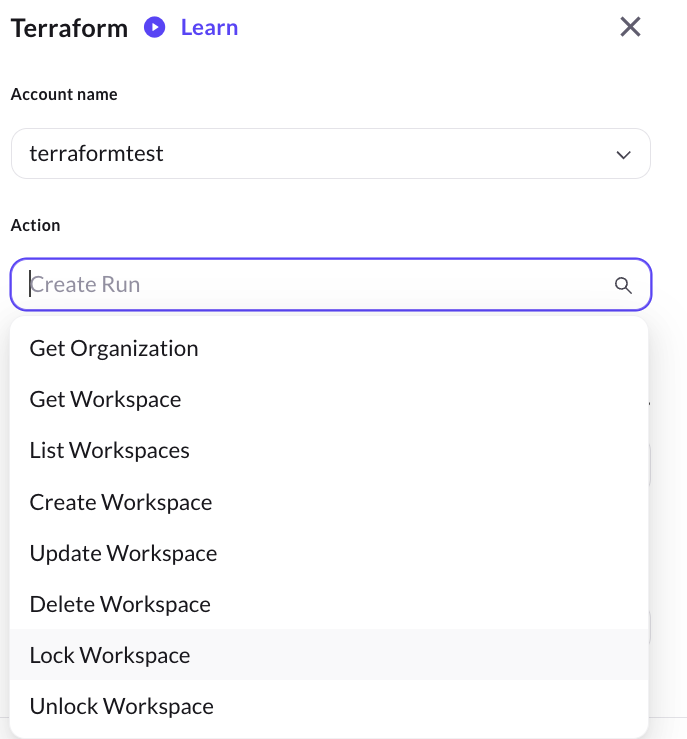
The following images show the list of available action nodes you can select from the Terraform Management integration:


Action Nodes
Get Organization
Fetches the details of your connected Terraform organization. No input is required — it uses the organization name you provided during setup.
Required parameters: None
Sample response:
{
"data": {
"id": "my-company",
"type": "organizations",
"attributes": {
"name": "my-company",
"plan-identifier": "free_standard",
"managed-resource-count": 10
}
}
}
Get Workspace
Fetches the details of a specific workspace using its name.
Required parameters:
| Parameter | Type | Description |
|---|---|---|
| Workspace Name | String | The exact name of the workspace (e.g., production-infra). |
Sample response:
{
  "data": {
    "id": "ws-WH1sqSKMgKygSZrA",
    "type": "workspaces",
    "attributes": {
      "name": "my-test-workspace",
      "locked": false,
      "terraform-version": "1.15.6",
      "execution-mode": "remote",
      "resource-count": 0,
      "auto-apply": false,
      "description": "Testing Yellow.ai integration"
    }
  }
}
Save the id field (ws-xxxxx) from this response — you'll need it for Lock/Unlock, Create Run, and other nodes that require a Workspace ID.
List Workspaces
Lists all workspaces in your organization. You can optionally filter by name or paginate the results.
Optional parameters:
| Parameter | Type | Description |
|---|---|---|
| Search by Name | String | Filters workspaces whose name contains this text. |
| Page Size | Number | Number of workspaces to return per page (e.g., 20). |
| Page Number | Number | Which page of results to return (starts at 1). |
Sample response:
{
  "data": [
    {
      "id": "ws-WH1sqSKMgKygSZrA",
      "type": "workspaces",
      "attributes": {
        "name": "my-test-workspace",
        "locked": false,
        "terraform-version": "1.15.6",
        "resource-count": 0
      }
    }
  ]
}
Create Workspace
Creates a new workspace in your Terraform organization.
Required parameters:
| Parameter | Type | Description |
|---|---|---|
| Workspace Name | String | The name for the new workspace. Use only letters, numbers, hyphens, and underscores. |
Optional parameters:
| Parameter | Type | Description |
|---|---|---|
| Description | String | A short description of what this workspace manages. |
| Terraform Version | String | The Terraform version to use (e.g., 1.6.0). Defaults to your org's default. |
| Auto Apply | Boolean | If true, changes are applied automatically after planning. If false, someone must manually approve. |
| Working Directory | String | The subdirectory within your repo that holds Terraform files (leave empty if files are at root). |
Sample response:
{
  "data": {
    "id": "ws-WH1sqSKMgKygSZrA",
    "type": "workspaces",
    "attributes": {
      "name": "my-new-workspace",
      "locked": false,
      "terraform-version": "1.15.6",
      "auto-apply": false,
      "description": "Created via Yellow.ai"
    }
  }
}
Save the workspace id (ws-xxxxx) from the response — you'll need it for creating runs and variables.
Update Workspace
Updates the settings of an existing workspace. Only the fields you provide will change — everything else stays the same.
Required parameters:
| Parameter | Type | Description |
|---|---|---|
| Workspace Name | String | The current name of the workspace to update. |
| New Name | String | The new name for the workspace (required by the API even if you're not renaming it — pass the same name to keep it unchanged). |
Optional parameters:
| Parameter | Type | Description |
|---|---|---|
| Description | String | Updated description. |
| Terraform Version | String | Updated Terraform version. |
| Auto Apply | Boolean | Enable or disable auto-apply. |
| Working Directory | String | Updated working directory path. |
Sample response:
{
  "data": {
    "id": "ws-WH1sqSKMgKygSZrA",
    "type": "workspaces",
    "attributes": {
      "name": "my-updated-workspace",
      "auto-apply": true,
      "terraform-version": "1.15.6"
    }
  }
}
Delete Workspace
Permanently deletes a workspace from your Terraform organization. All runs, variables, and state history for this workspace will be lost.
Required parameters:
| Parameter | Type | Description |
|---|---|---|
| Workspace Name | String | The name of the workspace to delete. |
Sample response:
{
  "status": 204,
  "message": "Workspace successfully deleted."
}
A successful delete returns HTTP 204 No Content. The response body is empty on success. The sample above is a Yellow.ai wrapper response.
This action is irreversible. Add a confirmation step in your agent flow before executing this node.
Lock Workspace
Locks a workspace so that no new runs can be queued. Useful during maintenance or when you want to pause all deployments for a workspace.
Required parameters:
| Parameter | Type | Description |
|---|---|---|
| Workspace ID | String | The unique ID of the workspace (format: ws-xxxxx). Use Get Workspace to find this. |
Optional parameters:
| Parameter | Type | Description |
|---|---|---|
| Lock Reason | String | A short message explaining why you're locking this workspace (e.g., "maintenance window"). |
Sample response:
{
  "data": {
    "id": "ws-WH1sqSKMgKygSZrA",
    "type": "workspaces",
    "attributes": {
      "locked": true,
      "name": "my-test-workspace"
    }
  }
}
This node requires the Workspace ID (ws-xxxxx), not the workspace name. Get the ID first using the Get Workspace node.
Unlock Workspace
Unlocks a previously locked workspace, allowing runs to be queued again.
Required parameters:
| Parameter | Type | Description |
|---|---|---|
| Workspace ID | String | The unique ID of the workspace (format: ws-xxxxx). |
Sample response:
{
  "data": {
    "id": "ws-WH1sqSKMgKygSZrA",
    "type": "workspaces",
    "attributes": {
      "locked": false,
      "name": "my-test-workspace"
    }
  }
}
Create Configuration Version
A Configuration Version is a required checkpoint before you can trigger a run. Think of it as telling Terraform "I'm about to send you a new set of instructions — get ready." The response gives you an upload-url (where you send the config files) and a cv-xxxxx ID (which you pass into Create Run).
In most automated flows driven from Yellow.ai, you create a Configuration Version and then immediately pass its ID into Create Run. You do not need to upload files manually — the configuration version acts as a trigger placeholder when you're driving runs via the API with a pre-uploaded configuration.
Required parameters:
| Parameter | Type | Description |
|---|---|---|
| Workspace ID | String | The unique ID of the workspace (format: ws-xxxxx). |
Optional parameters:
| Parameter | Type | Description |
|---|---|---|
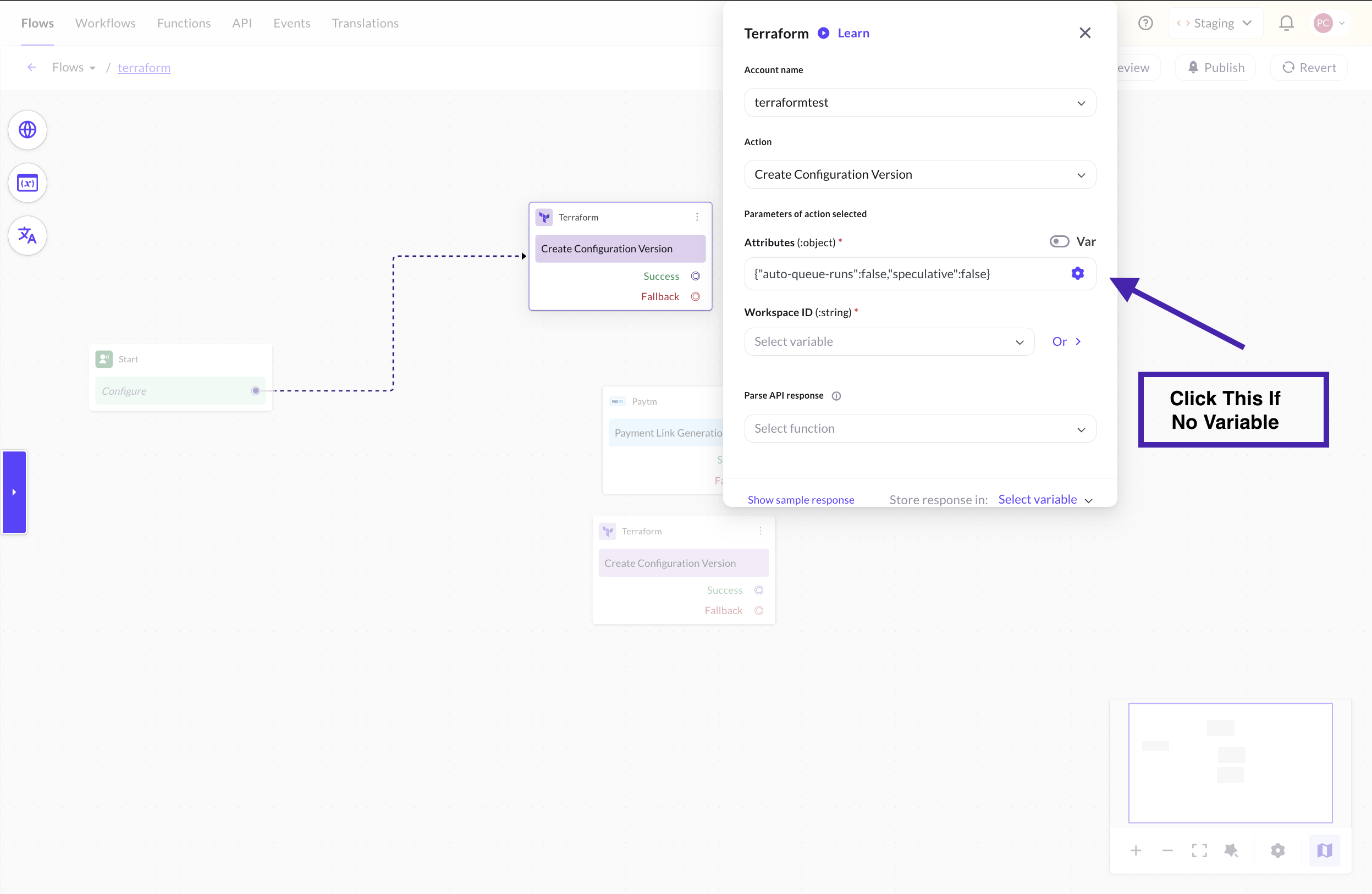
| Auto Queue Runs | Boolean | If true, a run is automatically queued once the config is uploaded. Defaults to false. |
| Speculative (Plan Only) | Boolean | If true, this config version will only run a plan — it will never apply changes. Useful for previewing what Terraform would do. |
Sample response:
{
  "data": {
    "id": "cv-ntv3HbhJqvFzamy7",
    "type": "configuration-versions",
    "attributes": {
      "auto-queue-runs": false,
      "status": "pending",
      "upload-url": "https://archivist.terraform.io/v1/object/some-long-url"
    }
  }
}
Save the id field (cv-xxxxx) — you'll pass it into Create Run as the Configuration Version ID.
Get Configuration Version
Checks the current status of a configuration version. Use this to confirm a configuration version has been successfully uploaded before triggering a run.
Required parameters:
| Parameter | Type | Description |
|---|---|---|
| Configuration Version ID | String | The ID of the configuration version (format: cv-xxxxx). |
Sample response:
{
  "data": {
    "id": "cv-ntv3HbhJqvFzamy7",
    "type": "configuration-versions",
    "attributes": {
      "status": "uploaded",
      "auto-queue-runs": false,
      "speculative": false,
      "source": "tfe-api"
    }
  }
}
Status values explained:
| Status | What it means |
|---|---|
pending | Configuration version was created but no files uploaded yet. |
uploaded | Files have been received and the config version is ready to use. |
errored | Something went wrong during upload. |
Create Run
Triggers a Terraform run (plan + optional apply) in a workspace. This is the most important action in the integration — it kicks off your infrastructure deployment.
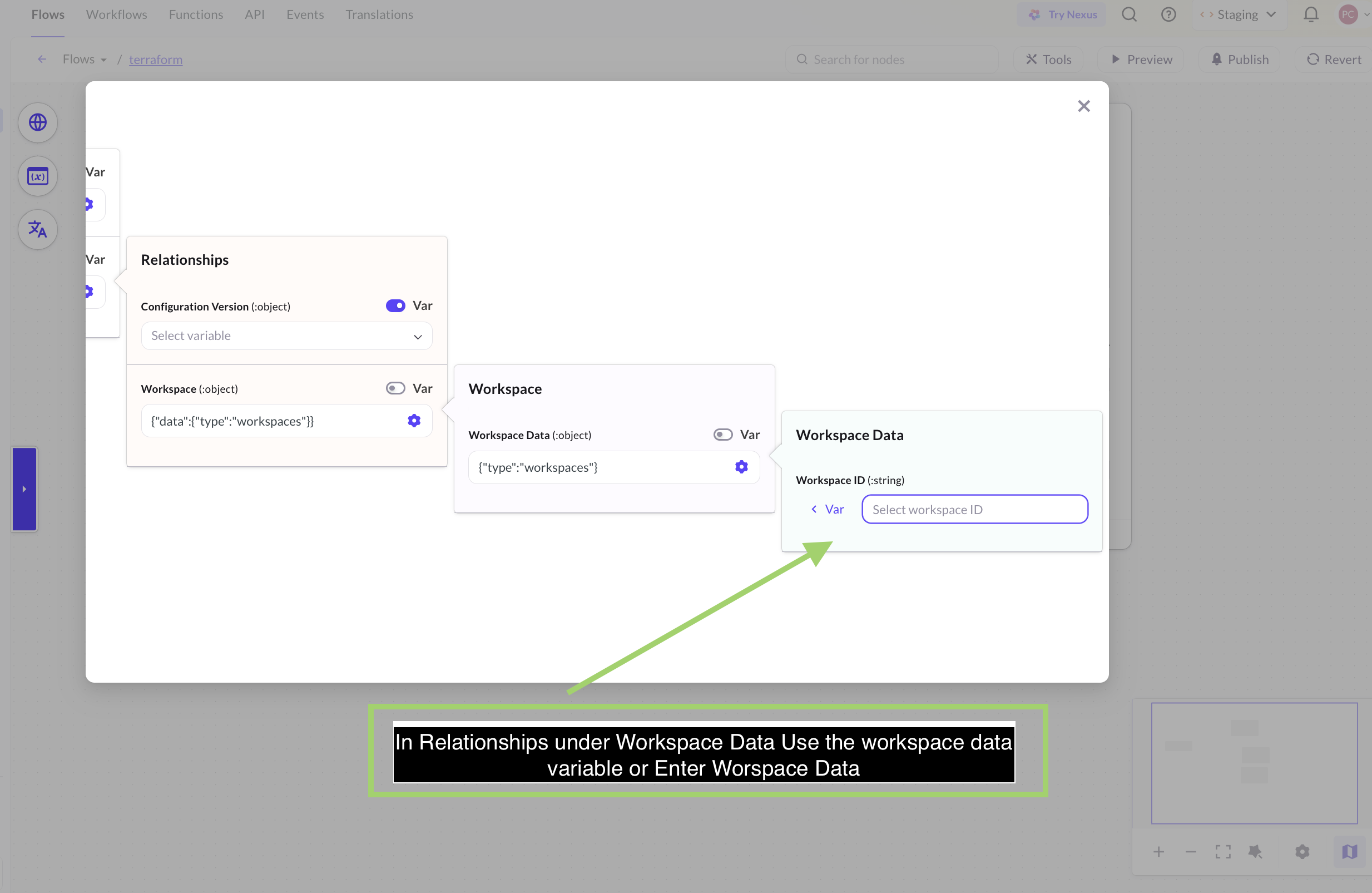
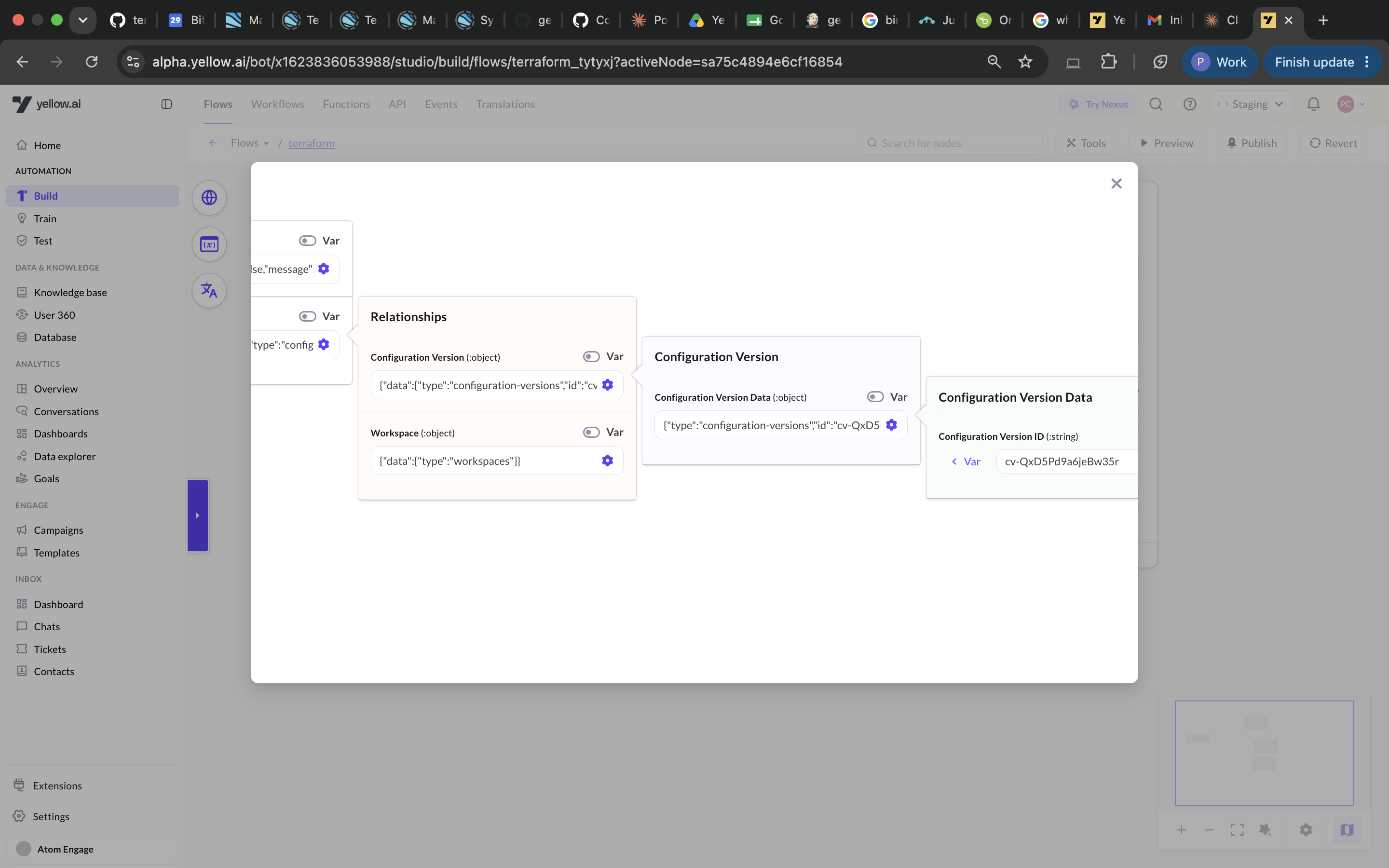
The Create Run node has a nested JSON structure that you must fill in completely. Unlike simpler nodes, this node requires you to provide the entire data object — including both attributes (what the run should do) and relationships (which workspace and config version to use). If any part is missing or wrong, Terraform will reject the request.
What you need before creating a run:
- A Workspace ID (
ws-xxxxx) — get this from Get Workspace or Create Workspace. - A Configuration Version ID (
cv-xxxxx) — get this from Create Configuration Version.
Required parameters:
You must pass the following complete JSON structure into the Data field:
{
  "data": {
    "type": "runs",
    "attributes": {
      "message": "Triggered from Yellow.ai",
      "is-destroy": false,
      "auto-apply": true
    },
    "relationships": {
      "workspace": {
        "data": {
          "type": "workspaces",
          "id": "ws-xxxxx"
        }
      },
      "configuration-version": {
        "data": {
          "type": "configuration-versions",
          "id": "cv-xxxxx"
        }
      }
    }
  }
}
Breakdown of each field:
| Field | Where | Type | Description |
|---|---|---|---|
data.attributes.message | attributes | String | A label for this run, visible in the Terraform UI (e.g., "deployment", "triggered by helpdesk"). |
data.attributes.is-destroy | attributes | Boolean | Set to true to destroy all managed infrastructure. Set to false for a normal apply. |
data.attributes.auto-apply | attributes | Boolean | Set to true to apply automatically after planning. Set to false to require manual approval using Apply Run. |
data.relationships.workspace.data.id | relationships | String | Your workspace ID (ws-xxxxx). |
data.relationships.configuration-version.data.id | relationships | String | Your configuration version ID (cv-xxxxx). |
The type fields ("runs", "workspaces", "configuration-versions") are fixed values — always use exactly these strings. Do not change them.
Real example — deploy to production with auto-apply:
{
  "data": {
    "type": "runs",
    "attributes": {
      "message": "production deployment",
      "is-destroy": false,
      "auto-apply": true
    },
    "relationships": {
      "workspace": {
        "data": {
          "type": "workspaces",
          "id": "ws-WH1sqSKMgKygSZrA"
        }
      },
      "configuration-version": {
        "data": {
          "type": "configuration-versions",
          "id": "cv-ntv3HbhJqvFzamy7"
        }
      }
    }
  }
}
Real example — destroy infrastructure:
{
  "data": {
    "type": "runs",
    "attributes": {
      "message": "teardown staging environment",
      "is-destroy": true,
      "auto-apply": false
    },
    "relationships": {
      "workspace": {
        "data": {
          "type": "workspaces",
          "id": "ws-WH1sqSKMgKygSZrA"
        }
      },
      "configuration-version": {
        "data": {
          "type": "configuration-versions",
          "id": "cv-ntv3HbhJqvFzamy7"
        }
      }
    }
  }
}
Sample response:
{
  "data": {
    "id": "run-CZcmD7eagjhyX0vN",
    "type": "runs",
    "attributes": {
      "status": "pending",
      "message": "production deployment",
      "is-destroy": false,
      "auto-apply": true
    }
  }
}
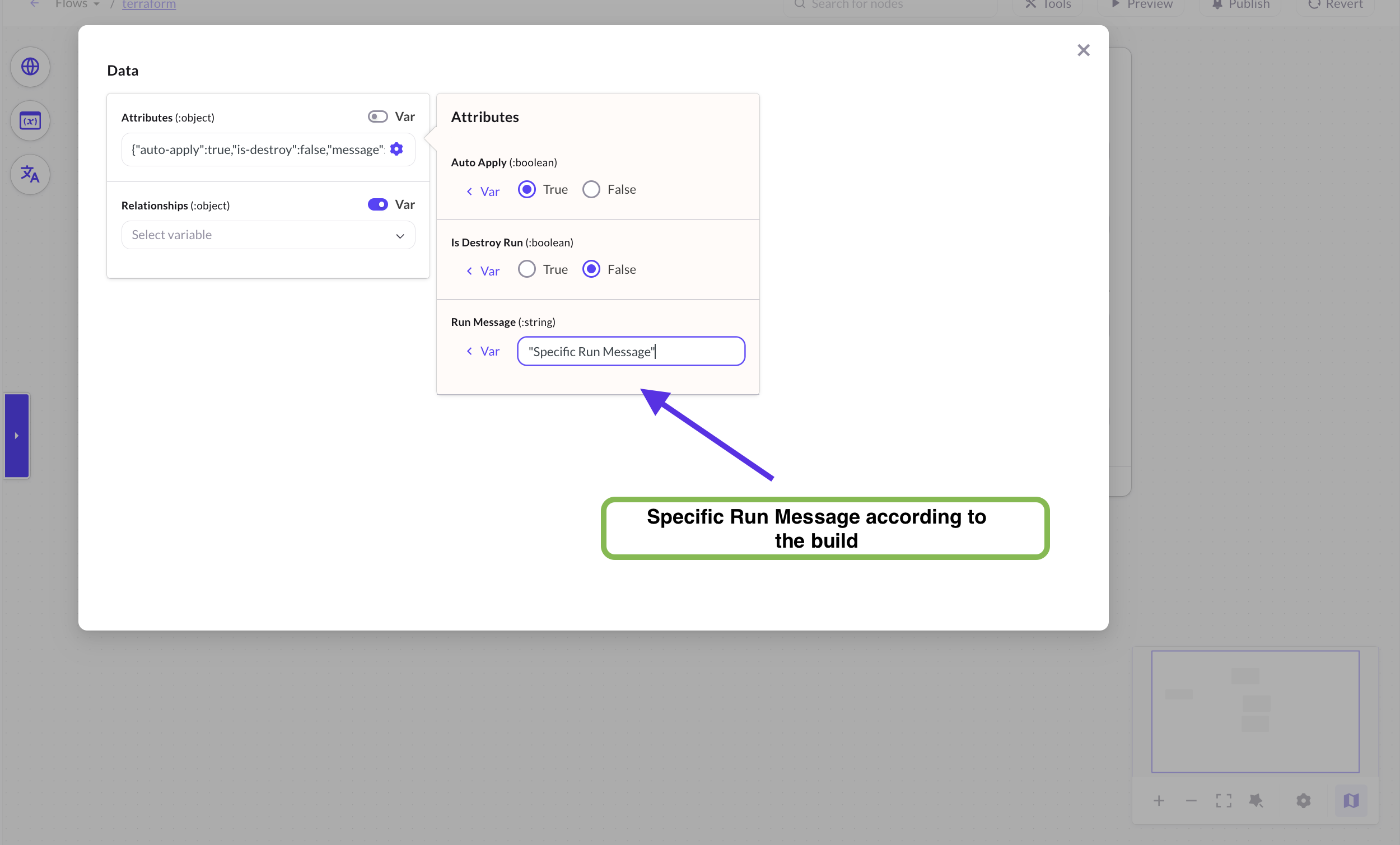
The following images show how to enter the Workspace ID, Configuration Version ID, and other data required for the Create Run node:
Get Run
Fetches the current details and status of a run using its Run ID.
Required parameters:
| Parameter | Type | Description |
|---|---|---|
| Run ID | String | The unique ID of the run (format: run-xxxxx). |
Sample response:
{
  "data": {
    "id": "run-CZcmD7eagjhyX0vN",
    "type": "runs",
    "attributes": {
      "status": "applied",
      "message": "production deployment",
      "is-destroy": false,
      "created-at": "2026-06-15T09:00:00.000Z",
      "status-timestamps": {
        "planned-at": "2026-06-15T09:01:00.000Z",
        "applied-at": "2026-06-15T09:02:00.000Z"
      }
    }
  }
}
Run status values explained:
| Status | What it means |
|---|---|
pending | Run has been created and is waiting in the queue. |
planning | Terraform is currently calculating what changes to make. |
planned | Planning is done — waiting for manual approval before applying. |
applying | Terraform is actively making changes to your infrastructure. |
applied | All changes have been successfully applied. |
errored | Something went wrong. Check the Terraform UI for logs. |
canceled | The run was stopped before completing. |
discarded | The plan was reviewed and rejected (not applied). |
List Runs in Workspace
Lists all runs in a workspace. You can filter by status and limit the number of results returned.
Required parameters:
| Parameter | Type | Description |
|---|---|---|
| Workspace ID | String | The unique ID of the workspace (format: ws-xxxxx). |
Optional parameters:
| Parameter | Type | Description |
|---|---|---|
| Filter by Status | Dropdown | Return only runs with this status. Options: applied, errored, planning, planned, canceled, pending. |
| Page Size | Number | Maximum number of runs to return. |
Sample response:
{
  "data": [
    {
      "id": "run-CZcmD7eagjhyX0vN",
      "type": "runs",
      "attributes": {
        "status": "applied",
        "message": "production deployment",
        "created-at": "2026-06-15T09:00:00.000Z"
      }
    }
  ]
}
Apply Run
Approves and applies a run that is in planned status (waiting for manual confirmation). Use this when a run was created with auto-apply: false and needs a human to sign off before infrastructure changes are made.
Required parameters:
| Parameter | Type | Description |
|---|---|---|
| Run ID | String | The unique ID of the run to apply (format: run-xxxxx). |
Optional parameters:
| Parameter | Type | Description |
|---|---|---|
| Comment | String | A note to add to the approval (e.g., "Approved by IT ops team"). |
Sample response:
{
  "status": 202,
  "message": "Run apply accepted."
}
A successful apply request returns HTTP 202 Accepted. The run then moves to applying status. Use Get Run to track progress.
Cancel Run
Cancels a run that is currently in progress (e.g., in planning or applying status).
Required parameters:
| Parameter | Type | Description |
|---|---|---|
| Run ID | String | The unique ID of the run to cancel (format: run-xxxxx). |
Optional parameters:
| Parameter | Type | Description |
|---|---|---|
| Comment | String | A short reason for canceling (e.g., "Wrong config — canceling to fix"). |
Sample response:
{
  "status": 202,
  "message": "Run cancel accepted."
}
Canceling a run mid-apply may result in partial infrastructure changes. Use with caution and verify the workspace state after canceling.
Discard Run
Discards a run that has been planned but not yet applied — i.e., a run sitting in planned status waiting for approval. Discarding means "I've seen the plan, I don't want to apply it."
Required parameters:
| Parameter | Type | Description |
|---|---|---|
| Run ID | String | The unique ID of the run to discard (format: run-xxxxx). |
Optional parameters:
| Parameter | Type | Description |
|---|---|---|
| Comment | String | A reason for discarding (e.g., "Plan looks wrong — will re-run after fixing config"). |
Sample response:
{
  "status": 200,
  "message": "Run discard accepted."
}
Discard only works on runs in planned status. If a run is already in progress, use Cancel Run instead.
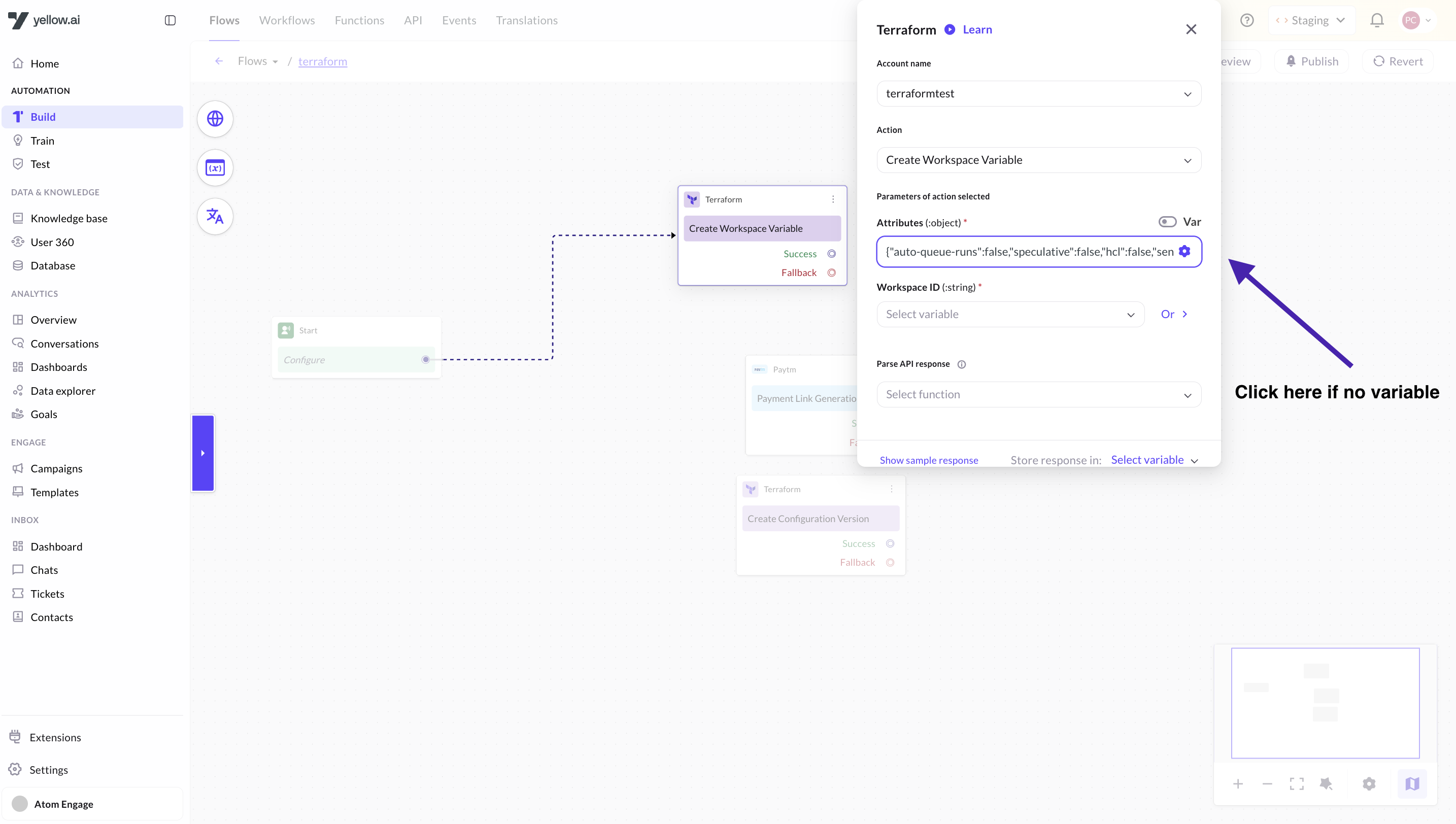
Create Workspace Variable
Creates a variable in a workspace. Variables come in two types:
- Terraform variables — values passed into your Terraform code (like
instance_type = "t3.micro"). - Environment variables — shell environment variables available during runs (like
AWS_ACCESS_KEY_ID).
Required parameters:
| Parameter | Type | Description |
|---|---|---|
| Workspace ID | String | The unique ID of the workspace (format: ws-xxxxx). |
| Variable Key | String | The name of the variable (e.g., AWS_REGION). |
| Variable Value | String | The value of the variable (e.g., us-east-1). |
| Category | Dropdown | terraform for Terraform input variables, env for environment variables. |
Optional parameters:
| Parameter | Type | Description |
|---|---|---|
| Description | String | A note explaining what this variable is for. |
| Sensitive | Boolean | If true, the value is write-only — it will never be shown in the UI or API responses again. Use for secrets like API keys. |
| HCL Format | Boolean | If true, the value is treated as HCL (HashiCorp Configuration Language) rather than a plain string. Use for complex values like lists or maps. |
Sample response:
{
  "data": {
    "id": "var-EavQ1LztoRTQHSNT",
    "type": "vars",
    "attributes": {
      "key": "AWS_REGION",
      "value": "us-east-1",
      "category": "env",
      "sensitive": false,
      "hcl": false,
      "description": "AWS deployment region"
    }
  }
}
List Workspace Variables
Lists all variables (both Terraform and environment) defined in a workspace.
Required parameters:
| Parameter | Type | Description |
|---|---|---|
| Workspace ID | String | The unique ID of the workspace (format: ws-xxxxx). |
Sample response:
{
  "data": [
    {
      "id": "var-EavQ1LztoRTQHSNT",
      "type": "vars",
      "attributes": {
        "key": "AWS_REGION",
        "value": "us-east-1",
        "category": "env",
        "sensitive": false,
        "hcl": false
      }
    }
  ]
}
Sensitive variables will show their value as null in the response — this is expected. Terraform never exposes sensitive values through the API.
Update Workspace Variable
Updates the value or settings of an existing workspace variable.
Required parameters:
| Parameter | Type | Description |
|---|---|---|
| Workspace ID | String | The unique ID of the workspace (format: ws-xxxxx). |
| Variable ID | String | The unique ID of the variable (format: var-xxxxx). Use List Workspace Variables to find this. |
| Variable Key | String | The variable name (required by the API — pass the same key if you're not renaming it). |
| Variable Value | String | The new value for the variable. |
Optional parameters:
| Parameter | Type | Description |
|---|---|---|
| Description | String | Updated description. |
| Sensitive | Boolean | Mark or unmark the variable as sensitive. |
| HCL Format | Boolean | Toggle HCL parsing on or off. |
Sample response:
{
  "data": {
    "id": "var-EavQ1LztoRTQHSNT",
    "type": "vars",
    "attributes": {
      "key": "AWS_REGION",
      "value": "us-west-2",
      "category": "env",
      "sensitive": false,
      "hcl": false
    }
  }
}
Delete Workspace Variable
Permanently removes a variable from a workspace.
Required parameters:
| Parameter | Type | Description |
|---|---|---|
| Workspace ID | String | The unique ID of the workspace (format: ws-xxxxx). |
| Variable ID | String | The unique ID of the variable (format: var-xxxxx). Use List Workspace Variables to find this. |
Sample response:
{
  "status": 204,
  "message": "Variable successfully deleted."
}
A successful delete returns HTTP 204 No Content. The response body is empty on success.
Get Current State Version
Fetches the most recent Terraform state for a workspace. The state tells you what infrastructure currently exists and how many resources are managed. Useful for monitoring and auditing.
Required parameters:
| Parameter | Type | Description |
|---|---|---|
| Workspace ID | String | The unique ID of the workspace (format: ws-xxxxx). |
Sample response:
{
  "data": {
    "id": "sv-SDboVZC8TCxXEneJ",
    "type": "state-versions",
    "attributes": {
      "created-at": "2026-06-15T09:00:00.000Z",
      "size": 940,
      "hosted-state-download-url": "https://archivist.terraform.io/v1/object/some-state-url",
      "resources-processed": true,
      "resource-count": 2,
      "terraform-version": "1.15.6"
    }
  }
}
resource-count tells you how many infrastructure resources (servers, databases, networks, etc.) are currently managed by this workspace.
List Workspace Resources
Lists all individual infrastructure resources currently managed by a workspace (e.g., EC2 instances, S3 buckets, databases).
Required parameters:
| Parameter | Type | Description |
|---|---|---|
| Workspace ID | String | The unique ID of the workspace (format: ws-xxxxx). |
Optional parameters:
| Parameter | Type | Description |
|---|---|---|
| Page Size | Number | Maximum number of resources to return per page. |
Sample response:
{
  "data": [
    {
      "id": "wsr-xjTF97KLNMA2xeSr",
      "type": "workspace-resources",
      "attributes": {
        "name": "server_name",
        "resource-type": "random_pet",
        "provider-type": "registry.terraform.io/hashicorp/random",
        "module-address": ""
      }
    }
  ]
}
Error Reference
All Terraform action nodes return structured errors when something goes wrong. Use the table below to understand what happened and how to fix it.
| Error Status | Code | HTTP Status | What it means | How to fix |
|---|---|---|---|---|
AUTHENTICATION_FAILURE | 8001 | 401 | Your API token is invalid, expired, or missing. | Regenerate the token at app.terraform.io under User Settings > Tokens and update it in your Yellow.ai integration config. |
RESOURCE_NOT_FOUND | 8002 | 404 | The workspace, run, variable, or configuration version ID you provided does not exist. | Double-check the ID. Make sure you're using the ws-xxxxx or run-xxxxx format and that the resource wasn't deleted. |
INVALID_FIELD_VALUE | 8001/8004 | 400/422 | A required field is missing or has an invalid value. | Check that all required fields are filled in and that values match the expected type (e.g., boolean true/false, not "true" as a string). |
DUPLICATE_WORKSPACE | 8003 | 409 | A workspace with that name already exists. | Use a different name, or use Get Workspace to check if it already exists. |
DUPLICATE_RESOURCE | 8004 | 422 | A variable with that key already exists in the workspace. | Use List Workspace Variables to check, then Update Workspace Variable instead of creating a new one. |
RESOURCE_ACCESS_DENIED | 9001 | 403 | Your API token doesn't have permission to perform this action. | Check your token's permission scope in Terraform. Some actions (create/delete workspace, apply runs) require admin-level tokens. |
CONFLICT | 8003 | 409 | The resource is already in the state you're trying to set (e.g., workspace already locked, run already applied). | Check current state using Get Workspace or Get Run before retrying. |
API_LIMIT_REACHED | 9002 | 429 | Terraform's API rate limit has been hit. | Wait a moment and retry. Add a delay node in your agent flow between rapid consecutive API calls. |