Routing Logic
Routing Logic is an optional v3 surface where you write plain-English rules that override or refine how your super agent picks between agents and tools.
Routing Logic rules are NOT mandatory. Most v3 bots route correctly with no rules at all — the super agent's router reads each agent's Trigger and picks based on that. Reach for Routing Logic only when you want a deterministic override on top of trigger-based routing.
How routing actually works
Every turn, the super agent decides one of three things: answer the message itself, hand off to one of your agents, or call a tool.
The primary signal is each agent's Trigger — the natural-language description you write at the top of an agent's profile that says when that agent should take over. The super agent's router reads every agent's Trigger and picks the best match against the current user message.
Example Trigger: "When the user wants to book or schedule a test ride, request a quote, ask for a callback, share contact details, or says they are interested in buying a bike soon."
If your Triggers are sharp and non-overlapping, this is enough — you don't need anything else.
Routing Logic rules are the override layer. Add a rule when:
- Two agents have overlapping Triggers and routing keeps picking the wrong one.
- You want a topic to always go to a specific agent, with no LLM judgement involved (sensitive topics, regulated content, escalations).
- You need a compound condition that's hard to express in a Trigger ("if region = X and topic = Y, route to…").
When a rule applies, it overrides the trigger-based pick. When no rule applies, the router falls back to the Triggers.
The same model applies to tools: the super agent can call any tool directly, using each tool's description (and the agents the tool is attached to) as routing signals. Write a Routing Logic rule when you need a topic to always go through a specific tool.
Start trigger = the agent's Trigger
The field labelled Trigger at the top of each agent's profile is sometimes called the agent's Start trigger. It's the same thing — the natural-language description the super agent reads to decide when this agent should activate. Don't confuse it with Routing Logic:
| Start trigger (per agent) | Routing Logic (super agent) | |
|---|---|---|
| Where it lives | At the top of each agent's profile, in the Trigger section | On the super agent's Configuration → Routing logic sub-page |
| What it does | The primary routing signal — read by the super agent's router on every turn to pick the best matching agent | Optional override rules that pin specific topics to specific agents/tools |
| Mandatory? | Yes — every agent needs a Trigger | No — bots route fine with no rules |
You almost always start by writing sharp Triggers. Reach for Routing Logic only after you've seen routing-logic-vs-trigger collisions in real conversations.
When to use Routing Logic vs Conversation Rules
People often mix these up. Here's the rule of thumb:
| You want to… | Use |
|---|---|
| Force a topic to always go to a specific agent or tool | Routing Logic |
| Set tone, style, "always do / never do" guidelines | Conversation Rules |
Routing Logic = hard constraints on routing decisions. Conversation Rules = soft guidance on how to talk.
When the two collide, Routing Logic wins.
Step 1: Open the Routing logic page
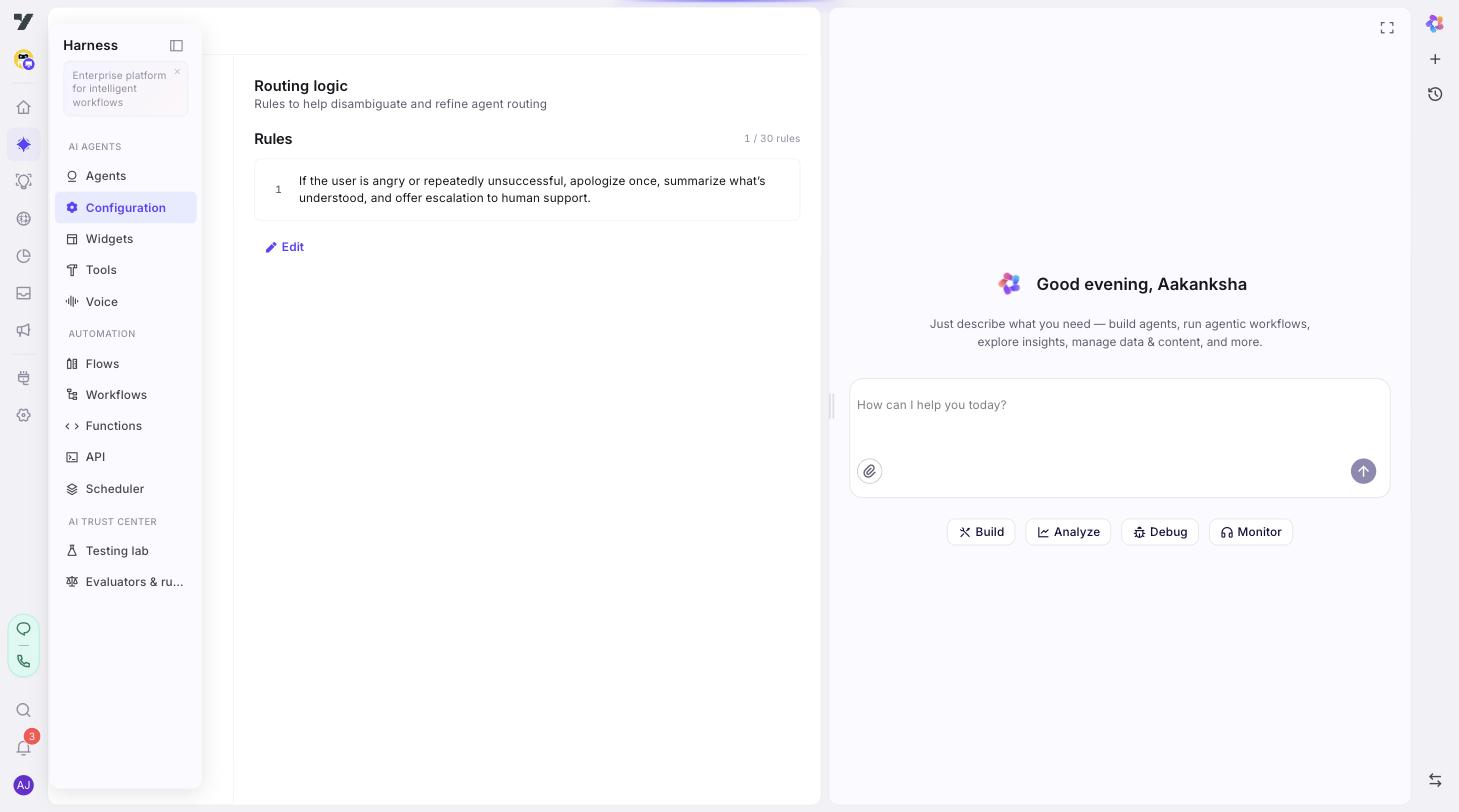
Go to AI Agent → Configuration and click Routing logic (under Agents in the left menu). The page only appears for v3 agents.
The page header says "Rules to help disambiguate and refine agent routing" — that's accurate. Agent Triggers alone get you a long way; add rules only when you need to tighten. Rules are numbered and capped at 30 per super agent.
Step 2: Add a rule
Click Add rule. Type your rule in plain English. Keep it concise — one or two short sentences usually beats a paragraph.
Step 3: Write rules that are testable
A good rule meets all three of these:
- It names the trigger. What user message or condition does this rule apply to?
- It names the action. Which agent or tool should fire?
- It can be proven by a single test conversation.
Examples that work
- "If the user mentions billing, invoices, or refunds, hand off to the @billing-agent. Do not answer billing questions yourself."
- "If the user asks about an order's status, route to the @order-status-agent and call the
getOrderStatusworkflow before composing a reply." - "If the user wants to book a demo, hand off to the @demo-booking-agent."
- "If the user types 'agent' or 'human', transfer to a live agent immediately. Do not try to resolve the issue first."
Examples that don't work
- "Be helpful." → Not testable. Move to Conversation Rules — and even there, it's too vague.
- "Route correctly." → Doesn't name a trigger or an action.
- "If billing, route." → Names the trigger and action but ambiguously; "billing" could mean many things, and the rule doesn't say where to route.
Step 4: Reference agents and tools by name
When your rule names an agent or tool, use @-mentions instead of typing the name as plain text. Type @ in the rule editor to open the picker — pick the agent, workflow, or tool, and it inserts a live chip:
"If the user mentions billing, invoices, or refunds, hand off to the @billing-agent. Do not answer billing questions yourself."
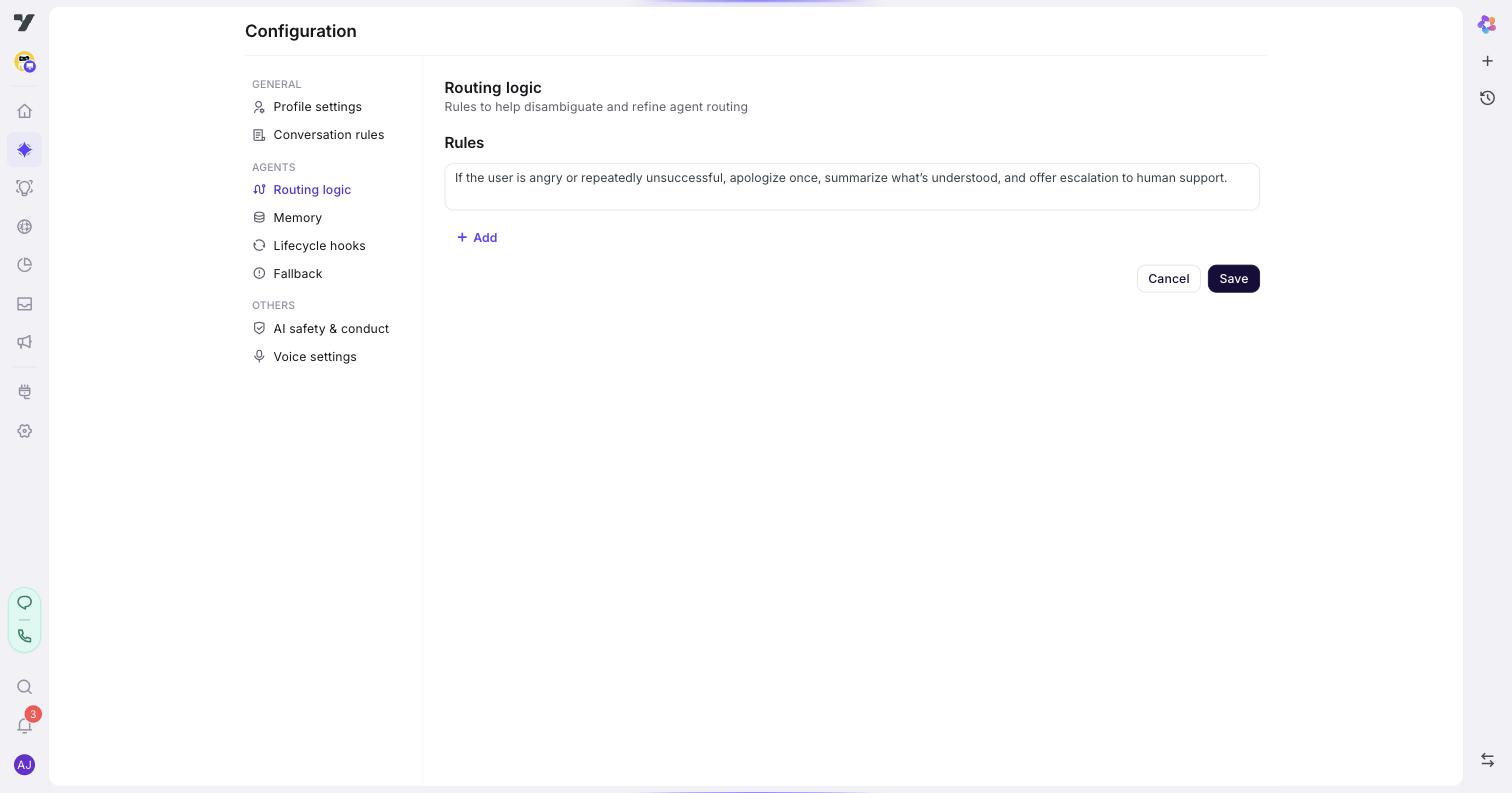
The chip is linked to the target's slug, so it resolves to the current name even if you later rename billing-agent to billing-team. Plain text doesn't — it goes stale silently.
A mention inside a rule is still just a reference — it's the rule that makes the handoff happen. Mentioning an agent in your bot identity, by contrast, doesn't route anywhere. See @-mentions vs agent handoff.
Step 5: Save and test
Click Save. Then open any agent and click the play (▶) icon in the title bar to launch the Playground.
For each rule you wrote:
- Send a prompt that should trigger it.
- Confirm the expected agent's persona takes over (or the expected tool fires).
- If the wrong thing happens, your rule wording isn't specific enough — or an agent's Trigger is competing for the same topic. Tighten the rule (more precise trigger words, clearer action), or sharpen the Triggers of the agents involved, and retry.
Best practices
- Start with Triggers, add rules when needed. A precise agent Trigger handles most routing on its own. Add a routing rule when (a) Triggers overlap and routing isn't picking the agent you want, (b) a topic is sensitive enough that you don't want the super agent to even attempt to answer it, or (c) you need a compound condition Triggers can't express.
- One rule, one concern. "If the user mentions billing or asks about an order, route to billing or fulfillment" is a compound rule. Split it into two separate rules.
- Order doesn't matter much. Rules are evaluated together as a constraint set, not top-to-bottom. Don't agonize over ordering.
- Test edge cases. Users phrase things weirdly. After the obvious test prompt works, try misspellings, partial matches, and adjacent topics that should not match.
- Prefer specific over clever. "If the user mentions cancellation" is better than "If the user wants to leave."
- Keep a list of test prompts alongside your rules. When you tweak wording later, you'll have a regression check ready.
Common pitfalls
- Vague triggers. "If the user is upset" — what counts as upset? Use concrete signals: "If the user mentions 'frustrated', 'angry', 'unacceptable', or types in all caps, …".
- Contradictory rules. Two rules pointing at different agents for overlapping triggers will produce inconsistent routing. Re-read your list whenever you add a rule.
- Fighting your own Triggers. If your rule and the agent's Trigger point in different directions ("route refunds to support-agent" but the billing-agent's Trigger claims it handles refunds), routing will feel unpredictable. Keep rules and Triggers consistent.
- Forgetting to add a "do not" clause. "Route billing to billing-agent" is good. "Route billing to billing-agent. Do not answer billing yourself." is better — the second sentence stops the super agent from taking a shot itself.
Continue to: Agents and Tools.