Memory in v3 agents
Memory is how a v3 bot retains context about the customer across turns — and across agent switches. This page covers what memory is, what it isn't, and the difference between an agent's local Memory and the bot-wide Global memory.
Memory ≠ Variables
If you only need to pass a value into an attached tool or workflow, you don't need memory. The tool will pick the value up directly from its input mapping at execution time.
Use memory only when you want to intentionally retain context about the customer / end-user so a later turn (or a different agent) can read it.
Tool input mapping  →  for data flow between a turn and a tool call
Memory              →  for context you want to remember across turns
Memory vs Global memory
A v3 bot declares memory in two places, both backed by the same runtime store:
- Configuration → Memory (under Agents in the super-agent Configuration nav) — variables that are shared across every agent in the bot. The page calls them "memory variables accessible to all agents across conversations". These same variables appear on every specialised agent's profile as the Global memory row.
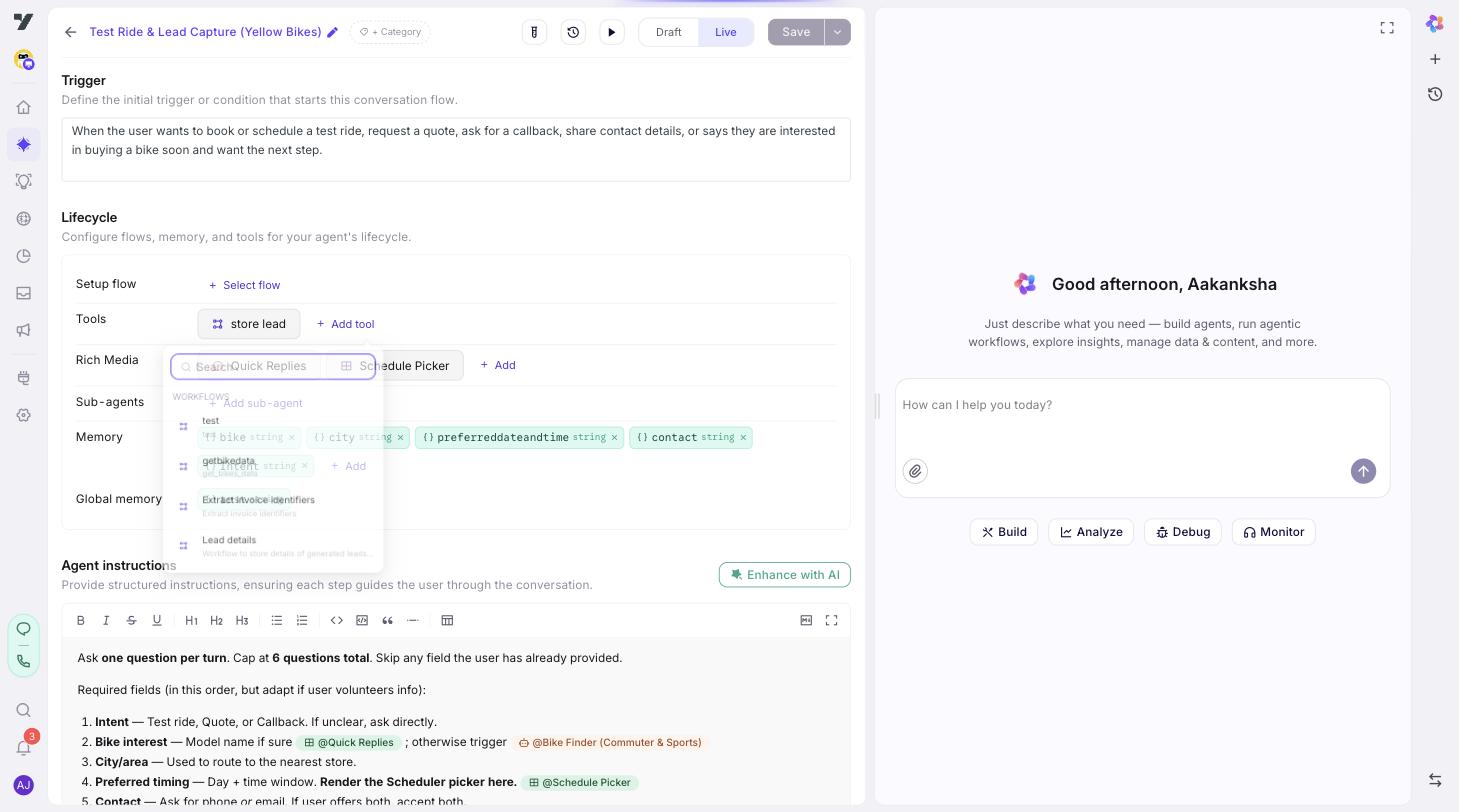
- Each specialised agent's Memory row (in its Lifecycle section) — variables that are local to that one agent.
So on a single agent's profile you see two memory rows side by side: Memory (this agent's local vars) and Global memory (the bot-wide vars defined on the super-agent Configuration → Memory page).
Both surfaces use the same entry fields:
| Field | Required | Notes |
|---|---|---|
| Variable name | ✅ | Letters, digits, underscores. Must start with a letter or underscore. |
| Data type | ✅ | string, number, boolean, object, array. |
| Default value | — | Seeded into memory when the conversation starts. |
| Description | ✅ | What the variable means and when to use it. Helps the model decide whether to write to it. |
Use Memory for context only this agent's flow needs to track (bike_model_picked, preferred_test_ride_slot). Use Global memory for context every agent should be able to read and write (customer_id, account_tier, preferred_language).
Variable names in Memory are validated against Global memory to prevent duplicates within the same agent's view.
How memory actually behaves at runtime
This is the part most people get wrong. At runtime, an agent's Memory and the bot's Global memory flow into the same memory store — a key-value pool scoped to (botId, userId), persisted for 2 days. The Memory / Global memory split is a declaration convention that documents intent and scopes the UI; it is not a runtime isolation boundary.
In practice:
- Memory survives agent handoffs. If the billing agent writes
last_invoice_id, the support agent can read it on the next turn. - Memory survives short breaks. If the customer comes back within 2 days, prior memory is still there.
- Memory is per customer, per bot. Two different customers talking to the same bot have independent memory.
Pick variable names with this in mind. Because every agent in the conversation can see every other agent's writes, name collisions across agents will silently overwrite each other. Prefix or namespace agent-local variables (
billing_last_invoice_id) when there's any chance of overlap.
Sharing parent memory with sub-agents (opt-in)
For tightly-coupled parent / sub-agent pairs you can opt in to projecting a parent agent's agent-scoped Memory into its sub-agents' prompt context — without using Global memory and without inlining values into Trigger instructions.
How it works:
- Set
exposeMemoryToSubAgents: trueon the parent agent's compiled config. - When a sub-agent runs, the parent's Memory keys appear in the sub-agent's
<ongoing-context>under aparentAgentsection, with each key rewritten asparent.<originalKey>. - The projection is read-only: the sub-agent sees the values but cannot write to the parent's scope through this surface. The existing merge-on-pop behaviour (where a child's local vars merge back into the parent on completion) is unchanged.
The parent. prefix prevents collisions — a child's own customer_id and the parent's parent.customer_id are distinct keys the LLM can address separately.
When to use it
- A sub-agent needs to read state the parent already collected (verified identity, order context) without that state leaking to peer specialised agents via Global memory.
- The parent / sub-agent pair is a tightly-scoped delegation and you don't want to namespace-pollute by writing to Global.
When not to
- The value is needed by multiple root agents — that's what Global memory is for.
- You want the sub-agent to be able to write back to a shared key — there's no write path through this surface; use Global memory or rely on the merge-on-pop behaviour.
Today this is a runtime-only flag. The agent profile editor doesn't expose a toggle yet — the runtime accepts
exposeMemoryToSubAgentsas soon as the platform sends it, but you'll need platform-side configuration or a future builder UX to enable it. Track PR #2190 for the follow-up UI.
Best practices
- Declare what you depend on. If an agent reads
customer_tier, declare it — even if another agent writes it. Declarations are the only documentation the next person editing your bot has. - Default values matter. Without a default, the variable is
undefineduntil something writes to it, and downstream tools may get an empty payload. - Don't use memory as a scratchpad. Memory persists for 2 days. If a value only matters within a single turn, pass it through tool input mapping instead.
- Don't put secrets in memory. Memory is conversation-scoped, not session-encrypted. Tokens and credentials belong in tool configuration, not in memory.