Create test cases
A test case is one conversation plus what must be true about it. How you create it decides how much typing you do and what the test can catch: a scenario you describe tests the rule you have in mind, and a real conversation that went wrong tests exactly the thing that broke. This page covers each way to create a test, the preview Nexus runs before saving one, and the checks you can add so a test fails when it should.
Not sure what to test yet? Start with What to test and Write tests that can fail.
Choose how to create it
| Way | Where | Best for |
|---|---|---|
| Scenario | Testing Lab → New test case | A specific behaviour you want checked. You describe it, Nexus drafts the conversation, and you edit it. |
| Import Content | Testing Lab → New test case → Import Content | Turning conversations you already have - a past chat, an email thread, a CSV of transcripts - into tests, or asking the Nexus AI to draft a set for an agent or a flow. |
| From a real conversation | Conversations → open a conversation → Testing Lab | A real conversation that went wrong, so it can't happen again unnoticed. |
| The Nexus AI | The Nexus AI panel | A first draft of tests for a finished agent. Review every one: tests drafted from an agent's instructions only check what those instructions say. |
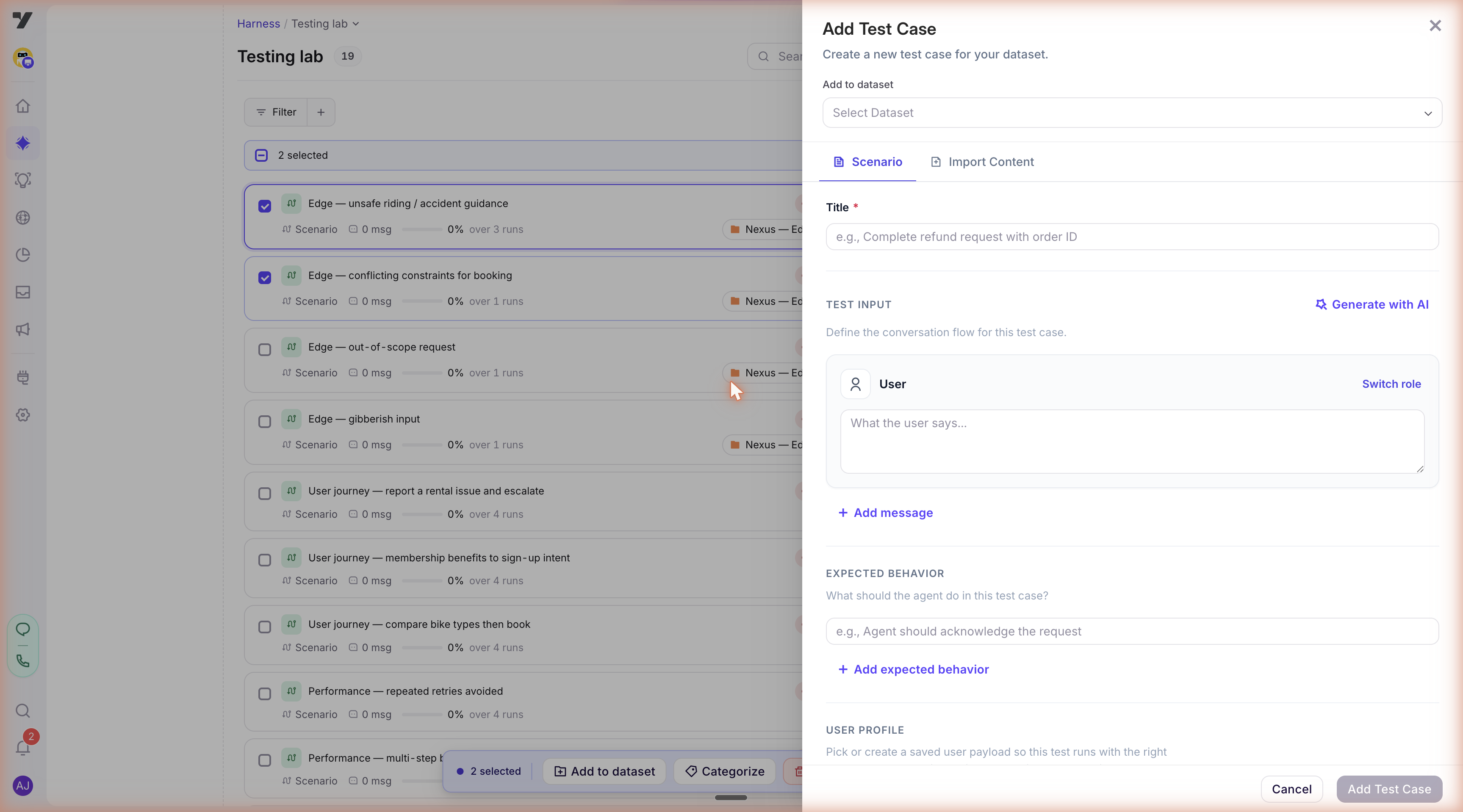
Scenario
Use a Scenario when you know the behaviour you want to check.
- In the Testing Lab, click New test case. It opens on the Scenario tab.
- Choose the dataset the test goes in, or create one.
- Give it a Title. Name it after the rule it checks, so it still makes sense after the agent's instructions are reworded.
- Under Test Input, click Generate with AI, pick the agent, describe the scenario in What kind of scenario should we generate?, and click Generate. Nexus drafts the conversation. You can also write the turns yourself with Add message.
- Under Expected Behavior, write what must happen - and what must not. Each run is judged against this.
- Optionally pick a User profile, so the test runs as a particular customer, and add Tags.
- Click Run preview. Nexus runs the test once and shows you what the agent did before you save it - see Run preview.
If you don't pick an agent, the button reads Add Test Case instead, and the test saves straight away with no preview and no suggested checks. When you start from Create test case on an agent's Tests button, the agent is already filled in.
Tip - describe a person, not a topic. Two to four sentences: who the customer is, what they want, and how they react when the agent pushes back. "Wants to move a booking to Saturday, gets told only weekdays are open, insists twice, then accepts Monday" produces a conversation that tests the rule. "Booking change" produces a polite exchange that tests nothing.
Tip - say what must not happen. An expected outcome that only lists the right behaviour passes when the agent does the right thing and something harmful in the same reply. "Must not agree to a time that wasn't offered" catches a broken rule; "handles the request well" never will.
Import Content
Use Import Content when the conversation already exists somewhere. Pick what you're bringing in:
| Choice | What you give it | What you get |
|---|---|---|
| Chat Transcript | The Session ID and User ID of a past conversation. | One test from that conversation. |
| A pasted email or thread. | A test for each topic in it. You choose which ones to import. | |
| CSV File | A CSV of one or more conversations. Download sample shows the format. | One test per conversation in the file. |
| Generate with AI | An agent or a flow to test. | A set of tests drafted by the Nexus AI, covering the main path and attempts to push it off course. The request opens in the Nexus AI panel, where you can read and change it before you send it. |
With AI Enrichment on, which it is unless you turn it off, Nexus writes each test's name and expected outcome for you. Read them before you rely on the test: the expected outcome is what the test is judged against.
Imported tests save straight away, without a preview, so they start with no checks. Open one, run it, and add checks once you've seen what the agent does.
From a real conversation
A conversation that went wrong in front of a real customer makes the best test - it's exactly the case your other tests missed.
- Go to Conversations and open the conversation.
- Open the Testing Lab tab beside it.
- Choose a dataset in Add to dataset, or create a new one.
- Optionally choose a profile under Test as user.
- Click Save test case.
Nexus then runs a preview, replaying the customer's messages exactly as they were, so you can see how the agent handles them today. Fix the agent first if you haven't already - then the preview shows the fix, and the test you save proves it.
If the conversation is already a test, the tab says so, and you can run it again from there with Run now.
With the Nexus AI
The Nexus AI can draft tests for you. Ask in the Nexus AI panel, or use Generate with AI under Import Content. It shows you the tests it proposes and asks you to confirm before it creates them.
Many tests the Nexus AI drafts start with a description of the customer and no conversation yet. Until they've run once, the agent's Tests button shows Drafted, never run, and editing one shows Run this test to capture a baseline. Run them, read what the agent did, then edit the tests and add checks.
The Nexus AI can't create tests while you're working in the bot's production environment. Switch to another environment first.
Run preview
When you write a Scenario for a specific agent, or save a test from a real conversation, Nexus doesn't save it straight away. It runs it once first, so you can see how the agent really responds before the test becomes part of your suite. This is Run preview.
You watch the conversation play out turn by turn. When it finishes:
- Read what the agent did. If something is wrong with the agent, fix the agent and click Re-run preview.
- Choose the checks to keep from the ones Nexus suggests - see Choose the checks to keep.
- Click Approve to save the test.
If you change the scenario after the preview, Nexus asks you to re-run the preview before approving, so the saved test matches what the agent was asked to do. When you're reviewing several tests at once, you can approve the ones you've checked together with Approve selected.
The preview happens only while you create the test. Once you approve it, the test is saved; to see the agent handle it again, run it.
Imported tests, tests with no agent, and tests on bots on the older platform skip the preview. They save straight away, without a baseline or suggested checks.
Choose the checks to keep
A check is a pass/fail test of what the agent did, not what it said. On screen, checks are labelled Assertions. After a preview, Nexus suggests checks that held in that run, and you keep the ones that prove something.
| Type | What it proves | Example |
|---|---|---|
| Tool called - optionally on a given turn | The agent used a tool, and at the right moment | getOrderStatus was called on turn 2 |
| Memory set | The agent saved a value it needs later | order.id was saved |
| Max turns | The conversation finished within a set number of turns, so the agent didn't go round in circles | It ended within 6 turns |
Checks about a particular turn appear next to that agent message; checks about the whole conversation appear below it. A few suggestions start unticked because they rarely prove anything: values the agent saves for its own use, and a turn limit set to exactly what this run took. You can still tick them.
Only the checks you keep are saved with the test. The rest have no effect on whether it passes.
Anything about what the agent says - its wording, its facts, its tone - belongs in the expected outcome, not in a check.
Priority
Give each check a Priority, so a failure counts for what it's worth:
| Priority | When it fails | Use it for |
|---|---|---|
| Critical | The test fails, and the evaluators don't score it. | Things that must never go wrong - the agent must look the booking up before changing it. |
| Normal | The test fails, and the evaluators still score it, so you see how good the replies were. | Most checks. |
| Informational | Reported only. The test doesn't fail. | Something you want to watch before you rely on it. |
Add or change checks later
Open the test and click Edit. Each agent turn in the conversation has its own Assertions for turn N; use Add assertion there to add a check on that turn.
- Tool called checks match the tool's name only, by default, so details that change from run to run - or a customer's personal data - don't break the test. When the details matter, set Match mode to Subset of args or Exact args. Use the tool's name as it appears in a run, not the name shown in the agent builder; picking it from the list of tools the baseline run called gets it right.
- Memory set checks can test that a value was saved at all (Exists), or that it Equals or contains what you expect.
- If you remove turns from the conversation, checks that pointed at them move to Unplaced assertions. They fail every time, so remove them or add them again on a turn that still exists.
Baseline capture
When a test goes through the preview, Nexus keeps that first run as the test's baseline: the conversation as it played, with what was behind each agent reply - the tools it called and the values it saved. You see it on the test's Conversation tab, and it's where the tool list comes from when you add a Tool called check.
The baseline is a reference for what the agent did when you approved the test, so you can compare a later run with it when something changes.
Tests drafted by the Nexus AI have no baseline until they run once - see With the Nexus AI.
After you save
A new test shows Never run in the Testing Lab until its first run. After that, it shows the result of its latest run - Passing, Failing or Systematic error. Read the list explains each one.
Results always describe the agent as it was when the run happened. Once you change the agent, its Tests button marks the results Outdated: treat them as unknown and run the tests again. A pass from before your last change says nothing about the agent you have now.
Common problems
| Symptom | Likely cause | Fix |
|---|---|---|
| There's no Run preview button, only Add Test Case | No agent is chosen for the Scenario. | Pick the agent in the Generate with AI panel, or start from the agent's Tests button. |
| An agent is greyed out in the agent list | It isn't set up enough for Nexus to generate a scenario. | Finish setting up the agent, or write the conversation yourself. |
| Please select a dataset | Every test needs a dataset. | Pick one at the top, or create one. |
| Preview failed | Nexus couldn't get a response from the agent for this scenario. | Check the scenario and the agent, then try again. |
| The preview says the user profile no longer exists | The profile was deleted after you picked it. | Go back, pick another profile or clear it, and run the preview again. |
| The Nexus AI won't create tests | You're working in the bot's production environment. | Switch to another environment and ask again. |
| A check fails on every run after you edited the conversation | It points at a turn that no longer exists. | Remove it from Unplaced assertions, or add it again on a turn. |
Next: Run tests.