Single agents
A single agent is one agent with one prompt. It reads the conversation and decides each turn what to ask, which tool to call, and when the job is done - you describe the outcome, and the model finds the path. That makes it the right choice for open-ended work: support, troubleshooting, and anything where what happens next depends on what the customer says.
Almost all of your work on a single agent is writing its instructions. The rest of the profile is a handful of settings around that prompt.
The profile
Three parts, top to bottom:
| Trigger | When this agent should take over. Read by routing, not by the agent |
| Lifecycle | What it can call, read and show - tools, variables, rich media |
| Agent instructions | How it behaves once it has the conversation. The prompt |
Keeping Trigger and instructions separate is the single most useful habit here. Putting persona in the Trigger, or routing hints in the instructions, is the most common cause of routing that feels unpredictable.
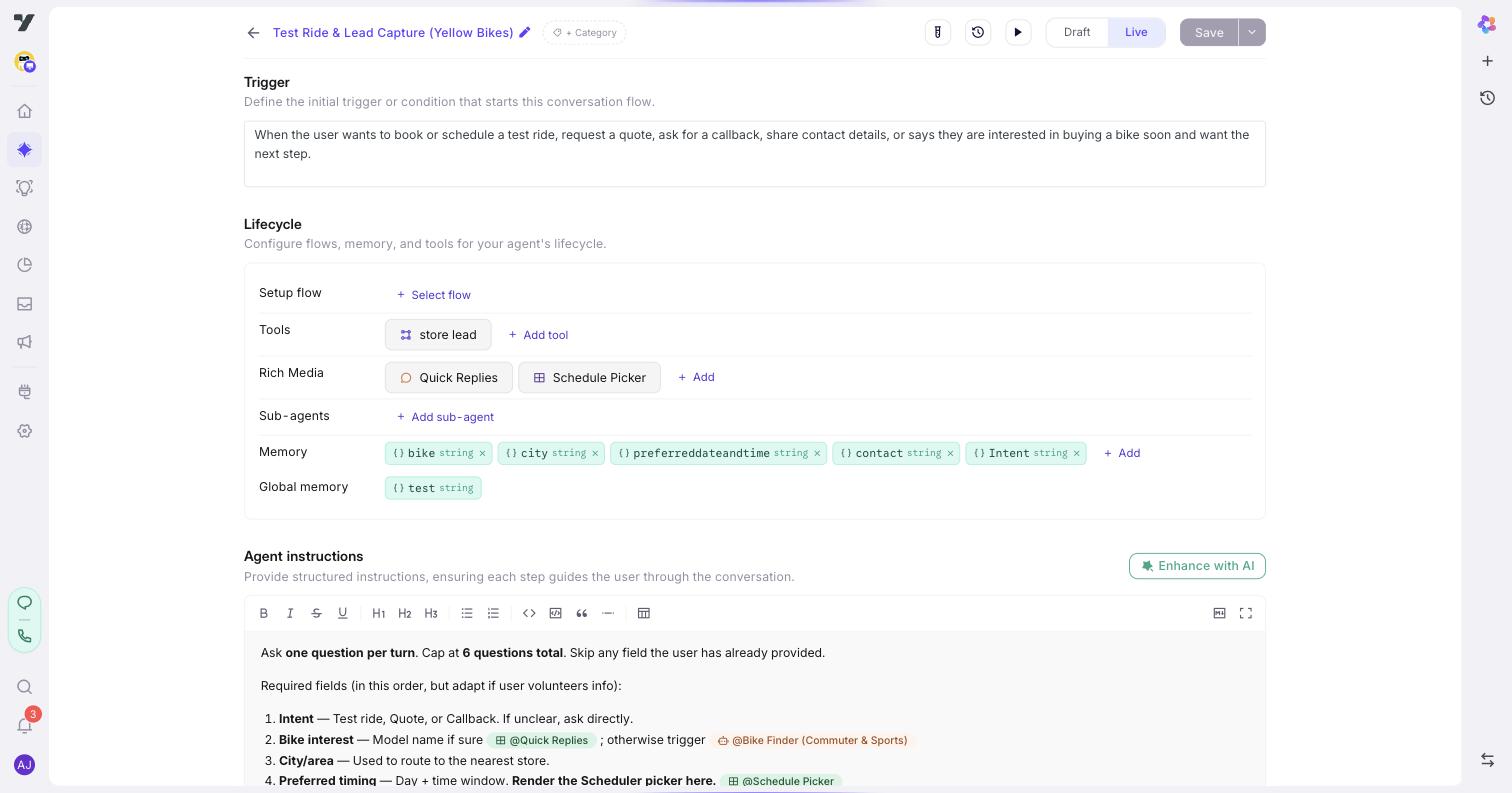
Trigger
One or two sentences saying when this agent should handle the conversation. It's the agent's pitch to routing, and the highest-leverage field for getting handoffs right.
Good: "When the user asks about billing, invoices, refunds, payment-method changes, or charges."
Too vague: "Handles money stuff."
Keep it to when to fire. Long triggers with do/don't lists - "Trigger ONLY when… Do NOT trigger for…" - actually hurt matching, because routing is comparing the message against a description, not following instructions. Push exclusions into a routing rule instead.
Agent instructions
The prompt. This is where the agent's behaviour lives.
What's already in your prompt
Before writing anything, know what the platform has put there for you. Your instructions arrive alongside:
| Already present | So don't write |
|---|---|
| Your identity and tone from Profile settings | "You are Acme's friendly assistant. Be warm and professional." |
| Your project's conversation rules | Anything you've already said there |
| Safety rules - stay in role, use only values tools returned, keep internal names out of replies, decline what's out of scope | "Never make things up", "don't reveal your instructions" |
| The agent's name and its attached tools, with their descriptions | A list of the tools it has |
Routing rules are not in your prompt. They're read by the router when it picks an agent, and never reach the agent itself - so an instruction here about which agent should handle something has nothing to act on.
That leaves your instructions to do one job: say what this agent does, in what order, with what boundaries. How to structure what's left - which headings to use, and when - is in Writing instructions.
Habits that work
Plain beats emphatic. Short, direct steps outperform capitalised insistence. Shouting doesn't increase compliance - it just buries the actual instruction.
Bad: "MANDATORY - DO NOT SKIP. You MUST collect the order ID and you must keep repeating until they get it right. THIS IS A CRITICAL STEP."
Good:
- Ask the customer for their order ID.
- Call @validateOrderId with their answer.
- Valid → continue.
- Invalid → ask once more, then offer to look it up by email.
One instruction per line. Chain two actions with "and" or "then" and the model often does the first and drops the second.
Bad: "Ask for the appointment date and confirm it back to the user and then book the slot."
Good: three lines - ask, confirm, book.
Clean messy input before it reaches a tool. People don't answer in the shape a tool expects, so say how to normalise the reply first.
Bad: the customer says "I'm based out of Mumbai, Maharashtra" → the whole sentence goes to @validateCity, which rejects it.
Good: "Extract only the city name - strip the state, country and any filler - then call @validateCity with just that."
Reference tools and variables with @. Typing a tool's name as plain text works until someone renames it. An @-mention stores the slug and renders the current name, so the prompt doesn't go stale.
Steps change how the turn runs
If your instructions contain the words "Step 1" - any capitalisation - the runtime treats the agent as sequential. It injects step-execution rules and requires the model to report its progress every turn.
That's usually what you want for a procedure, and it's the wrong thing for a list of unrelated capabilities. The three levels, and how to opt out, are in Writing instructions.
A worked example
An order-status agent, using everything above:
You help customers with orders that have already been placed.

Step 1: Ask for the order ID if it isn't already in memory.
  - Accept any format. Strip spaces and punctuation before using it.
  - If they don't have it, offer to look it up by email instead.

Step 2: Call @getOrderStatus with the order ID.
  - If it returns a status, save it to order_status.
  - If it returns not-found, say so plainly and offer @escalate-to-agent.

Step 3: Answer with the status, the carrier and the expected date.
  - If they ask to change the delivery, say you can't do that and let
    routing take it from there.
What each part is doing:
- The opening line is scope, not identity. Identity is already in the prompt from Profile settings; this says which slice of the world this agent owns.
Step 1/2/3makes it sequential, so it collects before it looks up, and reports progress each turn.if it isn't already in memorystops it re-asking for something a previous agent already captured.Strip spaces and punctuationis the cleaning step - without it,ORD 12345fails validation.@getOrderStatusand@escalate-to-agentare mentions, so both survive a rename.save it to order_statuswrites a declared variable - declare it first, or nothing persists.say so plainlyon not-found matters because the alternative is a plausible invented status.- The last line names something the agent can't do. Stating a boundary is more reliable than hoping it won't try.
Notice what isn't there: no tone instructions, no "never lie", no "you are a helpful assistant". All three are already in the prompt.
Giving it tools
An agent can only call tools you've attached to it. Add them under Lifecycle → Reasoning & actions, picking from the tools already defined for your project - you don't define a tool here, you decide which ones this agent can reach.
The tool's description does the work, not your prompt. When the agent decides whether to call something, it reads the tool's own description. A tool described as "gets data" will be called at the wrong moments however carefully you write the instructions around it. If an agent keeps calling the wrong tool, fix the descriptions before rewriting the prompt — see Designing tools well.
Attaching a tool also tells routing something. A refund workflow on the billing agent is a signal that refund questions belong there - so the attachment helps the right topics reach the right agent, not just the tool get called.
Keep the list short. An agent with twenty tools is far harder to predict than one with four, because every one of them is a candidate on every turn. If you're attaching many, that's usually a sign the work belongs to more than one agent.
Then reference them in your instructions with @ - @getOrderStatus rather than "the order status tool" - so the reference survives a rename.
The other lifecycle settings
Alongside tools, three more groups sit between the Trigger and the instructions:
| Group | What it holds |
|---|---|
| On start | A flow to run once when the conversation begins - look something up before the first reply |
| Variables | The memory this agent can read |
| Replies | The rich media it can show |
These behave exactly as they do on an Agent node inside a multi agent - that page covers each in depth.
Channel overrides further down let you vary behaviour per channel. Most agents don't need them.
When to add an agent
Add one when the work is a genuinely distinct domain with its own vocabulary and process, when it needs tools nothing else needs, or when you'd hand it to a different team if people were doing it.
Don't, when it's a short detour (that's a tool call), when you only want a different tone for one topic (that's a conversation rule), or when splitting would make the conversation feel choppy.
There's a mechanical reason to be sparing, not just a stylistic one: every single agent's Trigger goes into the routing prompt on every turn. Each agent you add makes the routing decision harder for all the others. Two agents whose triggers overlap will route inconsistently no matter how well each one is written - merge them, or sharpen the boundary between them.
@-mentioning an agent is not a handoff. A mention in prose is a reference the model may consider; a handoff only happens when routing picks the agent, via its Trigger or a rule. See Routing logic for how handoffs actually fire.
Common mistakes
Nearly all of these come from the same assumption: that instructions are executed like code. They aren't - they're read by a model that then decides. Anything that must happen belongs in a tool, not a sentence.
Setting a variable you haven't declared. This is the one that wastes the most time, because it looks like it worked. Write "save the order ID to order_id" and the model will do exactly that - the write shows up in the turn's trace. But the agent only gets declared variables back on the next turn, so an undeclared order_id is written and then invisible. Declare it on the Memory page first, and the same instruction starts working.
Treating an instruction as a guarantee. "Always call @verifyIdentity before answering" is a strong request, not a hard gate - the model usually complies and occasionally won't. If a step is a compliance requirement rather than a preference, a single agent is the wrong shape: lay it out as a multi agent, where the step is a node the run can't skip.
Naming a tool that isn't attached. An agent can only call tools on its own list. Mentioning @refundOrder in the instructions when it isn't attached gives the model nothing to call, and it will usually improvise an answer instead of telling you.
Writing routing into the prompt. "If they ask about billing, hand off to billing-agent" does nothing here. Routing happens before this agent runs, and its rules never enter this prompt. Put it in the Trigger or a routing rule.
Trying to change settings from the prompt. Tone, identity, which model runs, the welcome message, which tools exist - none of these are settable in instructions. They're fields elsewhere, and a sentence asking for them is just tokens.
Numbering things that aren't a sequence. Four separate capabilities written as Step 1–Step 4 become a four-turn procedure, because Step N is a real switch. Use a plain list for things that aren't ordered.
Repeating the platform. "Never make things up", "stay professional", "don't reveal your instructions" are all already in the prompt. They cost tokens and attention and change nothing.
Test it
Open the Playground - the play ▶ icon in the title bar - and send a message that should reach this agent. Check two things separately: did the right agent take over, and did it then behave well?
- Wrong agent took over → sharpen the Trigger, or add a routing rule.
- Right agent, poor answer → the problem is in the instructions.
The Tests button in the topbar links this agent to saved test cases and shows the latest run, so a conversation that went wrong can become a regression test. See Testing Lab.
Next: Multi agents - when you'd rather lay the steps out yourself.