Test your AI agent
Nexus gives you two complementary places to test:
- Playground - interactive, single-conversation testing on every agent's profile. Best while you build. Documented on this page.
- AI Trust Centre - durable, dataset-driven evaluation. Best before each release. Documented surfaces: Testing Lab, Evaluators & Rules, Test Case detail, and Reports. (Overview and Action Center are wired in the studio but run on mock data; their docs land with the v1 backend.)
Use both - they answer different questions.
Playground - try the bot as a user would
Inside any agent's profile, click the play (▶) icon in the title bar to open the Playground - a side panel on the left where you chat with the bot exactly as a customer would. This is your fastest feedback loop while building.
The Playground gives you:
- The bot's actual welcome message and quick-reply chips.
- A live chat input - type a message, hit Enter, watch the agent respond in real time.
- Per-message action icons (copy, voice playback, 👍 / 👎) for quick feedback.
- A voice/mic toggle for testing voice flows without leaving the page.
Don't confuse the Playground with the Nexus AI. The right-hand "How can I help you today?" panel on an agent's profile is the Nexus AI - an AI assistant for you, the builder. Use it to ask questions about the bot's configuration, generate suggestions, or scaffold logic. The Playground is for acting as the end-user and seeing how your bot actually replies.
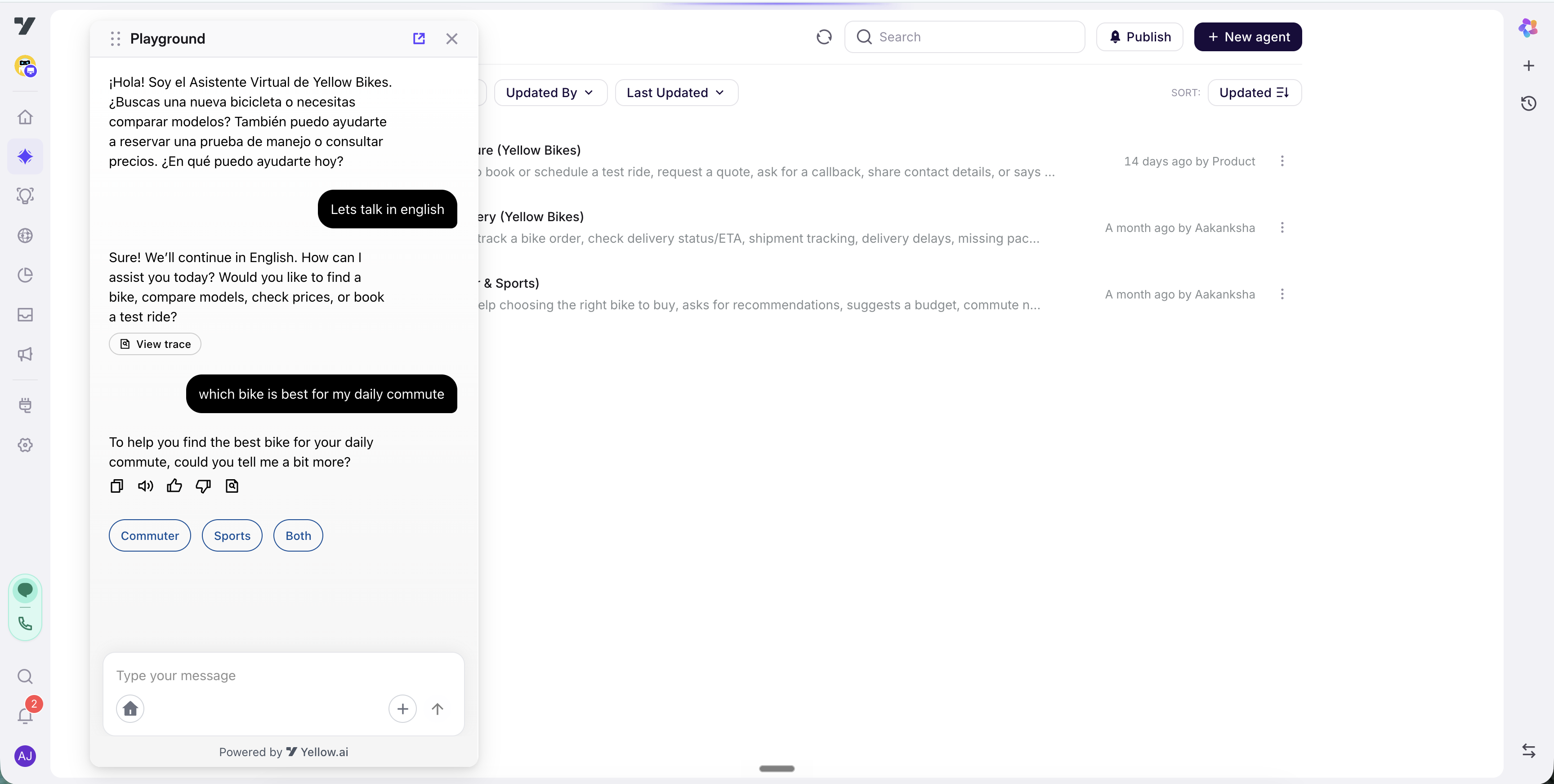
Step-by-step: try the bot
- Open any agent from AI Agent → Agents.
- Click the play (▶) icon in the title bar - the Playground opens on the left.
- Use one of the welcome quick-reply chips, or type a message and press Enter.
- Watch the agent respond. If voice is enabled for the bot, tap the speaker icon on a bot message to hear the TTS playback.
- Use 👍 / 👎 on individual messages to flag responses that looked good or bad - useful when you come back later to figure out what to fix.
Step-by-step: verify a routing rule fires
- Open the agent whose routing you want to test.
- Send a message that should match the rule (e.g. "I need a refund").
- Confirm the expected agent or tool takes over - the persona / response pattern should match.
- If the wrong thing fires, go back to Routing Logic and tighten the rule, or sharpen the agent's Trigger.
Step-by-step: verify a widget renders
- Make sure your bot has Nexus agents enabled - widgets only render in Nexus conversations.
- In the Playground, send a message that triggers a workflow node hosting your widget.
- The widget renders inline in the Playground chat. Interact with it (fill the form, click the button); the output flows back into the conversation as the next user input.
Mock APIs
Mock APIs let you rehearse a conversation in the Playground without calling your live backends. When mock mode is on, matching API calls return a saved response you defined instead of hitting the real service - so you can test happy paths, edge cases, and error handling deterministically, before anything is wired to production.
Turn on mock mode
Mock mode is a toggle you flip while testing:
- Playground - the Use Mock APIs control in the playground toolbar. When it's on, a banner reads "Mock mode ON — API calls return saved mock responses."
- Testing Lab - the Mocks panel applies the same mocks when you run a dataset.
With the toggle off, every API call runs live as normal.
Author a mock
Mocks are created and managed in the Mocks view. A mock has two parts - the match rules that decide when it applies, and the response it returns.
Match rules
| Field | What it does |
|---|---|
| Name | A label for the mock, so you can find it in the list. |
| Entity type | What the mock targets - a tool, a flow, or an api. |
| Priority | When more than one enabled mock matches, the highest-priority one wins. |
| Match conditions | One or more field/operator/value tests. All must pass (AND). Operators: equals, not-equals, in, not-in, exists, regex, and the numeric >, <, >=, <=. |
Response
- A canned response body (JSON) returned to the caller in the same shape a live call would produce, so the agent's transforms and branching behave exactly as in production.
- An optional latency to simulate a slow call.
What gets mocked
Mock mode covers APIs wherever they run in a turn:
- Direct API tools the agent calls, and
- APIs called inside a flow or skill - for example an API node in a guided flow, or an API a workflow invokes.
So a mock you author is honoured whether the API is called straight by the agent or several steps deep inside a workflow - you can rehearse an end-to-end journey, including the business logic behind it, without touching live systems.
When no mock matches
With mock mode on, only the entities you've actually mocked are intercepted - everything else passes through, so an un-mocked call never breaks the run:
- A mock exists for this entity and its conditions match → that mock's response is returned. When several could match, the highest-priority one wins.
- A mock exists for this entity but nothing matches its conditions → the call falls back to the mock you marked as default, or - if none is marked - the first (highest-priority) mock for that entity. A mocked entity is always served from a mock, never a live call.
- No mock is defined for this entity at all → the call runs live against the real API. Only the entities you explicitly mocked are intercepted, so an un-mocked call passes through instead of failing the run.
- Mock mode off → every call runs live.
AI Trust Centre - durable evaluation
The AI Trust Centre is the durable side of testing. Currently documented: Testing Lab / Evaluators & Rules / Test Case detail / Reports - see the AI Trust Centre section index for the full walkthrough. (Overview + Action Center docs land alongside their v1 backend.)
The 30-second version:
| Sub-page | When you open it |
|---|---|
| Testing Lab | "I need to capture / curate / run test cases." - Scenario AI-generation, Import Content, assertion picker. |
| Evaluators & Rules | "Tune what counts as a pass." - 10 evaluators (7 Quality + 3 Safety) + hard invariant Rules. |
| Test Case | "Why did this specific case fail?" - conversation paired with the trace that produced it. |
| Reports | "What happened in this run?" - per-run breakdown with evaluator scores per simulation. |
| Execution traces | "What did the agent actually do on this turn?" - read the per-turn trace (tool calls, memory, handoffs, KB, guardrails). |
| Debugging | "My case is failing - now what?" - a symptom → cause playbook that uses the trace. |
Common testing pitfalls
- Testing only the golden path. The hard cases are where bugs hide. Schedule time for adversarial testing - jailbreaks, off-topic, hostile users.
- Forgetting to test after rules change. Even a small wording tweak in identity, conversation rules, or routing logic can shift behaviour.
- Trusting "it worked once." LLMs are stochastic. Run the same test twice - if a behaviour is fragile, it'll fail intermittently.
- Not saving test cases. A test you ran manually once is one you'll have to re-run manually next time. Save it to the Testing lab dataset.
Best practices
- Test in the Playground first, then promote durable cases to a Testing lab dataset.
- Tune Evaluators once, save it, and let them score every future run automatically. Don't eyeball runs every time - that's what evaluators are for.
- Treat the regression dataset as production code. Review it, evolve it, don't let it rot.
- Test voice and chat separately - they don't behave identically, even with the same agent config.
Go to Widget Builder if you need custom UI in your conversations.