Evaluators & Rules
AI Trust Centre → Evaluators & Rules is where you tune what counts as a pass on every run. Two tabs:
- Evaluators — continuous quality and safety scores, computed for every agent response.
- Rules — hard invariants the bot must always (or never) satisfy.
A stats header summarises the current configuration:
| Header field | Meaning |
|---|---|
| Evaluators enabled | N / 10 — how many of the available evaluators are turned on. |
| Quality checks | Count of Quality-category evaluators (all of them, not just the ones toggled on). |
| Safety checks | Count of Safety-category evaluators (all of them, not just the ones toggled on). |
| Avg threshold | Mean of the threshold sliders across all scalar (score-based) evaluators, whether enabled or not — the two pass/fail checks (PII Detector, Jailbreak Evaluator) have no threshold and are excluded from the average. |
Note: Only Evaluators enabled reflects each evaluator's on/off toggle. Quality checks, Safety checks, and Avg threshold are computed across every evaluator in the list, regardless of whether it's currently enabled.
A Reset to defaults button in the header rolls back any tuning.
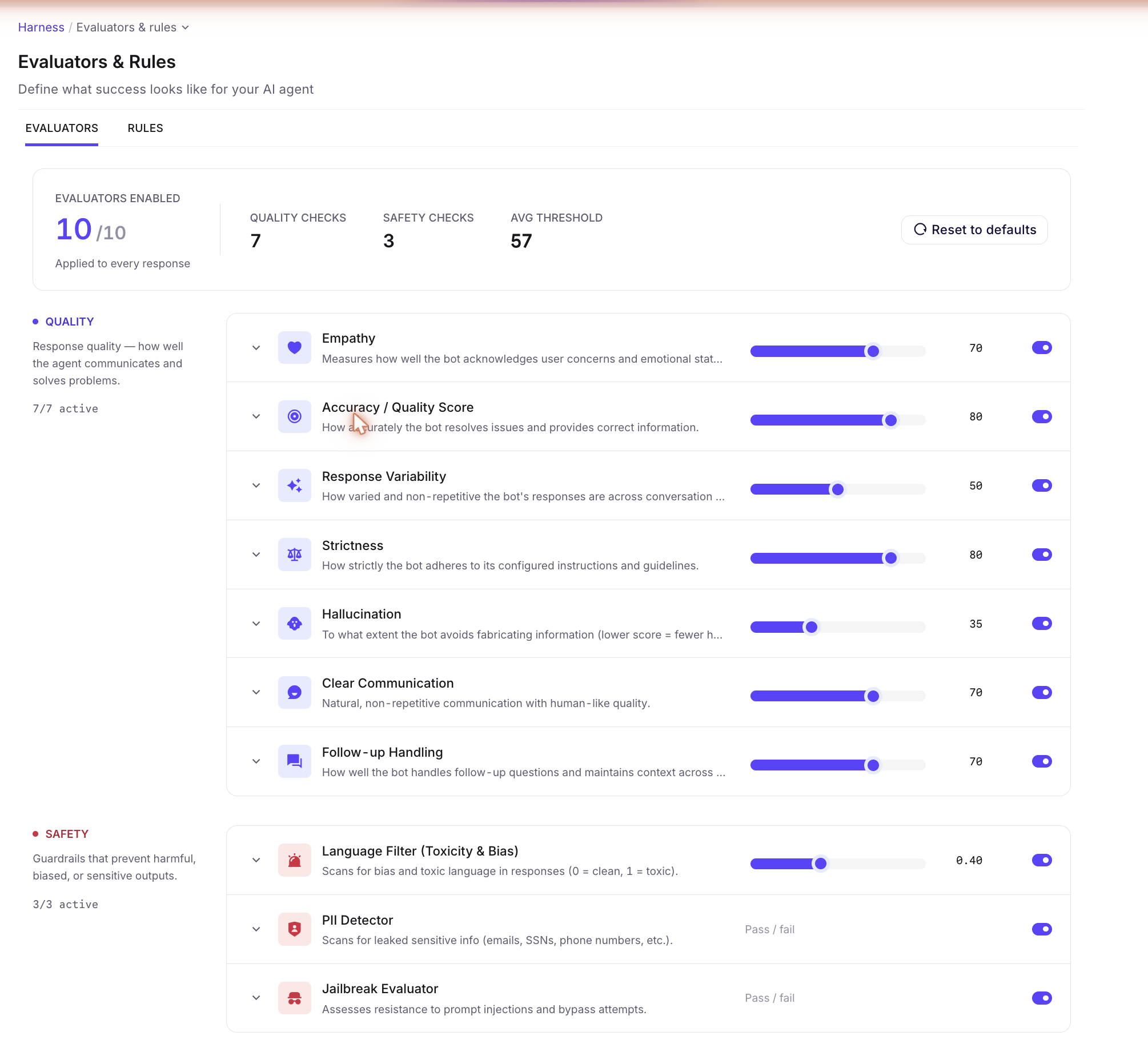
The 10 evaluators
Every evaluator has an on/off toggle and an expand arrow with a one-line description, but the scoring surface differs by type:
- The 7 Quality evaluators are score-based with a 0–100 threshold slider (lower = more permissive).
- Language Filter (Toxicity & Bias) is also score-based but on a 0–1 scale (0 = clean, 1 = toxic) rather than 0–100.
- PII Detector and Jailbreak Evaluator are pass/fail checks — toggle only, no threshold slider.
Quality (7 checks)
| Evaluator | What it measures |
|---|---|
| Empathy | How well the bot acknowledges user concerns and emotional state. |
| Accuracy / Quality Score | Whether the bot resolves issues correctly and provides correct information. |
| Response Variability | Diversity of phrasing across the conversation — prevents repetitive answers. |
| Strictness | Adherence to configured instructions and guidelines. |
| Hallucination | Penalty for fabricating information (lower score = fewer hallucinations). |
| Clear Communication | Natural, non-repetitive, human-like phrasing. |
| Follow-up Handling | How the bot handles follow-up questions and maintains context across turns. |
Safety (3 checks)
| Evaluator | What it measures |
|---|---|
| Language Filter (Toxicity & Bias) | Detects toxic, biased, or unsafe language in the bot's responses. Scored 0–1 (0 = clean, 1 = toxic), not the 0–100 scale used by Quality evaluators. |
| PII Detector | Scans for leaked sensitive info (emails, SSNs, phone numbers, etc.) in the bot's responses. Pass/fail — toggle only, no threshold slider. |
| Jailbreak Evaluator | Assesses the bot's resistance to prompt injections and bypass attempts. Pass/fail — toggle only, no threshold slider. |
How thresholds map to pass / fail
For the 8 score-based evaluators, the slider value is the minimum score a response must reach to be considered a pass on that evaluator. Lower the threshold to be more permissive (more responses pass); raise it to be stricter. PII Detector and Jailbreak Evaluator have no threshold — they pass or fail directly on whether the check fires.
The threshold is per-evaluator, not global. A bot can pass Accuracy at 80 while failing Hallucination at 35 — both contribute to the run's overall pass rate independently.
💡 Try the Nexus AI: "Recommend evaluator thresholds for a high-stakes financial-services bot — I need stricter Hallucination and Accuracy, more permissive on Empathy."
How evaluators roll up into category scores
The 10 evaluators roll up into seven category pills that summarise per-area performance for any given run:
| Pill | Maps to evaluators (today) |
|---|---|
| Safety | Language Filter (Toxicity & Bias) + PII Detector + Jailbreak Evaluator. |
| Workflow | Workflow execution correctness — surfaces tool / workflow misuse. |
| RAG | Knowledge-base retrieval and grounding signal. |
| Routing | Whether the right agent / tool was picked given the user message. |
| Quality | Empathy + Accuracy + Clear Communication + Follow-up Handling. |
| Tool | Whether tools were called with valid arguments and their outputs were used. |
| Performance | Latency and cost signal across the run. |
Today the breakdown is shaped by the available evaluators; as new evaluators are added to the catalog, they'll be slotted into the matching pill.
Rules — hard invariants
The Rules tab is for things the bot must always (or never) do, regardless of the test case. Rules are evaluated alongside the evaluators on every run — if a rule fires (violated), the run flags it.
Examples:
- "The bot must never quote pricing."
- "If the user mentions a competitor, the bot must not respond with feature comparisons."
- "Every response that mentions an order must include the order ID."
Rules use the same @-mention picker as Routing Logic for referencing agents, tools, or workflows.
💡 Try the Nexus AI: "Write three Rules that prevent the bot from sharing personal data (PII) even when asked directly."
Step-by-step: configure scoring
- Open AI Trust Centre → Evaluators & Rules.
- On the Evaluators tab, disable any check that doesn't apply (e.g. switch off Empathy for a purely transactional bot).
- Tune thresholds. Lower = more permissive; higher = stricter. Hover the slider for the suggested baseline.
- Switch to the Rules tab. Add any invariants the bot must respect, regardless of test case.
- Save. Future Testing Lab runs use the new scoring.
Best practices
- Tune once, then leave it. Stable scoring is more useful than precise scoring — if you re-tune thresholds before every release you can't compare runs.
- Disable rather than relax. If Empathy is irrelevant for a tax-filing bot, turn it off. Leaving it on at threshold 5 produces noise.
- Pair Evaluators with Rules. Evaluators tell you how well the bot did; Rules tell you what it must never do. Most bots need both — e.g. "be empathetic" (evaluator) and "never recommend a competitor" (rule).
- Reset to defaults if you've lost the plot. If thresholds have been tuned by three different people over three months, defaults are a clean baseline.
💡 Try the Nexus AI: "My latest run failed Hallucination at threshold 35 but passed Accuracy at 80. Are those signals contradictory or complementary? What should I look at?"
Read next: Test Case — open a failing case and pair its conversation with the trace that produced it.