AI agents

A Nexus agent is a small team of specialised agents working together, with their behaviour shaped by a shared Configuration, running on the Nexus engine. The engine adds platform-enforced refinements (two-stage routing, automatic step execution, parent-child agent triggers with auto-return, history compaction, structured traces) and authoring surfaces like Routing Logic, Widget Builder, the AI Trust Centre, and versioned configuration. See What the Nexus engine does for you below for the details.

The building blocks

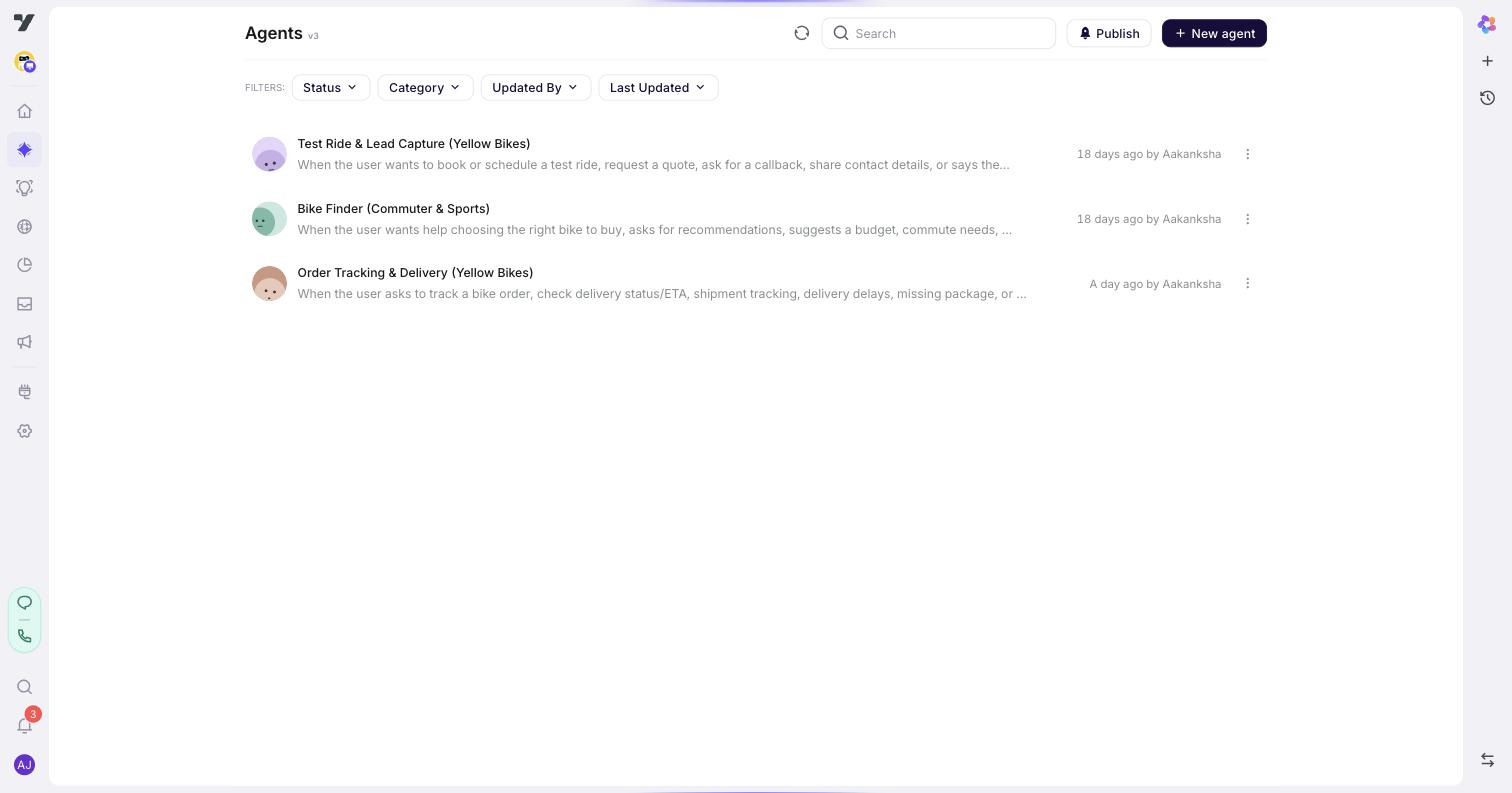
AI Agent → Agents page showing three peer specialised agents (Test Ride & Lead Capture, Bike Finder, Order Tracking & Delivery) that routing picks between

Specialised agents now come in two types:

  • Conversational agents - LLM-driven specialists that work out each reply on their own from your instructions and knowledge. Best for open-ended Q&A, troubleshooting, and anything where the path depends on what the user says.
  • Guided agents - deterministic agents that run the exact steps you lay out on a flow canvas, in the same order every time. Best for fixed procedures that must run consistently and auditably - order returns, KYC checks, booking flows. See Guided agents.

Configuration

Configuration is project-level - the settings you define here apply to all your agents, conversational and guided alike. It's where you set persona, identity, conversation rules, routing logic, memory, fallback, lifecycle hooks, AI safety, and voice. At runtime:

  • Every incoming message is read.
  • Routing decides whether to answer directly or hand off to one of your agents.
  • Your persona, identity, and rules shape the reply.
  • Tools (workflows, knowledge base lookups, escalations) are called when data is needed or an action must be taken.

You set this up in AI Agent → Configuration. See Configuration for the full tour.

Agents

Agents are specialists you design for one job each - an order-status agent that answers "Where's my order?", a demo-booking agent that helps users pick a slot, a billing agent that handles refunds and invoices. Every agent inherits the project-level Configuration above; on top of that, agents come in two types:

  • Conversational agents - LLM-driven specialists that work out each reply on their own. (guide)
  • Guided agents - deterministic agents that run a fixed flow you lay out on a canvas. (guide)

You create either type from the same Create picker - start at Create an agent. Each agent can also follow its own rules in addition to the shared Configuration's, though you'll rarely need that on day one.

Routing decides when to hand off to an agent. It reads each agent's Trigger (the natural-language description at the top of the agent's profile) as the primary routing signal. You can optionally add Routing Logic rules to make specific handoffs deterministic when Triggers alone aren't precise enough. Once an agent takes over, it owns the conversation until control returns.

You manage agents in AI Agent → Agents.

Global components

These are reusable pieces - shared prompts, policy text, tone snippets - that you can pull into any agent. Define them once, reuse them everywhere. Update them in one place and every agent using them gets the change.

You manage these in AI Agent → Global Components.

Tools

Tools are the actions an agent can take in the real world: call a workflow, search a knowledge base, escalate to a human, transfer a call. You define them once and any agent in the bot can use them - and they can be called directly at the Configuration level too. Attach a tool to a specific agent when it belongs to that agent's job; that also helps route a topic to the right place.

How routing decides what to do

When a user sends a message, one of three things happens: the message is answered directly, the conversation is handed off to one of your agents (an order-status agent, a billing agent, a demo-booking agent, etc.), or a tool is called. The primary input is:

  • Each agent's Trigger - the natural-language description at the top of every agent's profile that says when the agent should activate ("When the user wants to book or schedule a test ride…"). Routing reads every Trigger and picks the best match.

For simple bots with clearly distinct Triggers, that's all you need - agent routing works out of the box. You can optionally add Routing Logic rules (plain-English overrides like "If the user mentions billing or refunds, hand off to @billing-agent") when you want a deterministic override on top of trigger-based routing.

Tools work the same way: any tool can be called directly, using each tool's description as a routing signal. Attach a tool to a specific agent when it belongs to that agent's job - that also helps routing.

Where to find each surface in the studio

Want to…Go to
Edit Configuration (project-level - applies to all your agents)AI Agent → Configuration
Add or edit agentsAI Agent → Agents
Manage shared snippetsAI Agent → Global Components
Build a custom widgetAI Agent → Widget Builder
Test your agentAI Trust Centre (top-level menu item)

A typical build flow

If you're starting fresh, work in this order:

  1. Set up Configuration - project-level persona, identity, welcome, fallback that apply to every agent. (guide)
  2. Create an agent for each distinct task (order status, demo booking, billing) - conversational or guided. (guide)
  3. Write Routing Logic rules when you want a topic to always route to a specific agent. (guide)
  4. Add tools to whichever agents need them.
  5. Test interactively in the Playground (▶ on each agent), then regression-test with datasets in the AI Trust Centre. (guide)
  6. Build widgets if you need custom UI. (guide)
  7. Deploy - connect your agent to channels (web, WhatsApp, voice, …) and publish it. (Channels & Deploy)
  8. Monitor - track conversations, performance, and quality once it's live. (Analytics)

Steps 1-6 live in Harness; deploy and monitor are handled by the sibling Channels & Deploy and Analytics products - the build → test → deploy → monitor lifecycle spans the product rail, not just this section.

What the Nexus engine does for you

These are the platform-enforced behaviours you get out of the box, on top of the specialised-agents + shared-Configuration + tools model.

AreaNexus changeWhy it matters
RoutingTwo-stage LLM call - a small Context Expert picks the agent from each agent's Trigger description only, then a Conversation Agent runs that agent's instructions + tools.Faster routing (smaller Stage 1 model), narrower Stage 2 prompt, fewer wrong-tool calls.
ContinuityThe platform enforces a fixed continuity rule every turn - keep on the same agent unless the user has clearly switched topics.Fewer mid-flow drop-offs without writing defensive "stay here" logic.
Numbered stepsIf your Agent instructions list Step 1: / Step 2: …, the platform auto-injects sequential-execution rules: one step per turn, with step progress tracked automatically.Multi-step procedures stay on track without per-flow boilerplate.
Parent-child agent triggersA parent agent can call a child agent: the platform snapshots the parent's state, runs the child, and auto-restores the parent when the child completes. 1 level deep.Reusable sub-tasks (verify identity, capture payment) callable from any parent without writing return logic.
Conversation historyOnce history exceeds ~15 messages / ~10K characters, older turns are automatically summarised; the last 2 user turns stay verbatim.Long support conversations don't blow context; recent turns stay verbatim.
Tool failurePlatform rule: don't retry the same tool. Return the error as the tool result so the LLM phrases a recovery message.Predictable failure UX; no silent retries.
Execution traceEvery turn stores a structured executionTrace - tool calls + results, memory writes, intent classifications, the Context Expert decision.Testing lab and Copilot Debug share one underlying record. A buggy production conversation becomes a regression test in one click.
Routing Logic surfaceNew sub-page under Configuration (Configuration → Routing logic) where you write optional plain-English rules ("if billing → @billing-agent").Deterministic handoff when you want it; routing falls back to each agent's Trigger when you don't.
Widget BuilderNew top-level surface for designing custom in-conversation UI (forms, pickers, multi-step wizards).Custom UI without channel-specific code.
AI Trust CentreNew top-level menu - Testing lab + Evaluators & Rules (Quality / Safety scoring with thresholds).Durable regression coverage and automated scoring.
Versioned configurationEvery Configuration change is versioned with history.Roll back; review behaviour shifts over time.
@-mentions in promptsType @ in any prompt field to insert a live reference to an agent, workflow, tool, or rich-media item. Chips stay linked through renames.Prompts don't go stale when you rename a target.
Welcome / Fallback optionsWelcome supports Instruct, Send message, or any welcome workflow you've defined (each workflow shows up as its own option). Fallback supports Instruct + a retry count for validation failures.Cleaner UX; workflows attach as options instead of via a generic "Trigger a flow" item.

Best practices

  • Start small. Just your Configuration with no extra agents is a perfectly good starting point. Add agents only when you have clearly separable tasks.
  • Name agents by the task they own. order-status-agent, demo-booking-agent, billing-agent beat agent2. Sharp names lead to sharp routing.
  • Don't build a "general" agent. A general-purpose agent is a sign routing isn't doing its job. Keep each agent focused on one task.
  • Write rules in plain English, then test. It's easier to refine wording after seeing how routing interprets it than to engineer a perfect rule upfront.
  • Use Global Components for anything you copy more than once. Policy text, brand voice instructions, common disclaimers - define once, reuse.
  • Test before every release. Even small wording changes to identity or rules can shift behavior. Regression-test with a saved dataset before you ship.

Continue to: Configuration.