Multi agents
A multi agent splits the work across steps you lay out on a canvas, and you draw the routes between them. The model still runs the conversation at each step and picks which exit it takes - what it can't do is invent a step you never defined, or skip one you did. That's the whole difference from a single agent: both use an LLM, and the question is who owns the path.
Reach for one when the procedure matters as much as the answer - order returns, loan applications, KYC checks, booking an appointment. A single agent, however well-prompted, is hard to keep on the rails through a long procedure: it can skip a step, ask things out of order, or finish early. And past a certain size the prompt itself gives out - twenty steps with validation, branching and rollback don't fit in one reliably. Splitting the work into nodes keeps each prompt small, and makes a run inspectable step by step rather than one opaque decision.
Multi agents live on the same Agents page as single agents, under their own tab, and you create one from the same Create picker. See Agents if you're still choosing a type.
What one looks like
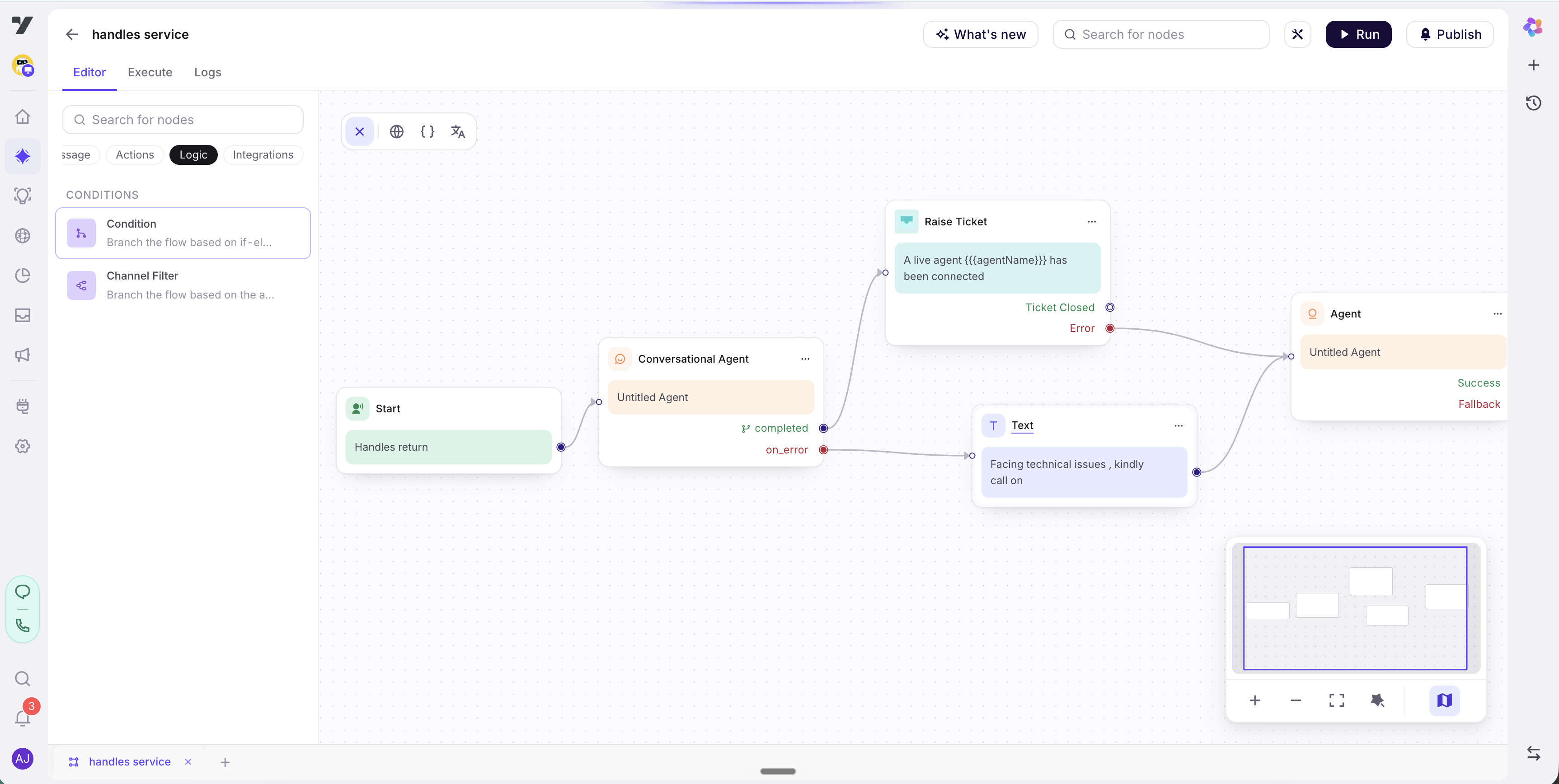
Reading that left to right:
- Start is the single entry point. It carries the trigger description - what this multi agent is for, and when it should run.
- The Agent node owns the first step of the conversation. In a returns flow that might be collecting an order ID and checking whether it's eligible. It has its own instructions, tools and variables, and it's where most of your work goes.
- That node finishes on one of its exits - the outcomes you declared inside it, such as
eligibleandnot_eligible. Each exit is wired onward by a branch: one leads to an Execute Workflow node that books the pickup, the other to a Transfer to Agent node that hands the conversation to a person.
Every multi agent is that shape: nodes that finish on a declared outcome, and branches that say what happens for each one. Exits belong to the node - you author them inside it - and the branch you drag from each exit is what turns that outcome into the next step.
So the wiring is the procedure. There's no separate place where the order lives, which is why you can look at a canvas and see every route a conversation can take.
The palette has far more than the three node types above - messages, prompts for input, conditions, workflow calls, transfers, and most of what a workflow can do.
Making it reachable
A multi agent is not a tool. You won't find it in the tools picker, and @-mentioning it does nothing. It becomes reachable the way any agent does - as a delegation target that routing can hand the conversation to.
Open Routing logic and find Routing targets. Multi agents are their own group there, with three modes rather than the two single agents get:
| Mode | |
|---|---|
| Off | The default. Never routed to |
| All | Every multi agent is a valid target, including new ones |
| Specific | Only the ones you pick |
Multi agents start Off, which is the single most common reason a handoff you expected never fires. A newly built multi agent is unreachable until you turn this on.
Once it's on, the two types compose cleanly: a single agent handles the open-ended conversation, and when it reaches a part that needs a fixed procedure it hands off - the same mechanism used between two single agents. The multi agent runs its steps and returns control.
A multi agent is not a workflow either. "Workflow" is a reserved term for a callable skill - an API call, a lookup, a job. A multi agent is a conversational journey across nodes. It can call a workflow through an Execute Workflow node, and it can be delegated to like an agent, but it is never itself a tool or a workflow.
Name them by the task.
order-return,kyc-verification,book-appointmentread clearly in the Multi agents list and in the Routing targets picker alike.flow2tells the next builder nothing about when to hand off to it.
Where to build it
Everything happens on the canvas. Start with The flow canvas for the tabs, the node palette and how branches work, then The Agent node for the step where your logic lives.
When you're deciding how to carve a job into nodes rather than how to configure one, Recipes has the two node shapes almost every flow is built from, and Exits covers the case where ten destinations won't fit in one node.
Next: The flow canvas.