The letter request flow
An employee asks for an employment, salary or visa letter. A manager can request one for a team member. It's the guide's worked example, because it carries every HR habit worth learning: an access check that has to gate the generate step, validation that belongs to a workflow rather than the model, and a system failure that must not look like a refusal.
Same skeleton for all three letter types — only the generate workflow changes.
@accessCheck@validateYear@generateLetter@notify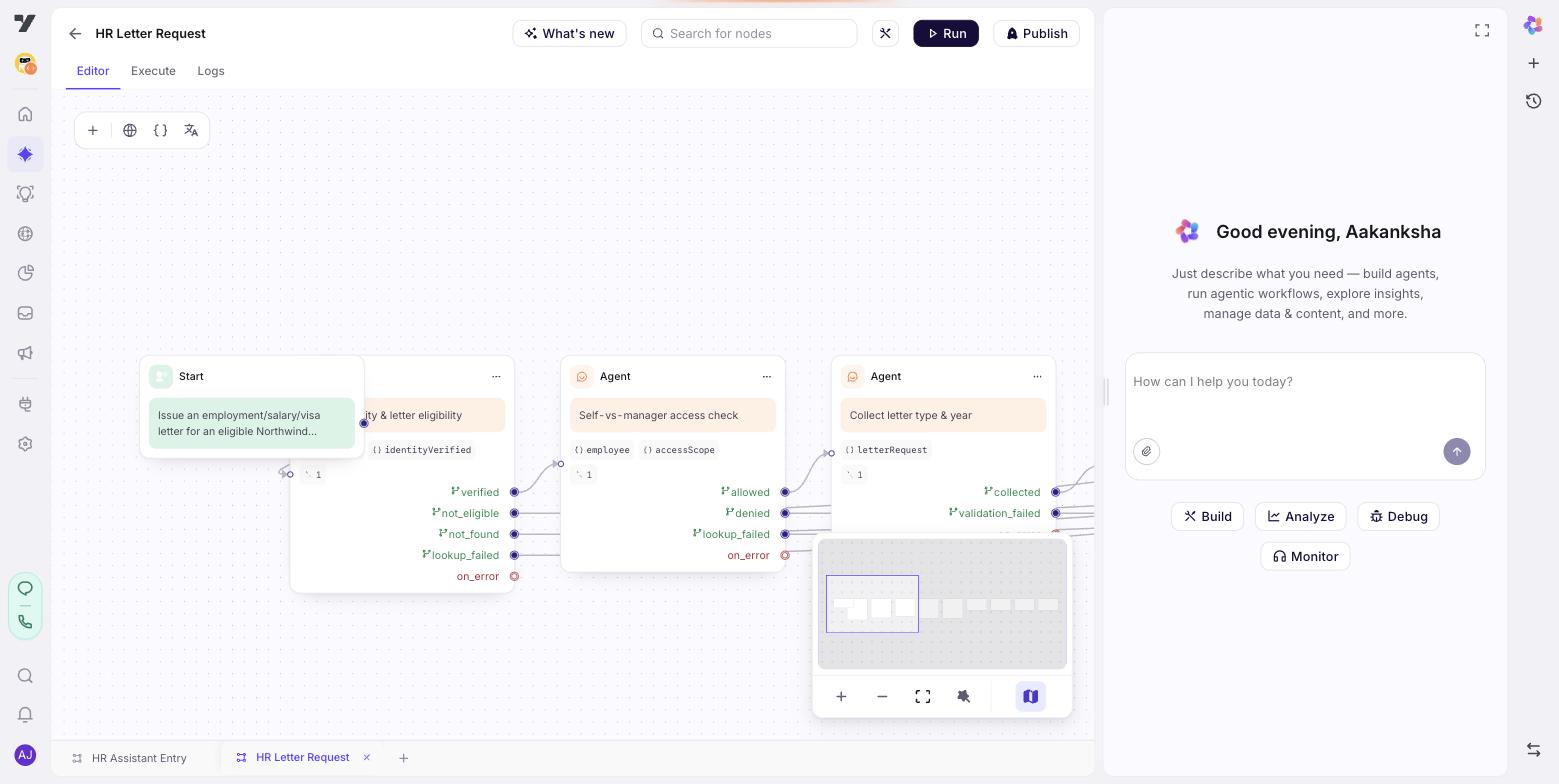
The Start trigger
A flow is unreachable until its Start trigger is set. This one has to catch both the direct ask and the hand-off from the entry menu:
When the employee asks for an employment letter, salary letter, visa letter or
salary certificate — or when selectedService is letter_request.
Not for payslips, and not for questions about what a letter contains.
The "not for…" line matters more than it looks. Payslip requests phrase almost identically, and without the exclusion this flow steals them.
Node by node
verify — is this person allowed a letter at all?
The employee record was loaded when the session started. Read {{employee}}.
- If it is empty, or its status says the lookup failed, do not assume they are
ineligible. Say you can't confirm their details right now and finish on
not_identified.
- If the record's entitlements include letters, finish on eligible.
- If they don't, tell them plainly that letters aren't available on their
employment type and finish on not_eligible.
Send no message on the turn you exit on eligible.It reads, it doesn't fetch. @getEmployeeDetails ran once in the session-start hook, so this node has no identity tool attached — one fewer tool weighed on every turn, and one fewer thing to pick wrongly.
Three exits, not two. not_eligible is a business outcome and ends the conversation politely. not_identified is a system problem and goes to a person. Collapsing them is the single most common HR mistake: during an outage, every legitimate employee is told they aren't entitled.
access-check — may they act on someone else's record?
Call @accessCheck for the current user and read isManagerAllowed.
- If true, finish on manager. A later step will collect the team member's code.
- If false, finish on self. If they have already named another employee, first
tell them plainly you can only handle their own record.
- If the check fails or returns nothing, finish on self. Least privilege: never
widen access because a check was unavailable.
Send no message on the turn you exit.
This is why the journey is a flow and not a single agent. "Only issue letters for the employee's own record" written into instructions reads perfectly and holds most of the time. Here the wiring enforces it: a self employee is never routed to a node that can accept a colleague's code, so there is no path along which the mistake can happen.
Failure closes rather than opens. Notice the last rule — a failed check exits self, the narrower outcome. That's the opposite of the verify node's failure handling, and deliberately so: not knowing who someone is means stop, while not knowing what they may do means assume less.
collect-team-member — the manager path only
Ask which team member the letter is for, and get their employee code.
- Save it and finish on collected.
- If they can't produce a code after three attempts, finish on max_retry.
Do not accept a name in place of a code, and do not guess a code from a name.
"Do not guess a code from a name" is load-bearing. Without it, a helpful model will happily infer priya.s from "Priya" — and issue one employee's letter to another. The access check decided whether; this line stops the model from filling in the who.
collect-details — letter type and year
Ask which letter they need (employment, salary, or visa) if it isn't
already clear, and which year.

Call @validateYear with the year they give.
- Valid: save the returned value to {{letter_year}} and finish on collected.
- Invalid: show the message @validateYear returned, and ask again.
- After three attempts, finish on max_retry.

Never accept a year @validateYear did not return as valid, and never write your
own error message for a rejected one.
Send no message on the turn you exit.Validation is a workflow, not the model. The rule "never write your own error message" is what keeps the reason consistent — if HR changes which years are available, the workflow changes and every message follows. A model-authored error goes stale silently.
max_retry needs both halves. There is no retry counter anywhere in the platform. The branch exists and the instruction reaches it — remove either line and the node re-asks forever. See retry is not an exit kind.
Both variables are writable. Leaving them read-only is the most common variable mistake: nothing is written, nothing warns you, and the failure surfaces two nodes later when the generate step receives an empty year.
generate-and-deliver — do the work, then hand it over
Ask how they'd like it: by email, or as a download link.

Call @generateLetter with the letter type, the year, and — only when a manager is
acting for a team member — the team member code. Pass only values collected in
this flow or returned by a validation workflow. Never one you inferred.

- Success, email: confirm it's on the way using @notify, and finish on delivered.
- Success, link: share the link and finish on delivered.
- Failure: apologise once, say you'll raise it with HR, and finish on
generation_failed. Never claim a letter was sent when it wasn't.
This is an Agent node, not an Execute Workflow node — it asks a question, so it needs a conversation. If it only generated and delivered with no choice to make, an Execute Workflow node would be cheaper and couldn't drift. That's the test: can you name what it would say?
generation_failed is separate from success on purpose. A document-service outage deserves an apology and a handover, not a pretend confirmation. And it's distinct from not_eligible back at verify — one is "we couldn't", the other is "you may not", and a customer can tell the difference even when a flow can't.
Variables this flow uses
Worth drawing for any flow. It exposes unused variables and missing ones at a glance.
| Variable | Scope | Written by | Read by |
|---|---|---|---|
employee | global | the session-start hook | verify, and every other journey |
is_manager_allowed | global | access-check | generate-and-deliver |
target_employee_code | journey | collect-team-member | generate-and-deliver |
letter_type | journey | collect-details | generate-and-deliver |
letter_year | journey | collect-details | generate-and-deliver |
delivery_method | journey | generate-and-deliver | — |
Two things the table shows. Everything specific to this request is journey-scoped — nothing outside the flow reads a letter year, so making it global would be prompt weight on every turn of every other agent. And employee is global because four journeys read it. That's the whole rule: global if another agent needs it.
delivery_method has no reader. It's kept because it's genuinely useful in the logs when someone asks why a letter went to email — but if you find several of these, they're usually leftovers.
The unhappy paths
| What happens | Where it goes | Why that and not something else |
|---|---|---|
| Session-start lookup failed | not_identified → HR | Not the employee's fault, and not a denial |
| Letters not available on their contract | not_eligible → polite end | A real business answer, so it deserves a real reply |
| Self-only employee names a colleague | stays on self | The wiring never offers the path, so nothing to refuse |
@accessCheck unavailable | self | Least privilege — narrow when unsure |
| No valid year after three tries | max_retry → HR | Wired somewhere different, never back into the same node |
| Manager can't produce a team code | max_retry → HR | Same |
| Document service down | generation_failed → HR | An outage, not a refusal |
| The run crashes or loops | on_error → HR | Already there — it just needs wiring |
Every one of those is wired. An unwired exit is a dead end: the conversation stops with no message and no next step.
Test it
Walk the unhappy column, not the happy path — these are the cases that pass a demo and fail a real employee:
- A self-only employee naming a colleague. Must refuse, and must not produce the colleague's letter.
- Someone claiming "I'm their manager" when
@accessChecksays otherwise. The claim must not be trusted. - A failed session-start lookup. Must reach a person, not a denial.
- An invalid year, three times.
max_retrymust actually fire — if it doesn't, the instruction that reaches it is missing. @generateLetterfailing. Must apologise and hand over, never claim success.
The full set, and how to keep them as a regression suite, is in Prove it.
Next: The booking flow.