The flow canvas
The flow canvas is where you build a multi agent: a zoomable node graph where each node does one job and the lines between them decide what runs next. Open a multi agent from the Multi agents tab on the Agents page, or create a new one, and the canvas opens on it.
This page is the canvas itself - the tabs, the palette, how branches work, and the variables that carry data between steps. The Agent node, where most of your logic lives, has its own page.
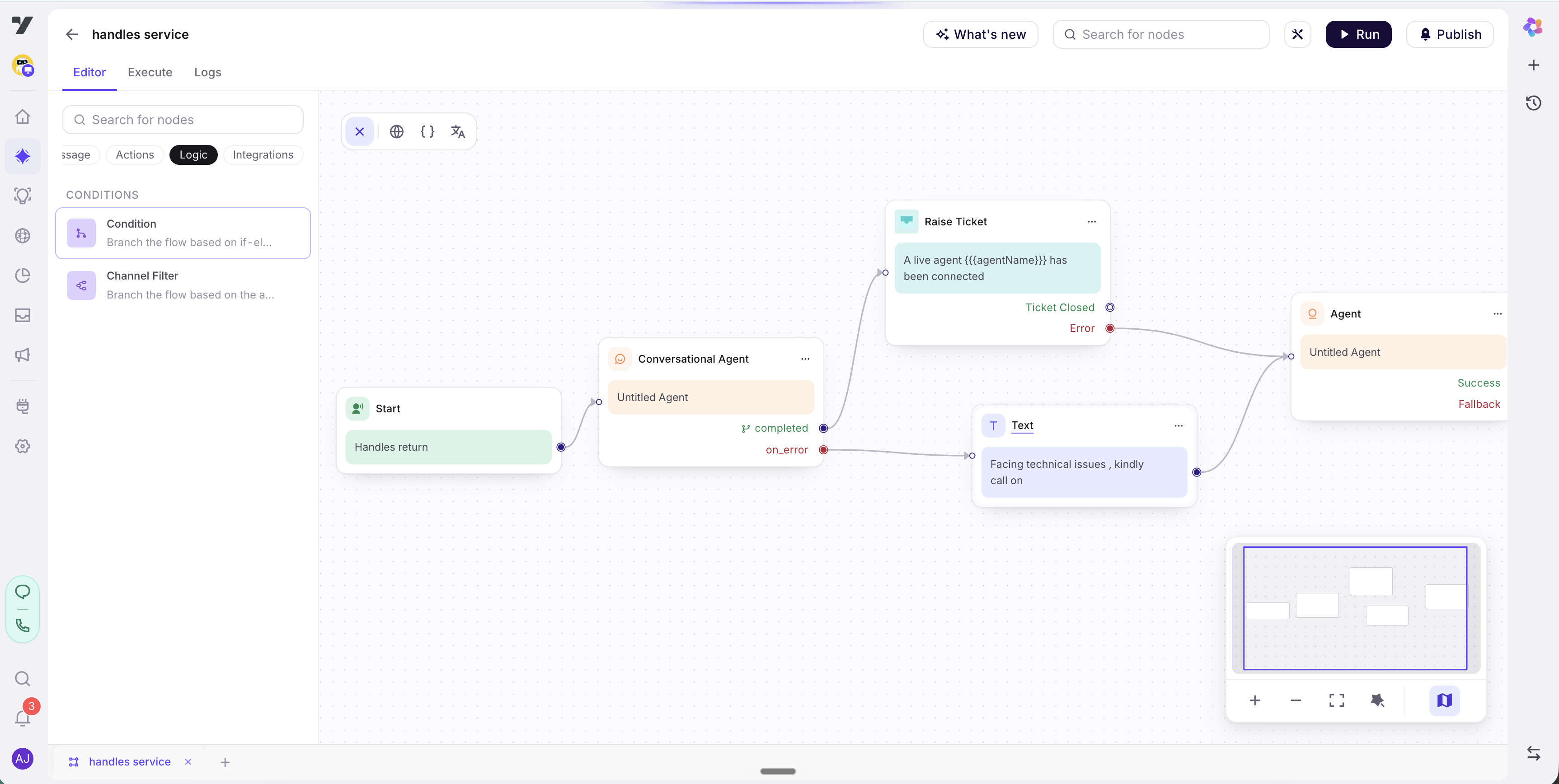
Tabs and toolbar
Three tabs across the top:
| Tab | What it's for |
|---|---|
| Editor | Build the flow - add nodes, write their instructions, wire branches. Where you spend most of your time |
| Execute | Run the flow end to end and watch it step through your nodes, so you can confirm the path an input takes |
| Logs | Inspect past runs - which nodes fired, which exit each took, and the variables along the way |
And in the header:
- Run - start a test conversation against the current draft, without publishing. Use it constantly as you build.
- Publish - make your edits live. A multi agent has no Live/Draft badge in the Agents list, so publishing is how canvas changes reach customers.
- Search for nodes - finds a node by name and jumps to it. Faster than panning once a flow has a dozen nodes.
For getting around a large graph there's a minimap, zoom and fit-to-screen, and auto-layout, which re-tidies everything into a clean top-to-bottom arrangement.
Let auto-layout do the tidying. Don't fuss over node placement while you build - wire the logic, then auto-layout to make it readable. Position is cosmetic; the branches are what matter.
The Start node
Every multi agent begins at a single Start node. It's the entry point, and it carries the trigger - the natural-language description of when this multi agent should run.
The trigger does the same job here that a Trigger does for a single agent, and you write it the same way: concrete about the situations it covers, explicit about what it doesn't.
"When the customer wants to return or exchange an item they've already received - start a return. Do not handle order tracking or delivery-status questions; those have their own agent."
Start has exactly one outgoing edge: it hands control to the first real node, usually an Agent node. From there the path is decided by each node's exits.
A multi agent has to be enabled as a routing target before anything reaches it. Open Routing logic → Routing targets - multi agents default to Off. A perfect trigger on an unreachable flow still never fires.
Node types
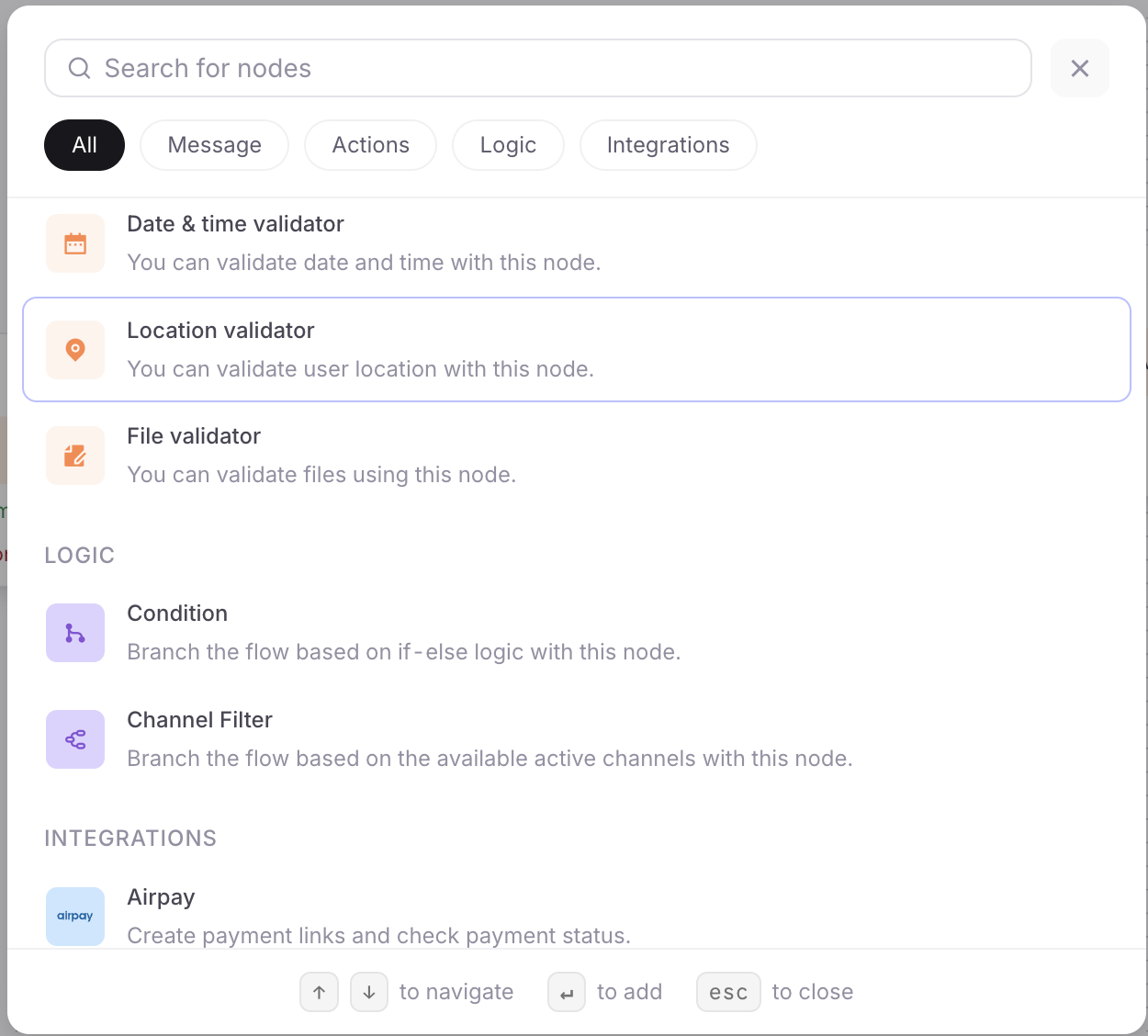
You drop a node on the canvas, configure it, and connect it onward by its handles. The palette is grouped by what a node does - Prompt, Message, Action, Logic, Integration - and the Agent node in the Action group is where most of your logic lives.
Build the backbone from Agent nodes, and reach for the others at the points where a step needs to branch mechanically, run business logic, or hand off. Nodes covers each one, and the rule that matters most: only the Agent node and the Condition node can send the flow more than one way.
A multi agent is never a "workflow." Workflow is a reserved term - a callable skill you build in the workflow editor and invoke from an Execute Workflow node or attach as a Workflow tool. The multi agent is the conversation; a workflow is a subroutine it can call.
Branches and exits
Nodes connect through exits. Each node finishes on one of its named exits, and each exit is a handle you wire - with a branch, the line on the canvas - to whatever should run next.
- An Agent node declares its exits: a label plus a short description of when each applies. A return node might exit on
eligible,not_eligible, ormax_retry. Every node also has anon_errorexit for the failure path. - Dragging a branch from an exit to another node's input is the routing. When the node finishes on that exit, control follows that branch.
- An exit wired nowhere ends the flow after that node. Wire what should continue; leave terminal outcomes unwired to finish.
- Branches can point forward, or back to an earlier node - confirm → collect to re-collect a changed detail - which is how you build retries and loops.
Exits are authored in the node; branches are drawn on the canvas. The exit's description is what the node's agent reads to decide which outcome it reached. The branch is what turns that outcome into the next step. See The Agent node for authoring exits.
This distinction is the real argument for a multi agent, and it's worth being precise about. The node's agent does choose its exit - that's a model decision, and two runs can take different branches. What it can't do is leave the flow: the set of possible paths is finite, and every one of them is a branch you drew. With a trace showing each node's run separately, that's what makes the journey auditable - not that it runs identically every time, but that it can only run in ways you laid out.
Wire the unhappy paths first. The success path is the easy one, and the reason to build a multi agent is that the edge cases stay consistent too. Make sure
not_eligible,max_retryandon_erroreach land somewhere sensible - usually a Transfer to Agent or a clean end - before you polish the happy path. See Testing a multi agent.
Journey variables
Journey variables are the flow's working memory: values carried from one node to the next. An order_id collected early, a return_eligible flag written by an Execute Workflow node, a pickup_slot chosen later.
- They're scoped to the flow. Journey variables belong to this multi agent, not the project. An Agent node reads and writes them through its Variables capability; an Execute Workflow node can read its inputs from them and write results back.
- They persist across nodes within a run, which is what lets a flow remember what it has collected as it walks the journey.
- If a value matters outside this flow, declare it in Memory instead, where every agent can read it. Reach for a journey variable when the data only matters here.
See Memory for the full model and how flow-scoped and shared variables relate.
Next: The Agent node - where each step's goal, tools, variables and exits live.