The Agent node
An Agent node is the workhorse of a multi agent. It owns one job - with explicit exits - inside the flow you design on the flow canvas, and it talks with the customer over as many turns as that job needs. The node speaks to the user, follows its instructions, and finishes by choosing one of the exits you defined; each exit is wired to whatever comes next.
Think of it as a small, sharply-scoped agent that the flow invokes at exactly the right moment. It does not have a trigger and it is never picked by routing - the flow decides when control reaches it. That's the whole point of a multi agent: the order is fixed, so every run is consistent and auditable.
This page covers the concepts and maps the settings; each group has its own page below. For two nodes written out in full, see Recipes.
How it differs from a standalone single agent
A single agent and an Agent node share the same engine - an LLM that reads the conversation, uses tools, and replies - but they sit in very different places:
| Single agent | Agent node | |
|---|---|---|
| Lives | On the Agents page (Single agents tab) | Inside a multi agent, on the flow canvas |
| How it's reached | Routing routes to it based on its Trigger | The flow hands control to it - no trigger, no routing |
| Scope | Owns a whole domain ("billing", "order status") and reasons openly | Owns one step and finishes on an explicit exit |
| Finishes by | Returning control for routing when it's done | Choosing one of its exits, which decides the next node |
| Lifecycle | Has Live / Draft status, an avatar, conversation rules | No status - it's part of the flow's lifecycle |
Note: Because they share an engine, the writing skills carry over. A good Trigger on a standalone agent and a good exit description on a node are the same craft: say precisely what's true when the agent is done. The difference is that a node's outcome is a branch in a flow, not a handoff back to a router.
One consequence worth internalising early: a node cannot hand off to another agent by name. Inside a flow, the canvas owns the order. A node names its outcome; the wire decides where that outcome goes.
What one turn looks like
Knowing the order settings fire in makes most of them self-explanatory.
- Control reaches the node. If First response is on, its scripted message goes out immediately - no model call - and the node waits for the user.
- The context is assembled. This is the box in the middle of the diagram, and it's the part most worth understanding: the agent sees its Goal and Instructions, the conversation history (unless you switched it off), the current values of its Allowed variables, and the tools, rich media and exits available to it. Anything not in that box does not exist as far as the agent is concerned - which is why a variable you forgot to allow reads as a mystery bug rather than a missing setting.
- The agent responds - with a message, some rich media, or a tool call. If it called a tool, the tool runs, the result goes back, and the agent goes again. That's the inner loop, and it can go round several times before the agent has what it needs.
- The turn ends. Lifecycle Hooks fire here, quietly, with no user-facing output.
- Exit or wait. If the agent chose an exit, the flow leaves along that branch. If it didn't, the node waits for the user's next message and the whole cycle runs again - with a freshly rebuilt context, so any variable that changed in the meantime is now visible.
The two loops
They're easy to conflate, and telling them apart is what makes the failure modes make sense.
| What's looping | Bounded by | |
|---|---|---|
| Inner | The agent calling tools within a single turn - the agent working | A step ceiling. Hit it without choosing an exit and the node goes down on_error. |
| Outer | Turn after turn with the user - the node holding a conversation | Nothing automatic. The node keeps control until it takes an exit, which is why you write a max_retry branch. |
A node can sit in the outer loop for as long as the conversation needs. It only ever gives up control by taking an exit.
What a node is made of
Six groups of settings. Each has its own page:
| The prompt | Name, Goal and Instructions - what the step is for and how it goes about it |
| Capabilities | Tools, rich media, and the variables it can read and write |
| Exits | The ways this step can end, and where each one leads |
| Settings | First response, lifecycle hooks, model, behaviour, channel overrides |
Two of them behave differently from how they look, and are constantly confused with each other:
- Exits are control flow. Exactly one is chosen when the step finishes, and it decides where the conversation goes.
- Allowed variables are data. The step sees only what you list, and writes only what you mark.
Getting that distinction right is the single most useful thing on this page. See Variables and exits - which one do I want?.
Every node has its own agent. A node's configuration belongs to that node alone - there's no shared agent behind several nodes, and nothing is inherited from the node before it. Two steps that need the same behaviour are configured twice, or share a workflow they both call. That's more work up front, and it's also why one node misbehaving doesn't disturb the rest of the flow.
Open the node
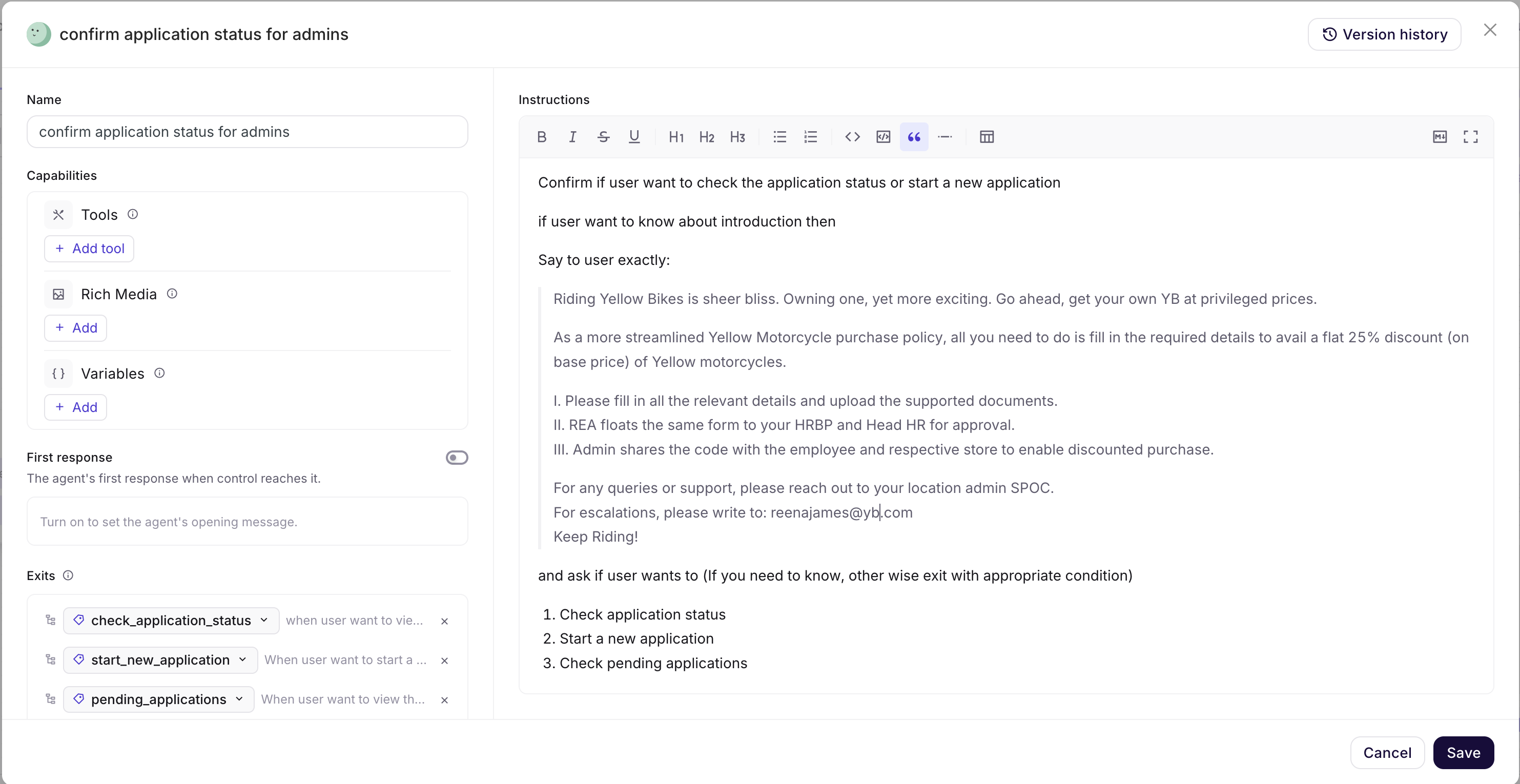
Click the node on the canvas to open its configuration drawer. The header shows the node's Name and a Version history button; Cancel and Save sit at the bottom, and nothing is committed until you save.
The drawer has two columns: the left holds Name, Capabilities, First response, Exits, Lifecycle Hooks, Model configuration, Behaviour and Channel overrides; the right holds the Goal and the Instructions.
Next: The prompt - the Goal and Instructions that drive the step.