Analyze Knowledge base usage with Knowledge insights
What shipped
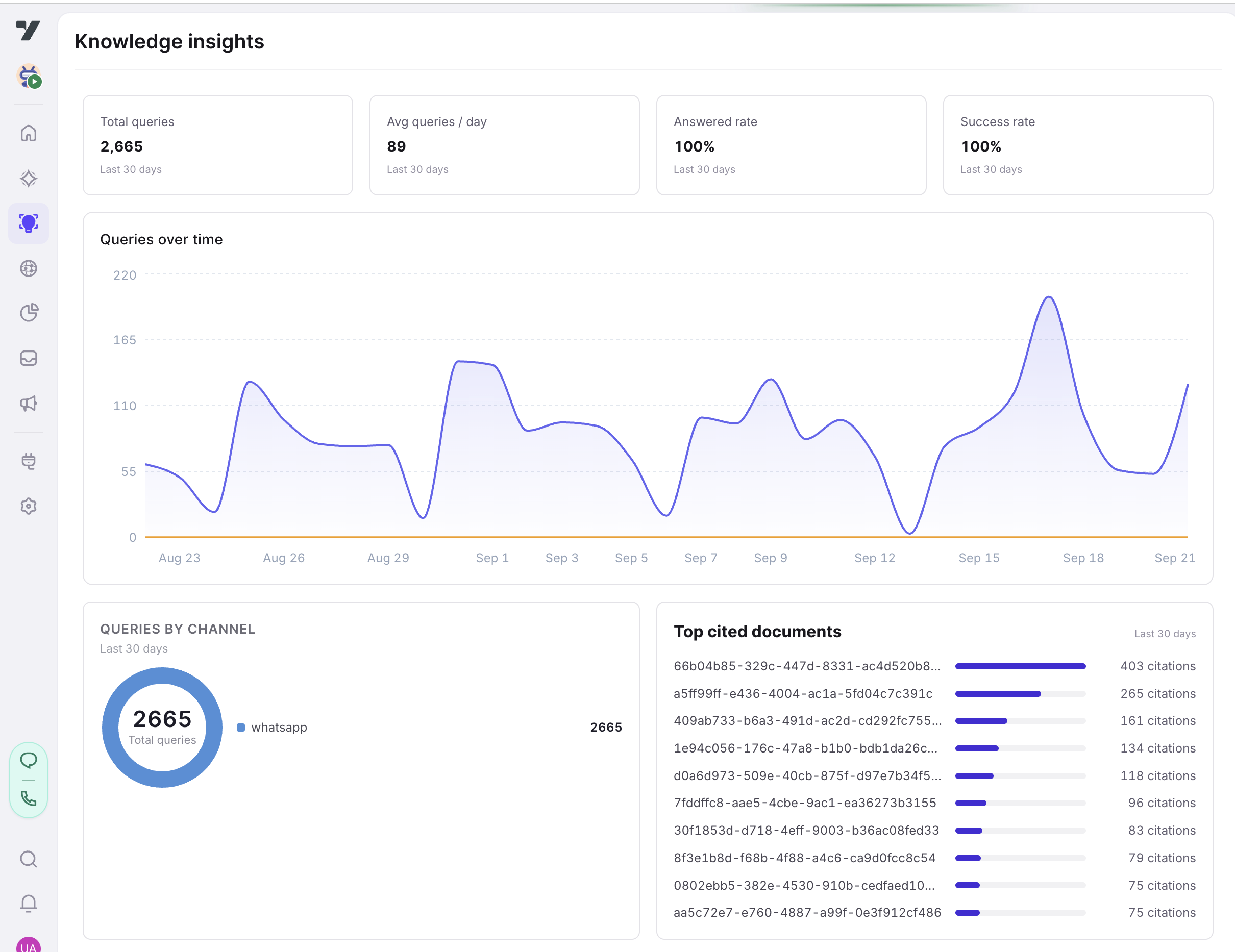
The Knowledge insights page in Atlas now shows how your Knowledge base is being used, instead of the topic graph (which moved to its own Knowledge graph page in the sidebar). The page reports on every Knowledge base search over the last 30 days:
- Total queries, Avg queries / day, Answered rate, and Success rate at a glance
- Queries over time — a daily chart split into answered and unanswered queries
- Queries by channel — where your users ask from (WhatsApp, web, and so on)
- Top cited documents — the documents your Knowledge base cites most often
Who it's for
Admins and developers who maintain a Knowledge base and want to see whether it is being used, how well it answers, and which documents carry the load.
How to use
- Open your AI agent and go to Atlas in the left sidebar.
- Select Knowledge insights. The page loads the last 30 days of Knowledge base queries.
- Read the tiles for the headline numbers; hover the Queries over time chart to see the answered/unanswered split for any day.
- Use Top cited documents to spot the content doing the most work — and, together with a low answered rate, to find gaps worth filling.
note
The topic and sub-topic visualization that used to live here is unchanged — find it under Knowledge graph, just below Knowledge insights in the sidebar.
Screenshots