Channels FAQs
This page covers channel FAQs. WhatsApp and Facebook Messenger FAQs have moved to their own pages (linked below) to keep each channel's FAQs together with its setup docs.
WhatsApp chatbot related FAQs
These FAQs have moved to the WhatsApp FAQs page — see the "General WhatsApp chatbot FAQs" section there.
Facebook (FB) Messenger chatbot related FAQs
These FAQs have moved to the Facebook Messenger FAQs page.
Google Business Messaging (GBM) chatbot related FAQs
note
GBM was discontinued by Google effective July 31, 2024. The FAQs below are kept for historical reference only.
Why do we need GBM chatbot channel?
The first thing we do when we look for some product or service is to 'Google them'. 90% of overall search traffic globally is using Google. The ability to engage with the potential customers right then when they search is powerful. In other words, GBM helps with fantastic Discovery-to-Engagement.
What can a user share on GBM chatbot?
- A simple text message
- An image in JPEG or PNG format
- An image in JPEG or PNG format
In what ways can a GBM chatbot respond?
- A simple text message
- An image in JPEG or PNG format
- Can send URLs to files of PDF or docx
- Can share interactive cards about products or service offerings
- Can trigger Quick reply buttons for users to click
- An image in JPEG or PNG format
- Can send URLs to files of PDF or docx
- Can share interactive cards about products or service offerings
- Can trigger Quick reply buttons for users to click
What is not possible with GBM chatbot today?
- The GBM chatbot is not supported in desktop or laptop view but only on mobile phones.
- Videos cannot be embedded. Any type of custom, for example, a Slider or dropdown is not available.
- The Thumbview or preview link is not possible through GBM chatbot.
- Videos cannot be embedded. Any type of custom, for example, a Slider or dropdown is not available.
- The Thumbview or preview link is not possible through GBM chatbot.
Which industries are allowed to use GBM?
Please go through this document for detailed industry-wise solution
Is there a restriction on GBM for any location or country?
There is no restriction on location or countries where the product would not work yet.
Where can I find data and security details?
Click here
Does a brand need to have a specific location mapped to the Google My Business account to use GBM?
For time being, countries except for the US, a brand must have a verified location associated with its Google My Business Account to use GBM.
How much time would it take to deploy a chatbot for a customer in GBM?
If the bot is ready (Changes to be made for GBM specific bot) and the pre-requisite to onboard a customer is available, the whole process from registration to verification till launch with relevant Google and Brand approval should be tentatively around 3-4 business days in an ideal scenario.
Can GBM support Multiple languages?
The multi-language support is not there in the shell of the product for example, the CSAT score popup. Also, a welcome message will have to be in English. But if the bot is multilingual it can handle the language conversation in different languages during conversation messages.
What is the pricing model of GBM?
Contact support for pricing information.
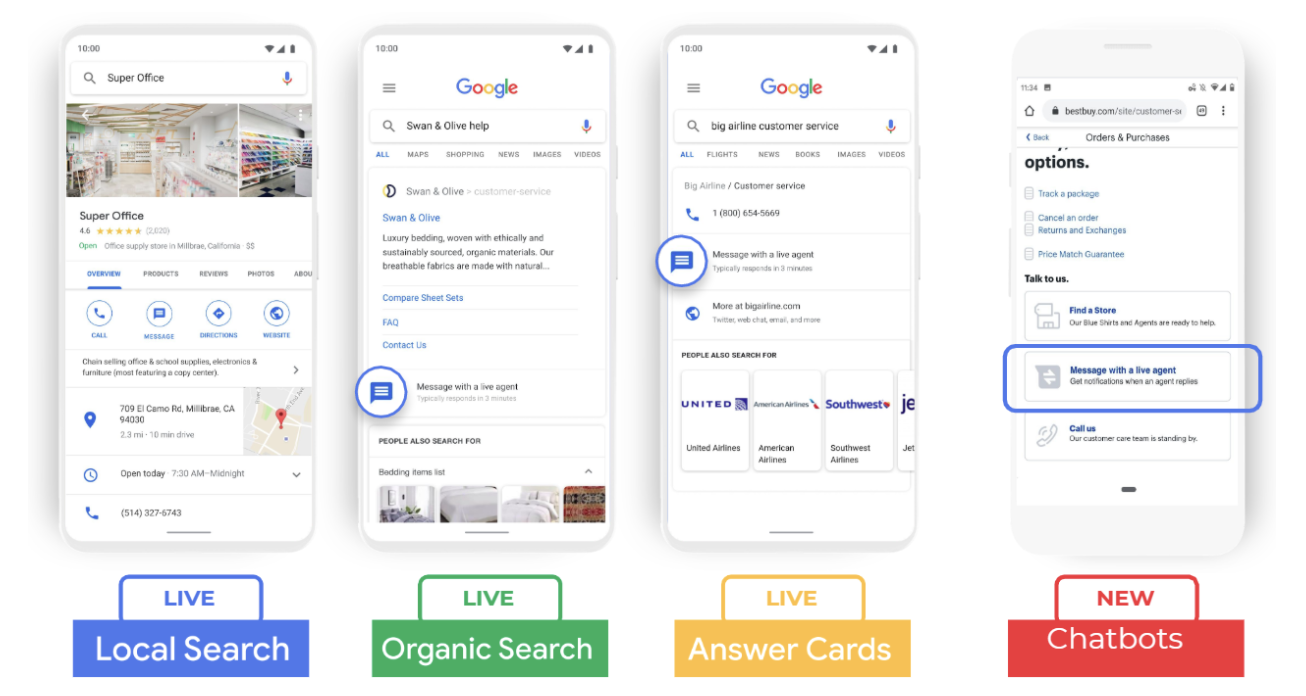
What are all the discovery points of GBM chatbot channel?
These are the possible entry points to GBM channel.
General FAQs
What is session timeout?
A session lasts for 24 hours and includes any number of interactions the user has in a 24-hour window from the start of the session.
What is session duration?
Session duration is based on the time of each user response. It resets if there is a 30-minute gap between responses. The total session duration is the sum of all user response times.