Call logs
This page provides detailed insights into every call handled through the platform. It includes information such as call direction, participants, duration, and resolution status.
This report helps administrators, supervisors, and analysts monitor call activity, troubleshoot issues, and evaluate performance.
The log data refreshes automatically every 30 minutes.
Accessing the Report
- In the left navigation, go to Analytics > Conversations > Call Logs.
- Apply the required filters.
- View or export the report.
Report Columns
| Column Name | Description | Example |
|---|---|---|
| Call ID | Unique identifier for the call. | c123456 |
| Recording | Link to call recording (if available). | Play |
| Direction | Direction of the call (Inbound/Outbound). | Inbound |
| From | Caller’s number or ID. | +1-202-555-0147 |
| To | Receiver’s number or ID. | +1-202-555-0173 |
| Duration | Total call duration. | 5m 32s |
| Start time | Timestamp when the call started. | 2025-09-12 14:03:12 |
| Status | Final call status. | Completed / Missed |
| Hangup reason | Reason for call termination. | User ended |
Drill-down call logs data
Filters
You can refine the report using the following filters:
| Filter Name | Description | Example |
|---|---|---|
| Status | Filter by call outcome. | Completed, Missed |
| From | Search by caller ID or number. | +91-98765-43210 |
| To | Search by receiver ID or number. | +91-98765-67890 |
| Direction | Choose call type. | Inbound, Outbound |
| Hangup reason | Filter based on why the call ended. | Network error |
| Ringing duration | Time spent ringing before pickup. | 12s |
| Call duration | Total length of the call. | 5m 32s |
| Voice bot duration | Duration handled by a voice bot. | 2m 15s |
| Voice bot bill duration | Billable bot interaction time. | 2m 15s |
| Campaign ID | Identify calls linked to a campaign. | cmp-2025-08 |
| Hangup source | Source that triggered call termination. | System / Agent |
Available Actions
Download/export in CSV, XLSX, or PDF format

Search data by call ID
Access call details
To view the details of a specific call:
- Search or filter to locate the required call record.
- In the Call logs table, click the Call ID link.
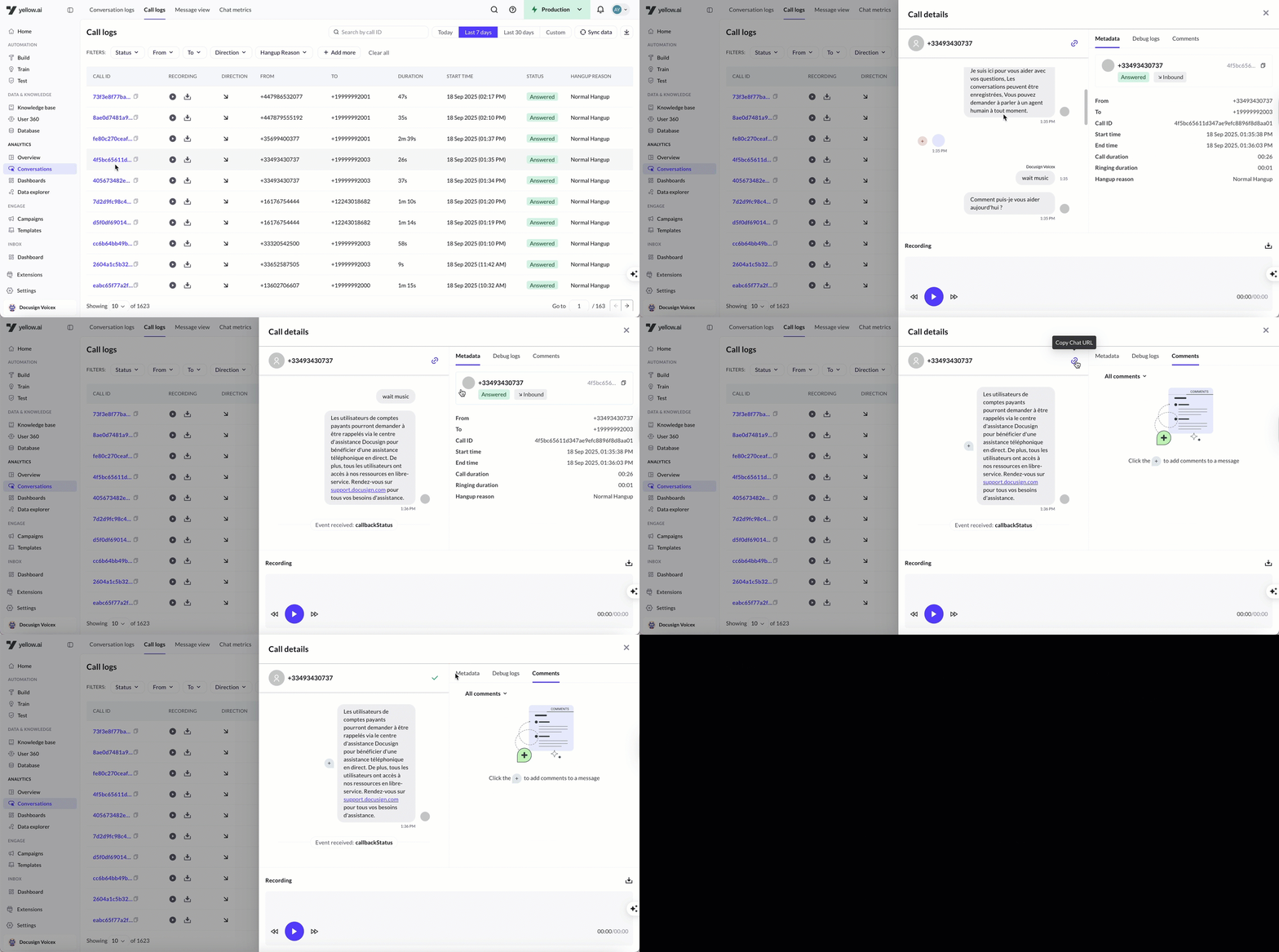
- The detailed call view opens, showing transcript, recording, metadata, and logs (if available).
Call detail view
When you select a call from the Call logs table, the system opens the Call detail view. This view is organized into tabs, allowing you to review different aspects of the call.
1. Conversation Details
- Conversation transcript – Full transcript of the call.
- Recording playback – Option to listen to the audio recording.
- Copy chat URL – Share the conversation link directly.
2. Metadata
Displays all key attributes of the call, including:
- From – Caller number
- To – Recipient number
- Call ID – Unique identifier for the call
- Start time – Timestamp of when the call began
- End time – Timestamp of when the call ended
- Call duration – Total length of the call
- Ringing duration – Time before the call was answered
- Hangup reason – Why the call ended (for example, Normal Hangup)
3. Debug logs
Shows system-level logs generated during the call for troubleshooting and analysis.
4. Comments
Add notes, tag team members, and collaborate on call-specific observations directly within the platform.

5. Call Details (voice)
For voice calls on a genAI (v3) agent, the Call Details tab gathers the call's key artefacts in the order the call happened:
- Recording – play back the call audio.
- Call record – every field the call detail record (CDR) carries.
- Latency – median, average, p95 and turn count for the call, then the average STT · Bot · TTS split, so you can see where the time went.
Each bot turn in a voice transcript also shows a per-turn latency badge with the caller-perceived latency — the time from the caller finishing speaking to hearing the bot's first word (for example ⏱ 2.2s | STT 374ms · BOT 1.8s · TTS 15ms). Hover the badge for the definition. These metrics appear for voice conversations in both Call logs and Conversation logs.
Refresh Call Log
By default, the system refreshes log data every 30 minutes. However, you can refresh Call logs data manually whenever needed using the Sync data option.
