Test a guided agent
A guided agent runs the same steps in the same order every time - which is exactly what makes it testable. Your job when testing is to walk every branch of the flow at least once: confirm each Conversational Agent node finishes on the exit you expect, that every exit is wired to the right next node, and that the run holds together end to end.
This page covers the three places you test a guided agent: Run on the canvas and the Execute tab to drive it, the Logs tab to inspect a run, and the AI Trust Centre to lock in regression coverage before you ship.
Note: Guided agents have no Live/Draft status - there's nothing to "set live." A guided agent runs as soon as it's published and is automatically available as a tool to your conversational agents. So testing isn't a release gate you flip; it's the thing you do every time you change a node, an exit, or a branch. See Build a guided agent on the canvas.
Where you test
| Surface | Where it lives | Use it when |
|---|---|---|
| Run | The button in the flow canvas header | You want a quick, interactive pass through the flow while you're still editing it. |
| Execute | A tab on the flow canvas (Editor / Execute / Logs) | You want to drive the agent turn by turn and watch it move from node to node. |
| Logs | A tab on the flow canvas | You want to inspect a finished run - which exit each node took, what each branch did, where it stopped. |
| AI Trust Centre | Test & debug → AI Trust Centre | You want durable, repeatable regression coverage that runs on every future change. |
Use them in that order: Run / Execute while you build, Logs to diagnose, then promote the cases that matter to the AI Trust Centre so they run automatically forever after.
Step 1: Run the agent on the canvas
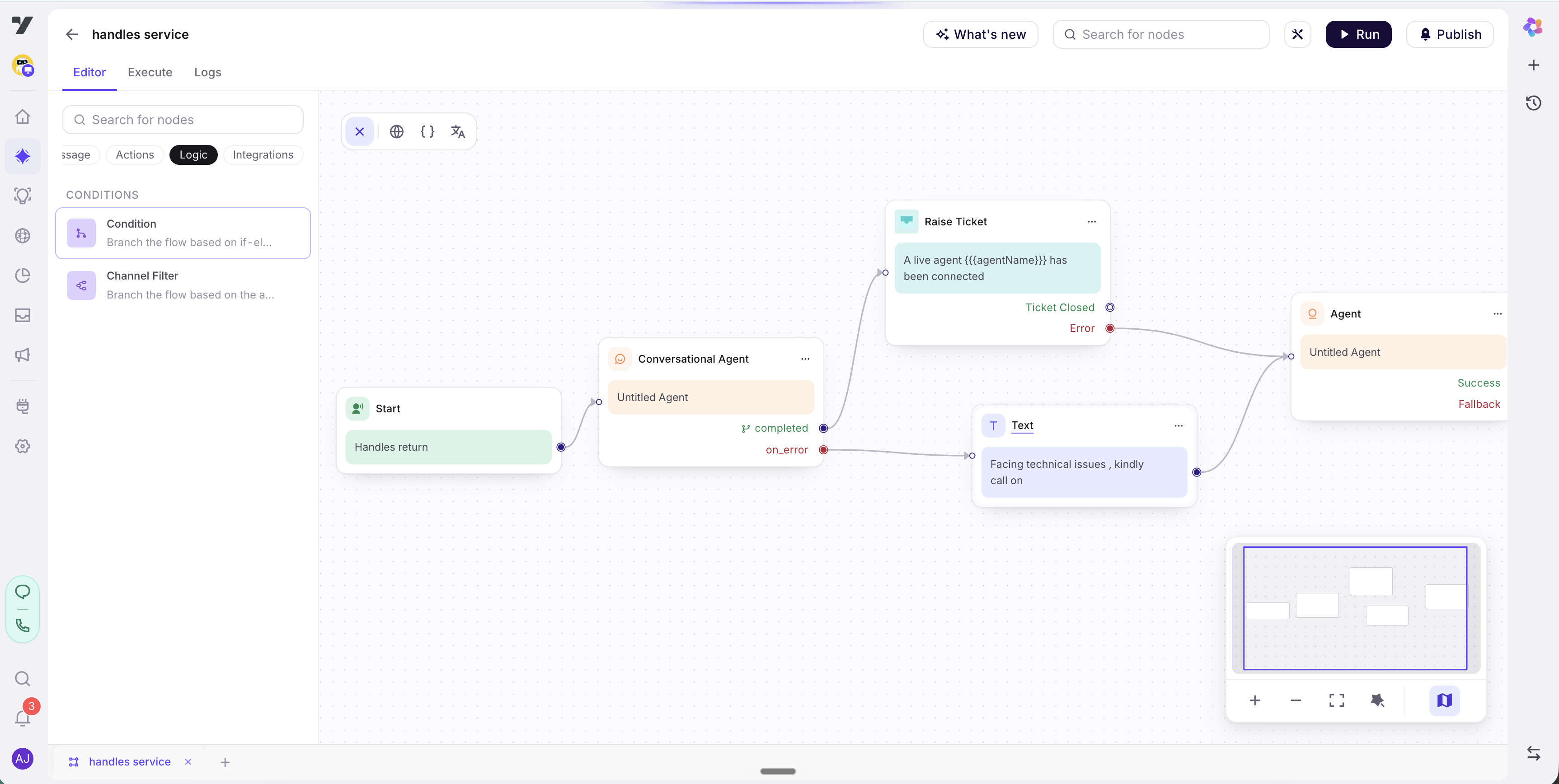
Open your guided agent from the Guided tab on the Agents page (it opens the flow canvas at /build/flows/<slug>). In the canvas header you'll see Run alongside What's new, Publish, and the Search for nodes box.
Click Run to start an interactive session against the current state of the flow. The run begins at the Start node and follows your wiring: the first Conversational Agent node takes control, acts on its instructions, and - when it reaches an outcome - finishes on one of its exits. The exit's branch hands control to the next node, and so on until the flow ends or transfers.
This is the fastest way to sanity-check a change. Edit a node, hit Run, play the conversation, repeat.
Tip - drive it like a real user. Don't only type the "happy" answer. If a node has a
max_retryexit described as "when the user can't decide after 3 attempts," test it by being indecisive on purpose. Branches you never exercise are branches you never verified.
Step 2: Drive it turn by turn from the Execute tab
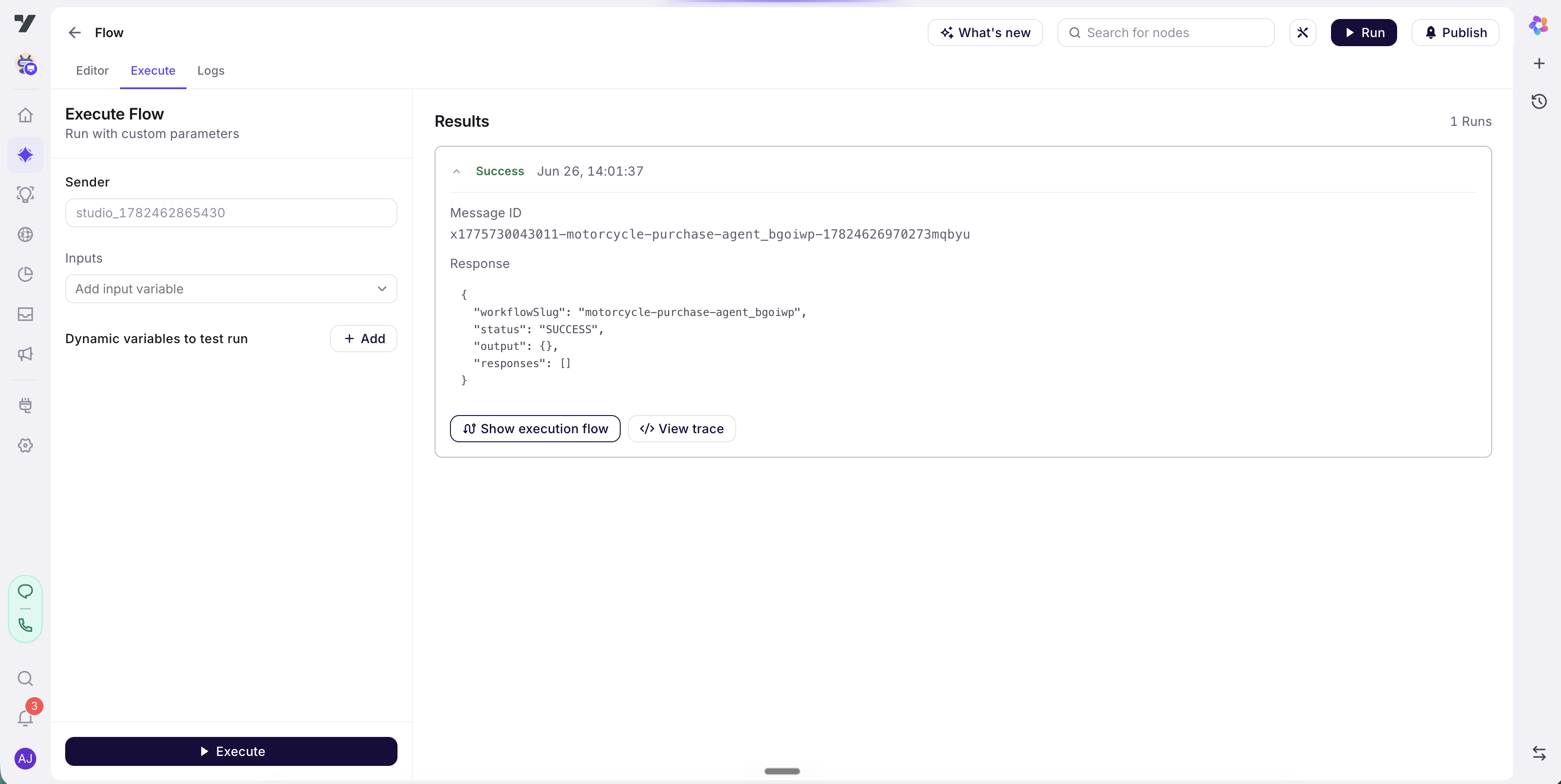
Switch to the Execute tab on the canvas. This is the dedicated harness for stepping the flow as an end user: you send a message, the agent responds, control moves to the next node when the current one finishes on an exit, and you keep going.
As you converse, confirm three things on each step:
- The right node has control. A node only takes over when a branch from the previous node points to it. If the wrong node speaks, the wiring upstream is off.
- The node finished on the exit you expected. A Conversational Agent node ends on one of its exits - for example an intent exit (
vpf,nps), amax_retryexit, oron_error. The exit it picks is driven by its Instructions and the natural-language description on each exit. - The branch sent you to the right place. Each exit is wired by a branch to a next node. Walk the conversation down each branch at least once.
Run through the flow several times, taking a different path each time, until you've covered every branch - including max_retry and on_error.
Step 3: Inspect a run in the Logs tab
When a run does something you didn't expect - wrong node took over, the flow stopped early, an exit never matched - open the Logs tab. Logs give you the run's history so you can see why control moved the way it did, node by node.
Read the log top to bottom and ask:
- Which exit did each node finish on? If a node you expected to take the
refundexit tookmax_retryinstead, its Instructions or that exit's description isn't steering the model the way you think. Sharpen them (see Configure a Conversational Agent node). - Did a branch go nowhere? If a node finished on an exit but the run stopped there, that exit has no branch wired to a next node. Go back to the Editor tab and connect it.
- Did
on_errorfire? Anon_errorexit means the node hit a failure (a tool error, an unhandled condition). Follow that branch and confirm it lands somewhere graceful - a retry, aTransfer to Agentnode, or a clean message - not a dead end.
Tip - match Logs against the graph. Keep the Editor tab's node graph in mind as you read Logs. The exit labels in the log are the same labels you see on the node's output handles in the canvas - tracing one against the other is the quickest way to spot a misrouted branch.
Step 4: Promote durable cases to the AI Trust Centre
Run / Execute / Logs are for the loop you run while building. They don't persist - close the tab and the run is gone. For coverage that survives every future edit, promote the conversations that matter into the AI Trust Centre.
The Trust Centre is the durable, dataset-driven side of testing. Capture a guided-agent conversation as a test case, add it to a dataset, and it runs automatically on every future change - so a branch you wired correctly today can't silently break next month. See the Testing Lab for capturing and curating cases, and the Test & debug overview for the full picture.
A good regression set for a guided agent covers, at minimum:
- One case per branch. Every exit on every Conversational Agent node should have at least one case that drives the conversation down it - including
max_retryandon_error. - The unhappy paths. Indecisive users, invalid inputs, mid-flow topic changes. These are where consistency breaks.
- The full journey end to end. A single case that walks the whole flow from Start to its terminal node, so you catch wiring regressions across the whole graph at once.
Tip - guided agents are tools too. Because a guided agent is automatically available as a tool to your conversational agents, also test it from the calling side: open the conversational agent that invokes it and confirm it hands off to the guided agent at the right moment. See Conversational agents.
Common pitfalls
| Symptom | Likely cause | Fix |
|---|---|---|
| A node never takes the exit you expect | The exit's description is too vague for the model to match against (e.g. "if relevant" instead of "if the intent is a refund request"). | Rewrite the exit description in plain, specific language; tighten the node's Instructions. See agent-node.md. |
| The run stops dead after a node | An exit was left unwired - it has no branch to a next node. | Open the Editor tab and connect the exit's output handle to the next node. |
| Two exits both seem to match | Overlapping exit descriptions on the same node. | Sharpen the boundary between them, or merge them into one exit. |
on_error fires unexpectedly | A tool the node calls is failing, or the node hit an unhandled condition. | Check the failing step in Logs; fix the tool or add handling, and make sure the on_error branch lands somewhere graceful. |
| The first node says nothing on entry | First response is off (the default) - the node acts on its instructions without a canned opener. | If you want a spoken opening when control reaches the node, turn First response on. See agent-node.md. |
| It passes once, then behaves differently | The agent layer is stochastic - a single pass doesn't prove a branch is reliable. | Run the same path more than once; promote it to a Trust Centre dataset so it's checked every time. |
Note: Don't confuse a vague exit description with a missing branch. A vague description means the node finishes on the wrong exit (Logs shows it picking the wrong label); a missing branch means the node finishes on the right exit but the run stops because that exit isn't wired (Logs shows it ending after a node that should have continued). The first is fixed in the node config, the second in the canvas.
Best practices
- Walk every branch before you publish. A guided agent's whole value is determinism - but only the branches you've actually run are the ones you've verified.
- Test the retry and error paths on purpose.
max_retryandon_errorare where real conversations go sideways. Be indecisive; feed bad input; make a tool fail if you can. - Read Logs against the graph. The exit labels in Logs map one-to-one to the output handles in the Editor - trace them together to pin a misroute.
- Promote anything that matters to the Trust Centre. Run/Execute is throwaway; a Trust Centre dataset is the only test that runs again next month.
- Re-test after every wiring change. Moving one branch can reroute a whole journey. Don't trust a flow you edited but didn't re-run.
Continue to: Guided agents best practices.