The Conversational Agent node
A Conversational Agent node is the workhorse of a guided agent. It embeds a single focused conversational turn - one job, with explicit exits - inside the flow you design on the flow canvas. The node speaks to the user, follows its instructions, and finishes by choosing one of the exits you defined; each exit is wired to whatever comes next.
Think of it as a small, sharply-scoped agent that the flow invokes at exactly the right moment. It does not have a trigger and it is never picked by routing - the flow decides when control reaches it. That's the whole point of a guided agent: the order is fixed, so every run is consistent and auditable.
How it differs from a standalone conversational agent
A conversational agent and a Conversational Agent node share the same engine - an LLM that reads the conversation, uses tools, and replies - but they sit in very different places:
| Conversational agent | Conversational Agent node | |
|---|---|---|
| Lives | On the Agents page (Conversational tab) | Inside a guided agent, on the flow canvas |
| How it's reached | Routing routes to it based on its Trigger | The flow hands control to it - no trigger, no routing |
| Scope | Owns a whole domain ("billing", "order status") and reasons openly | Owns one step and finishes on an explicit exit |
| Finishes by | Returning control for routing when it's done | Choosing one of its exits, which decides the next node |
| Lifecycle | Has Live / Draft status, an avatar, conversation rules | No status - it's part of the flow's lifecycle |
Note: Because they share an engine, the writing skills carry over. A good Trigger on a standalone agent and a good exit description on a node are the same craft: say precisely what's true when the agent is done. The difference is that a node's outcome is a branch in a flow, not a handoff back to a router.
Open the node
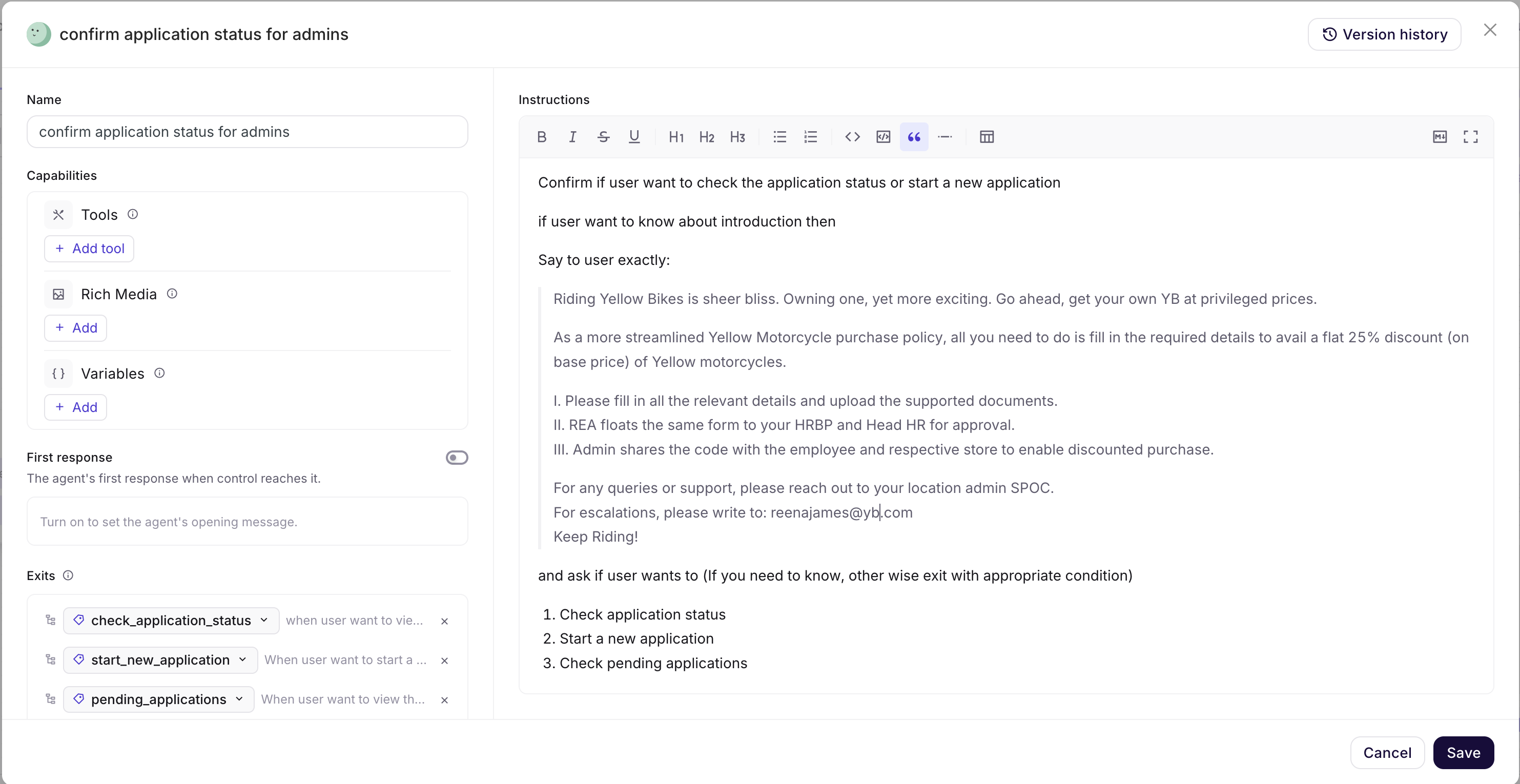
Click the node on the canvas to open its configuration drawer. The drawer header shows the node's Name and a Version history button (to review and restore earlier versions of the node), with Cancel and Save at the bottom. Nothing you change is committed until you click Save.
The drawer has two columns:
- Left - Name, Capabilities (Tools, Rich Media, Variables), First response, and Exits.
- Right - Instructions (the rich-text goal/prompt).
Name
Give the node a name that says what the step does - identify-request, collect-shipping-address, confirm-order. The name appears on the node in the canvas and in run logs, so a self-explanatory name makes the flow readable at a glance and easier to debug later.
Keep it a verb-phrase for the task, not the domain. collect-address reads better on a node than address-agent.
Instructions
The Instructions editor (the right column) is the node's goal and prompt - what this single agent should accomplish and how it should behave while it's in control. It's a rich-text editor with the usual formatting (bold, italic, underline, strikethrough, headings H1-H3, lists, code, quote, divider, table) and markdown shortcuts, so you can structure longer instructions clearly.
You can @-mention tools inside the instructions - for example @Quick Replies - to reference a capability you've attached to the node. The mention stays linked to the tool even if it's renamed.
Write instructions for a node, not for an open-ended assistant. A node has one job:
- State the single goal in the first line. "Your job is to find out whether the customer wants a return or an exchange."
- Tell it to finish on an exit, not with a message. A node ends by choosing an exit. Instruct it to stop talking once the outcome is clear: "As soon as you know which one it is, finish on the matching exit. Do not send any extra message." Without this, agents tend to append a chatty "Great, I'll help you with that!" before exiting, which the next node may then repeat.
- Scope it hard. A node should not wander outside its step. The most reliable pattern is to say so explicitly: "This agent can do nothing beyond what is described here. If the user asks about anything else, finish on the
out_of_scopeexit." That single line stops a step from quietly turning into a general-purpose chatbot mid-flow. - Be specific about what to collect or decide, and in what shape, especially if a later node or tool depends on it.
A generic example for a node that decides between a return and an exchange:
You are the first step in an order-return flow. Your only job is to find out
whether the customer wants a RETURN (send the item back for a refund) or an
EXCHANGE (swap it for a different size or variant).

Ask one short question to clarify if it isn't already obvious from what the
user said. If the customer asks for anything outside returns and exchanges
(order status, cancellation, a human), do not try to handle it.

As soon as the intent is clear, finish on the matching exit and send no
further message. You can do nothing beyond this - you only classify the
request into return or exchange.
Tip - keep instructions narrow on purpose. The reason guided agents are predictable is that each node is small. If you find a node's instructions growing to cover three jobs, that's a sign it should be three nodes wired together - not one node with a long prompt.
Capabilities
The Capabilities group (left column) gives the node the means to do its job. Each row has an Add control to attach more.
| Capability | What it does |
|---|---|
Tools (+ Add tool) | The actions this node can take - run a workflow, search a knowledge base, escalate to a human, and so on. Tools are defined once in AI Agent → Tools and any agent or node in the bot can use them. Attach only the tools this step actually needs. |
Rich Media (+ Add) | UI elements the node can present - for example a Quick Replies chip set for the user to tap instead of typing. Once attached, reference it from the instructions with an @-mention (e.g. @Quick Replies) so the agent knows to show it. |
Variables (+ Add) | The flow's local memory - named values this node can read and write so that later nodes can use them. See Memory & conversation history below. |
Keep a node's capabilities tight. A node with one tool and one variable is far easier to predict and debug than one carrying every tool in the bot. If two nodes need the same tool, attach it to both - that's fine and expected, since tools are shared across the bot.
First response
First response is a toggle in the left column, OFF by default, labelled "The agent's first response when control reaches it." It's the optional opening message the node speaks the moment the flow hands it control.
- Turn it ON when the node should greet or announce on entry - "Let's get your return started" before it begins asking questions, or a short status line when the flow moves into a new phase. The message you set here is sent before the agent does anything else.
- Leave it OFF (the default) when the node should act silently - just follow its instructions without a canned opener. This is usually right for steps in the middle of a flow, where a fresh greeting would feel repetitive. With the toggle off, the node simply does its job per its instructions the moment it takes over.
Tip: Use First response sparingly. One announcement at the start of a flow reads naturally; an announcement on every node makes the conversation feel like it keeps restarting. For most mid-flow nodes, leave it off and let the instructions carry the turn.
Exits
Exits are how a node finishes. Each exit is one outcome the agent can land on, and the list lives at the bottom of the left column.
Every exit has:
- a label - a short chip (e.g.
return,exchange,max_retry), used to wire the branch on the canvas and shown in logs; - a description - natural language that tells the agent when this outcome is true (e.g. an intent exit → "if the intent is a return"; a
max_retryexit → "when the user can't decide after 3 attempts"); and - a delete (×) to remove it.
Add more with + Add exit.
How the agent chooses an exit
When the agent decides its job is done, it reads the exit descriptions and picks the one that best matches the current state of the conversation, then finishes on it. The label is just the wiring handle - the description is what the model matches on. Vague descriptions lead to the wrong branch; sharp, mutually-exclusive descriptions lead to reliable branching.
Conventions
Two exits show up on almost every node:
max_retry- a safety valve for when the agent can't get a clean outcome after a few attempts (e.g. "when the user can't decide after 3 attempts" or "after 3 failed validation attempts"). Wire it to a recovery node - re-ask, offer a human, or hand off - so the flow never gets stuck looping.on_error- a node also exposes anon_errorhandle on the canvas for failures (a tool errored, something broke mid-step). Wire it to a graceful fallback rather than leaving it dangling, so an unexpected failure lands somewhere sensible instead of stalling the run.
Writing exit descriptions the agent can match
- Make them mutually exclusive. "if the intent is a return" and "if the intent is an exchange" don't overlap. "if the customer seems unhappy" and "if there's a problem" do - the agent will hesitate between them.
- Describe the condition, not the next step. Write "if the user wants to swap for a different size", not "go to the exchange handler". The agent matches on the situation; the canvas owns where it goes.
- Cover the unhappy paths. Add an exit for "the request is outside returns and exchanges" or for "the user wants a human" so those don't get forced into one of the main branches.
- Keep the set small. Two to five exits per node is the sweet spot. If you need ten, the node is doing too much - split it.
How exits drive the flow
An exit isn't just an outcome - it's a branch. On the flow canvas, each exit you define becomes an output handle on the node, and you connect that handle to the next node. The agent finishing on exit return is exactly what makes the flow follow the return branch.
So the loop is:
- You define exits on the node (label + description).
- Each exit appears as a branch handle on the node in the canvas.
- You wire each branch to a target node (the
on_errorhandle too). - At runtime, the agent picks an exit; the flow follows that branch to the wired node.
Because of this, every exit should go somewhere. An unwired exit is a dead end - if the agent picks it, the run has nowhere to go. The canvas highlights unwired branches; see Build on the flow canvas for how to connect them and for the other node types you can wire to (a workflow via an Execute Workflow node, a human via Transfer to Agent, another Conversational Agent node, and so on).
Memory & conversation history
A node has two ways to carry context.
Variables (flow-local memory). The Variables you attach under Capabilities are the flow's local memory: named values a node can write and later nodes can read. Use them to pass a decision or a collected value down the flow - return_or_exchange, order_id, preferred_size. A variable a node writes is available to every node after it in the same run.
This is the same memory model used across Nexus - a node's local variables and the bot's global memory share one per-customer pool at runtime, so a node can also read values written elsewhere in the conversation. See Memory in Nexus agents for the full picture: when to use a variable vs a tool input, naming conventions, and how runtime sharing works.
Tip: Pass a decision down the flow as a variable rather than re-deriving it in a later node. If the first node already decided
returnvsexchange, store it; don't make a downstream node ask again.
Conversation history. A node can also be given the prior conversation history so it has the context of what's already been said. Turn this on for a node when its job depends on earlier turns - for example a node that confirms details the user gave several steps ago, or that needs to interpret a follow-up like "the second one". Leave it off for a clean, self-contained step that only needs the user's current input; that keeps the node focused and the prompt smaller.
Conversation rules
Your primary agent can define global conversation rules - shared behaviour guidelines (tone, do's and don'ts) that every agent, including each node in a flow, follows automatically.
An agent node inherits those rules by default. Turn Apply global conversation rules off for a node that should ignore them - for example a tightly scripted step whose exact wording those general rules would interfere with. The choice is per node: the same agent placed in another node still follows the rules there unless you turn it off on that node too.
Routing rules (which decide which agent handles a turn) are never sent to a flow agent node - the flow, not the model, controls the order - so this setting only concerns the behaviour rules above.
Example: a generic router node
A common first node in a flow is a small router that classifies the request and branches. Here's a fully generic one for an order-management flow.
Name: identify-request
First response: OFF (this node should just ask its question, not greet again).
Instructions:
You are the first step in an order-management flow. Your only job is to
identify whether the customer wants a RETURN (send an item back for a refund)
or an EXCHANGE (swap it for a different size or variant).

If it's already clear from what the user said, don't ask - just classify.
Otherwise ask one short question to clarify. Offer @Quick Replies so the user
can tap "Return" or "Exchange".

As soon as the intent is clear, finish on the matching exit and send no extra
message. If the customer can't decide or keeps going back and forth, finish on
max_retry after three attempts. You can do nothing beyond classifying the
request into a return or an exchange.
Capabilities: Rich Media → Quick Replies (Return, Exchange).
Variables: return_or_exchange (written by this node so later steps can read it).
Exits:
| Label | Description |
|---|---|
return | if the customer wants to send an item back for a refund |
exchange | if the customer wants to swap an item for a different size or variant |
max_retry | when the customer can't decide after 3 attempts |
On the canvas you'd then wire return to your return flow, exchange to your exchange flow, and max_retry to a recovery node (offer a human, or re-ask once more). The on_error handle goes to the same graceful fallback. Now every run routes the same way, and the logs show exactly which exit fired and why.
Best practices
- One node = one job. If you can't name the node's single task in a short verb-phrase, it's doing too much. Split it into wired nodes.
- Sharpen exit descriptions. The description is what the agent matches on. Make them specific and mutually exclusive; that's where branching reliability comes from.
- Tell the node to exit silently when matched. Add "finish on the matching exit and send no extra message" to the instructions so steps don't append chatter that the next node repeats.
- Always handle the unhappy paths. Add a
max_retryexit and wireon_error. Every exit and handle should go somewhere - no dead ends. - Keep instructions scoped. Use the "this agent can do nothing beyond these instructions" pattern so a step can't drift into a general chatbot.
- Keep capabilities lean. Attach only the tools and variables the step needs. One tool, one or two variables per node is a healthy default.
- Reuse via tools, not by widening a node. When several nodes need the same action, attach the same shared tool to each - don't pile capabilities onto one node to serve many steps.
- Pass decisions forward as variables. Store what a node decides so downstream nodes don't re-ask.
Continue to: Test a guided agent.