Guided agents
A guided agent runs the exact steps you design, in the same order every time - so nothing is missed and every run stays consistent and auditable. It's the deterministic counterpart to a conversational agent: instead of working out each reply on its own from your knowledge, a guided agent follows a flow you lay out on a canvas.
Reach for one whenever a task has a fixed procedure that must run the same way every time - order returns, loan applications, KYC checks, booking an appointment. These are the cases where an LLM-driven agent, however well-prompted, is hard to keep on the rails: it can skip a step, ask things out of order, or finish early. A guided agent removes that risk by making the path explicit.
Guided agents live on the same Agents page as conversational agents, under their own tab. You create one from the same Create picker, then build it on the flow canvas.
Conversational vs guided - which should I build?
Both are agents you create from the Agents page; the difference is how they decide what to do next.
| If the task is… | Build a… | Why |
|---|---|---|
| Open-ended Q&A - answering questions from your knowledge | Conversational agent | It works out each reply on its own; no fixed path to enforce. |
| Troubleshooting and support - diagnosing errors, fixing login/device issues, guiding someone to a resolution step by step | Conversational agent | The path depends on what the user says; the agent adapts turn by turn. |
| A multi-step procedure that must run the same way every time - order returns, loan applications, KYC checks, booking an appointment | Guided agent | The steps and their order are fixed; you want every run consistent and auditable. |
| A regulated or audited process where skipping or reordering a step is unacceptable | Guided agent | The flow guarantees each step runs, in order, on every run. |
A useful test: if you'd describe the work as "it depends on what they ask," build a conversational agent. If you'd describe it as "first do this, then this, then this - every time," build a guided agent.
You don't have to choose only one. The two compose: a conversational agent can call a guided agent as a tool when a conversation reaches a part that needs a fixed procedure (for example, a support agent that hands off to a kyc-verification guided agent once the user is ready to verify their identity). The conversational agent stays in charge of the open-ended conversation; the guided agent runs the deterministic part and returns control. See Guided agents as tools below.
What's in a guided agent
A guided agent is a flow on a canvas - a graph of nodes wired together by exit branches. When you open one, you'll see:
- Start - the entry node. It carries the trigger description (what the guided agent is for / when it runs).
- Nodes - the steps. The main node types are:
- Conversational Agent node - a focused agent that owns one step of the flow (collect details, confirm, answer a sub-question). It has its own instructions, tools, and exits. This is the workhorse node - see The Conversational Agent node.
- Execute Workflow node - runs a workflow (a callable, deterministic skill - an API call, a lookup, a calculation) as a step.
- Transfer to Agent node - hands the conversation to a human agent in Inbox.
- Exit branches - every node finishes on one of its exits, and each exit is wired by a branch to the next node. This is how the flow's order is enforced: a Conversational Agent node that exits on, say,
eligiblegoes to one node; onnot_eligibleit goes to another; onmax_retryoron_errorit goes somewhere else. The wiring is the procedure.
Because the path is drawn out explicitly, a guided agent is easy to reason about and audit: you can look at the canvas and see every route the conversation can take.
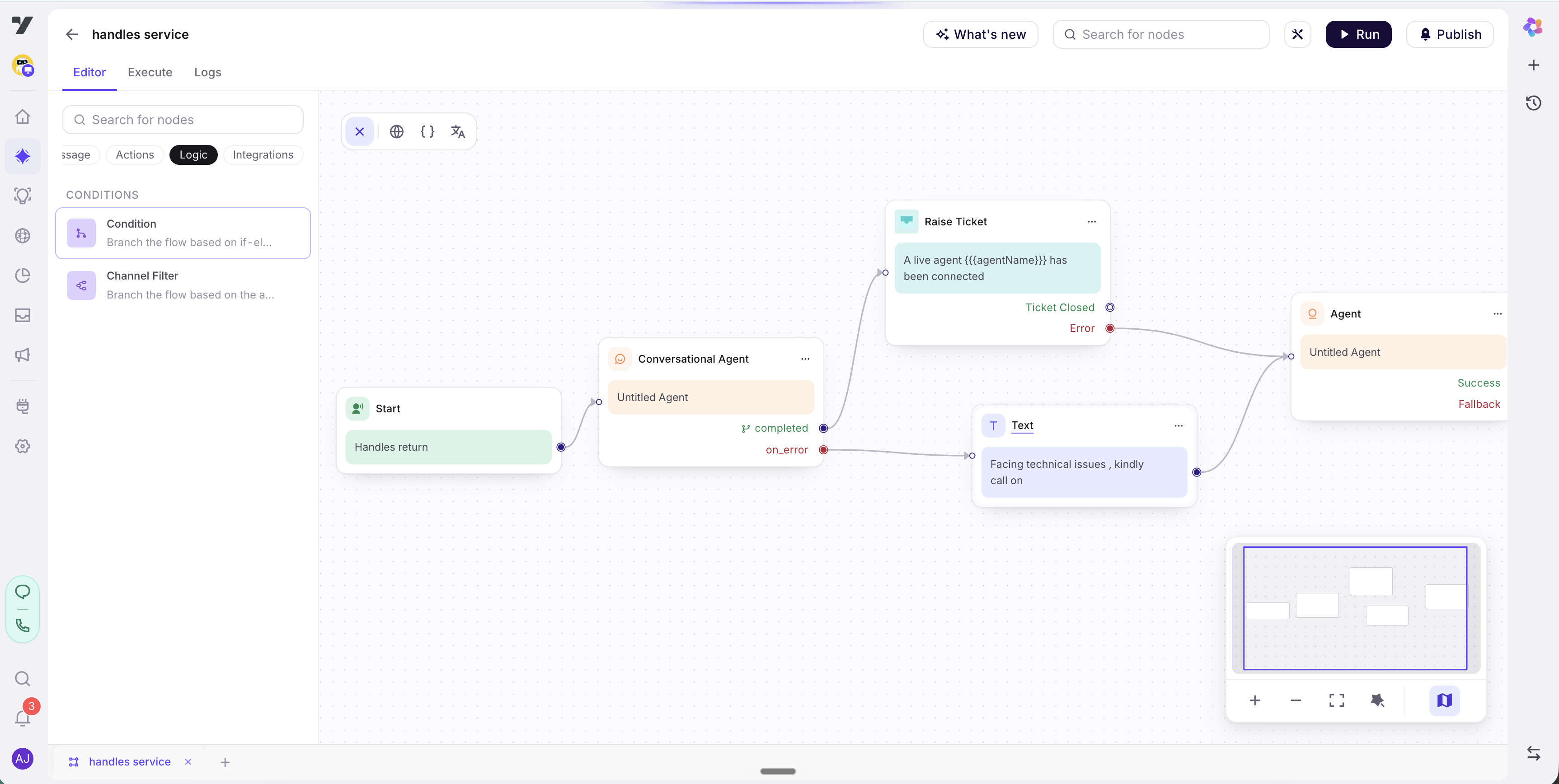
For a full tour of the canvas, see The flow canvas.
Where guided agents live
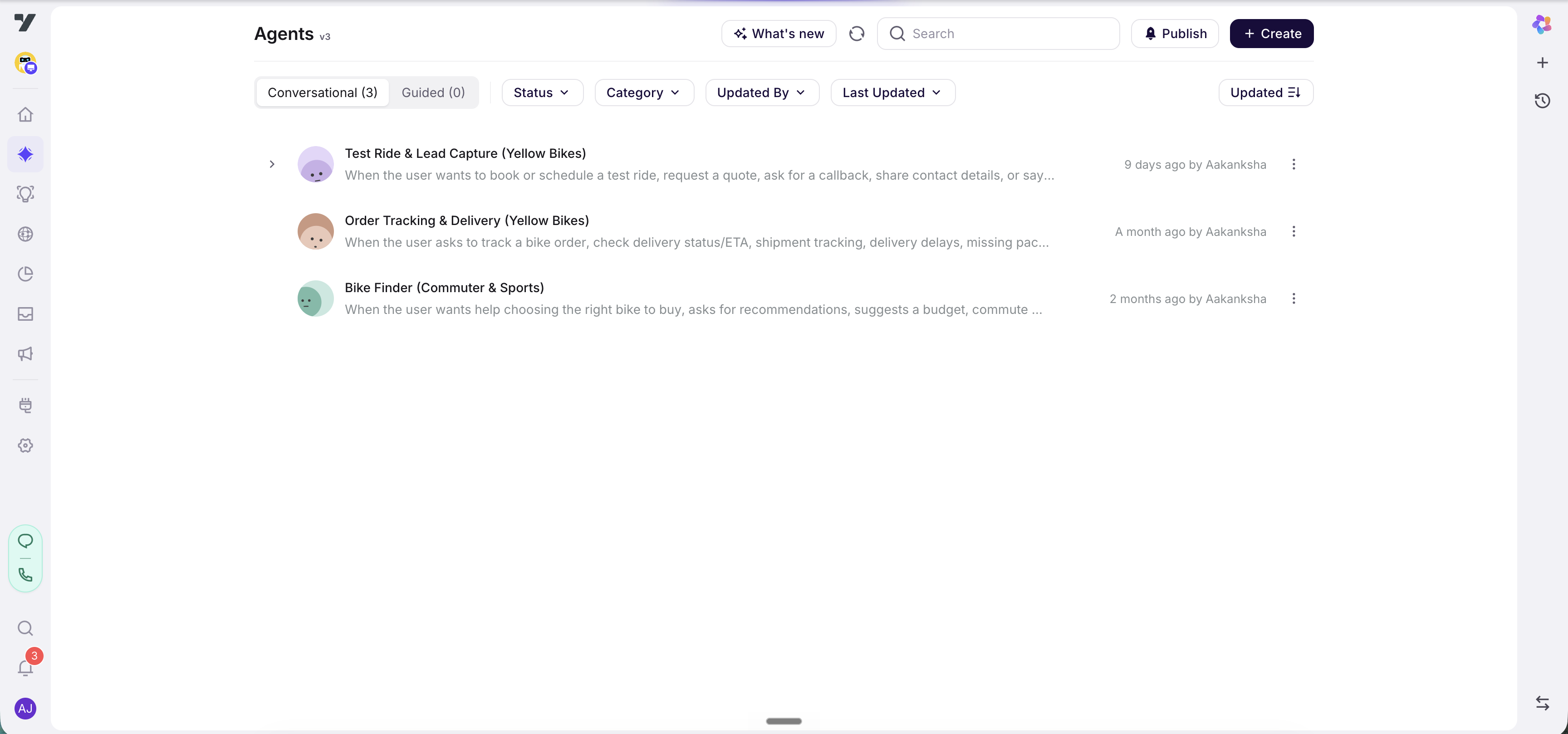
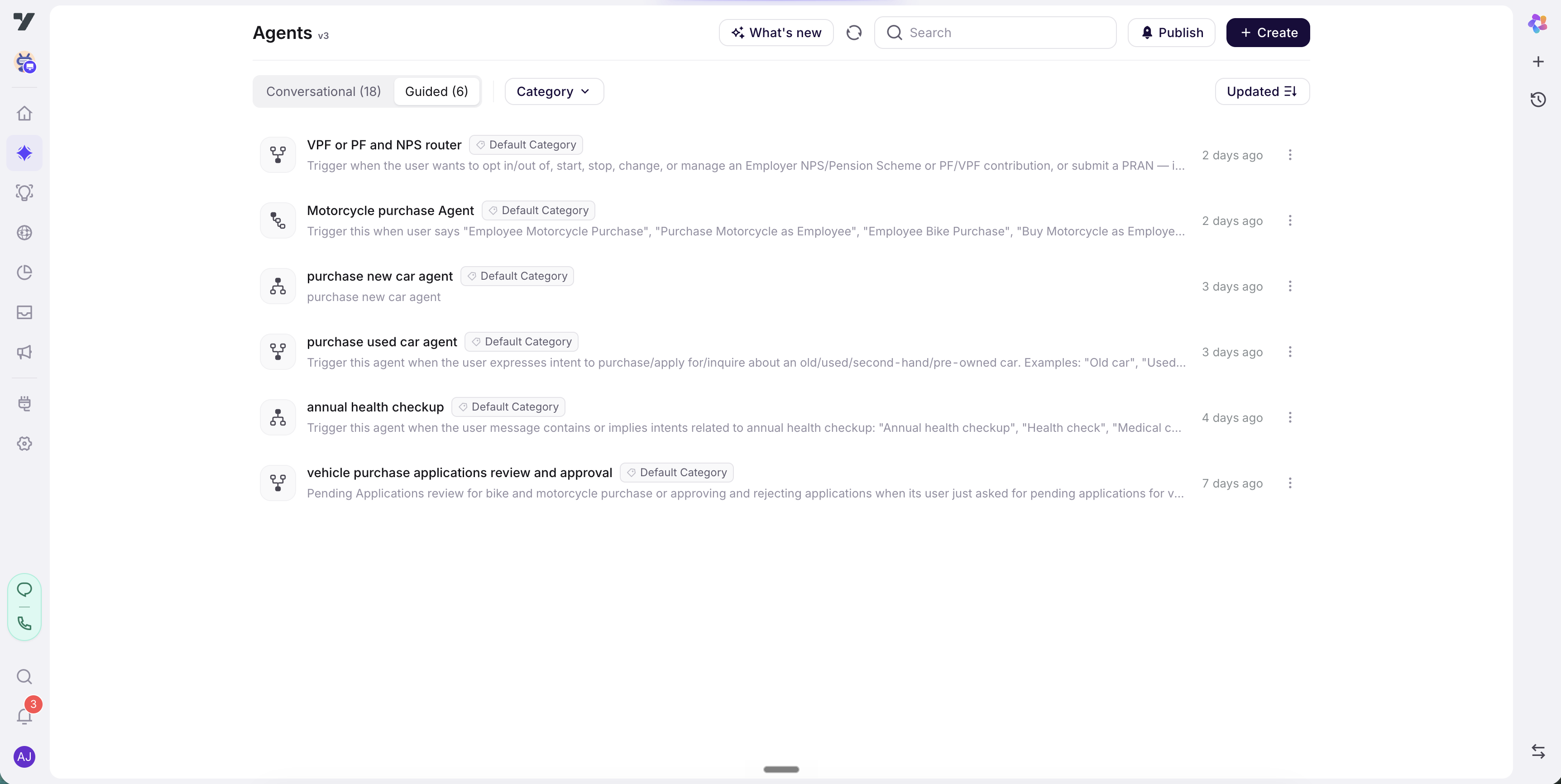
Guided agents share the Agents page (AI Agent → Agents) with conversational agents, but each type has its own tab:
- Conversational - your LLM-driven agents. Each row shows a round avatar, the agent's name, its trigger description, and a Live/Draft status.
- Guided - your guided agents. Each row shows a generated flow icon (not an avatar), the agent's name, a Category tag, and a short description.
The active tab is saved in the URL, so a link to the Guided tab reopens there.
Two things are deliberately different about guided agents in this list:
- No Live/Draft status. A flow has no live/draft lifecycle, so the Guided tab has no Status filter - it filters by Category and a sort only. (The Conversational tab keeps Status, Category, Updated By, and Last Updated.)
- A generated icon instead of an avatar, so you can tell the two types apart at a glance.
To create one, click Create in the page header and pick Guided agent from the "What would you like to create?" picker. (The same picker offers Conversational agent.) See Create an agent.
Guided agents as tools
Every guided agent is automatically available as a tool to your conversational agents. There's no toggle to switch on - if a guided agent exists in the bot, your conversational agents can call it.
This is what makes the two types compose cleanly. A conversational agent handles the open-ended conversation, and when it reaches a part that needs a fixed procedure, it calls the relevant guided agent the same way it would call any other tool. The guided agent runs its steps to completion and returns control.
Note: A guided agent is not a workflow. "Workflow" is a reserved term for a callable scheduler skill (an API call, a lookup, a job). A guided agent is a conversational journey across nodes - it can call a workflow (via an Execute Workflow node), but it is never itself a workflow.
Tip - name guided agents by the task.
order-return,kyc-verification,book-appointmentread clearly both in the Guided list and when a conversational agent calls one as a tool. A vague name likeflow2tells the calling agent nothing about when to use it.
Availability
Guided agents are gated. They appear only on Nexus bots that also have the flow-agent capability enabled. When the gate is off, the Agents page behaves exactly as before - no Guided tab, no Guided option in the Create picker.
Note: If you don't see the Guided tab on the Agents page, or the Create picker shows only Conversational agent, the capability isn't enabled for your account. Talk to your account team to turn it on.
Read next
- Create an agent - start from the Create picker and open the flow canvas.
- The flow canvas - the Editor / Execute / Logs tabs, nodes, and exit branches.
- The Conversational Agent node - instructions, exits, tools, variables, and first response.