Inbox Webhooks
Webhooks push Inbox ticket activity to your own HTTPS endpoint as it happens. When
a ticket is created, assigned, resolved or edited, we POST the event to every
endpoint subscribed to it — with automatic retries, per-attempt delivery logs, and
health tracking that disables an endpoint that has been failing for too long.
This is the push counterpart to the Inbox Ticketing API: instead of polling for changes, you receive them within seconds.
Webhooks are enabled per account. If you don't see the Webhooks tile under Integrations, reach out to our team.
How it works
- Something happens to a ticket — an agent resolves it, a tag changes, a note is added.
- We match the event against your endpoints. An endpoint receives it only if it is enabled and subscribed to that event type.
- We
POSTthe event to your URL and read your response. - On failure we retry on a fixed schedule, backing off as attempts continue.
- Every attempt is written to Delivery logs with its status, latency and reason.
- An endpoint that fails continuously for 48 hours is disabled automatically.
Events that match no endpoint are discarded — there is no queue waiting for you to subscribe later.
Set up an endpoint
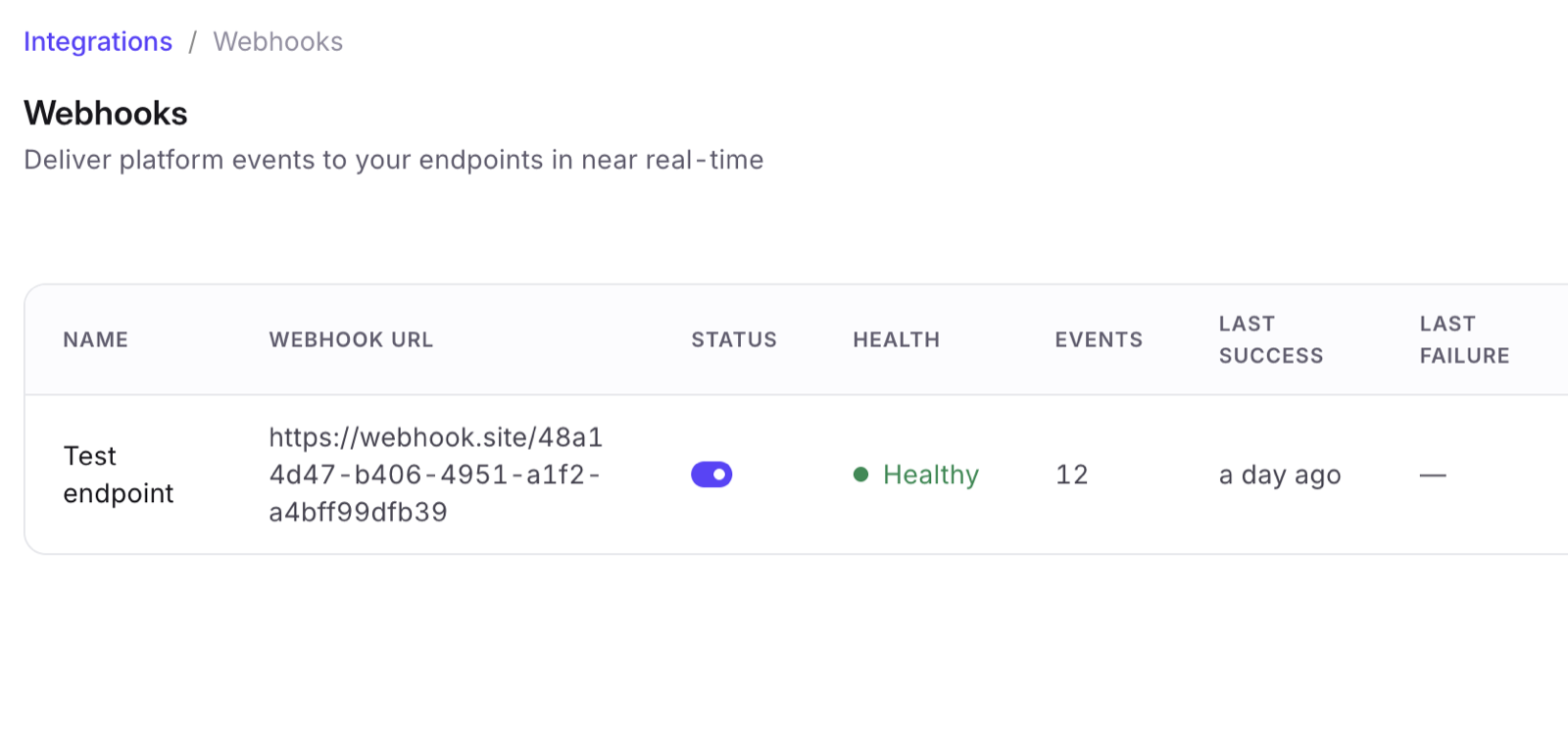
The Webhooks screen lists your endpoints with their status, health, event count and when each last succeeded or failed.
-
Go to Integrations and open the Webhooks tile under Tools.
-
Select New endpoint.
-
Fill in the form:
Field Notes Name How the endpoint appears in the list. Description Optional — what the endpoint is for. Webhook URL Must be https://.Authentication See Authentication. Request timeout 3,000–30,000 ms. Default 10,000 ms. Enabled Turn off to pause delivery without deleting the endpoint. -
Under Events, pick the events this endpoint should receive. Search filters the list; Select all takes everything. At least one is required.
-
Select Create endpoint.
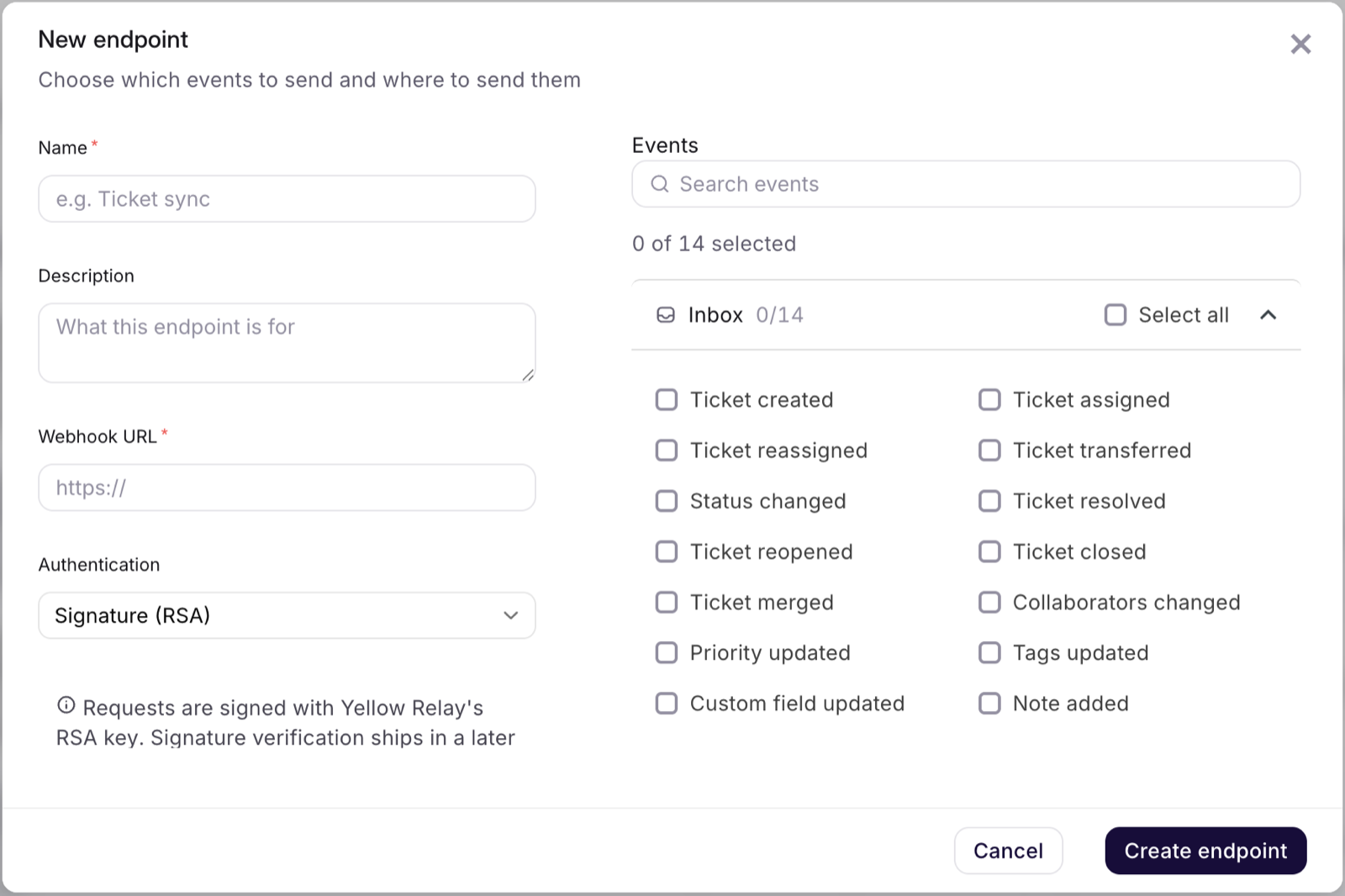
You can register up to five endpoints, each with its own URL, authentication and event selection. Paused and auto-disabled endpoints still count toward the five — delete one to free a slot.
Changing an endpoint's event selection takes effect on the next event; it does not backfill.
Send a test event
The Send test event action on any endpoint posts a sample payload immediately and reports the HTTP status, latency and result. It's the fastest way to confirm your URL, firewall rules and response handling before real traffic arrives.
Test events are not recorded in Delivery logs.
Events
Fourteen ticket events are available, all under the Inbox category:
| Event | Fires when |
|---|---|
| Ticket created | A new ticket is created. |
| Ticket assigned | The ticket is assigned to an agent. |
| Ticket reassigned | The ticket moves from one agent to another. |
| Ticket transferred | The ticket moves to a different group. |
| Status changed | The status changes with no more specific event — for example moving to On hold or back to the queue. |
| Ticket resolved | The ticket is marked resolved. |
| Ticket reopened | A resolved ticket is reopened. |
| Ticket closed | The ticket is closed. |
| Ticket merged | The ticket is merged into another ticket. |
| Collaborators changed | A collaborator is added or removed. |
| Priority updated | The ticket priority changes. |
| Tags updated | The ticket tags change. |
| Custom field updated | A custom field on the ticket changes. |
| Note added | A note is added to the ticket. |
The picker only lists events that are actually emitted today. If an event isn't in the list, nothing would ever be sent for it — so you can't subscribe to silence.
Payload
Each delivery is an HTTPS POST with Content-Type: application/json and an
X-Yellow-Event-Id header carrying the event id.
The body is a Kapture-compatible envelope, so if you are migrating from Kapture you can point your existing webhook at us unchanged:
{
"request": {
"head": {
"version": "1.0",
"clientId": "your-client-id",
"function": "dana.kapture.ticket.manage",
"reqTime": "2026-08-06T09:17:54+00:00",
"clientSecret": "…",
"reqMsgId": "3da24fdc-fb26-482f-9146-e4a9be8d495b"
},
"body": {
"externalId": "TCK-10432",
"subject": "Refund not received",
"status": "RESOLVED",
"agentName": "Priya R",
"comment": "",
"externalCommentId": "",
"authorId": "u-8821",
"authorType": "agent",
"orderId": "",
"loginId": "",
"topic": "",
"subTopic": "",
"attachments": []
}
},
"signature": "…"
}
head.clientId and head.function are per-endpoint settings you control.
status carries our ticket status vocabulary as-is — it is not remapped.
Responding
Return a 2xx as soon as you have accepted the event. Don't do slow downstream
work before responding, or you risk hitting the request timeout and being sent a
retry for an event you already processed.
If your response body contains a resultInfo object we read it: resultStatus of
"S" is success and "F" is failure. A plain 2xx with no resultInfo is
treated as success.
Delivery guarantees
At-least-once, so build for duplicates. head.reqMsgId is the event id and
stays the same across every retry of that event — use it as your idempotency key.
Order is best-effort, not guaranteed. A retried event can arrive after a newer one. If sequence matters, order on the event's own timestamp rather than on arrival.
No replay or backfill. Once an event is dropped — because nothing was subscribed, the endpoint was disabled, or every attempt failed — it is not re-delivered, and there is no way to request it again. For workflows where a missed event is costly, reconcile periodically against the Inbox Ticketing API.
Retries
Every event gets up to 12 attempts — the first, plus 11 retries:
| Retry | Delay after the previous attempt |
|---|---|
| 1 | 15 seconds |
| 2 | 5 minutes |
| 3 | 30 minutes |
| 4 | 2 hours |
| 5 | 4 hours |
| 6–11 | 8 hours each |
Each delay carries up to ±20% of randomness so a backlog to one endpoint doesn't arrive as a single burst. After the twelfth failure the event is given up on.
Retry-After wins. If your response carries a Retry-After header — on a
429 or 503, for example — we schedule the next attempt then instead of using
the table, with a floor of 5 seconds. A Retry-After above 24 hours is refused
and the event is dropped, on the grounds that a day-late ticket event is no longer
useful.
What gets retried:
| Retried | Given up immediately |
|---|---|
| Timeouts and connection errors | 400, 410, 422 and other malformed-request responses |
429 rate limits | 501, 505 |
All 5xx except 501/505 | |
401, 403, 404, 408, 425 |
401, 403 and 404 are retried because in practice they're temporary — a
rotated credential, or a route that's missing for the length of a deploy — rather
than a permanent refusal.
Endpoint health
| State | Meaning |
|---|---|
| Unknown | Nothing delivered yet to judge on. |
| Healthy | The last delivery succeeded. |
| Degraded | Recent failures, still delivering. |
| Failing | Five consecutive failures. Delivery pauses for a 5-minute cooldown, then resumes — we stop hammering an endpoint that is clearly down. |
| Deregistered | 48 hours of continuous failure. The endpoint is disabled and stops receiving events. |
The 48-hour clock starts at the first failure and resets on any success. Rate
limiting (429) never counts against endpoint health, so an endpoint that only
ever rate-limits us is never disabled for it.
While an endpoint is deregistered its events are discarded, not held.
Re-enable a deregistered endpoint
Fix the endpoint, then select Re-enable on its row. This sends a test event and reactivates the endpoint only if that delivery succeeds — an endpoint that is still broken cannot be switched back on. Health reads Unknown until the first real delivery lands.
Delivery logs and metrics
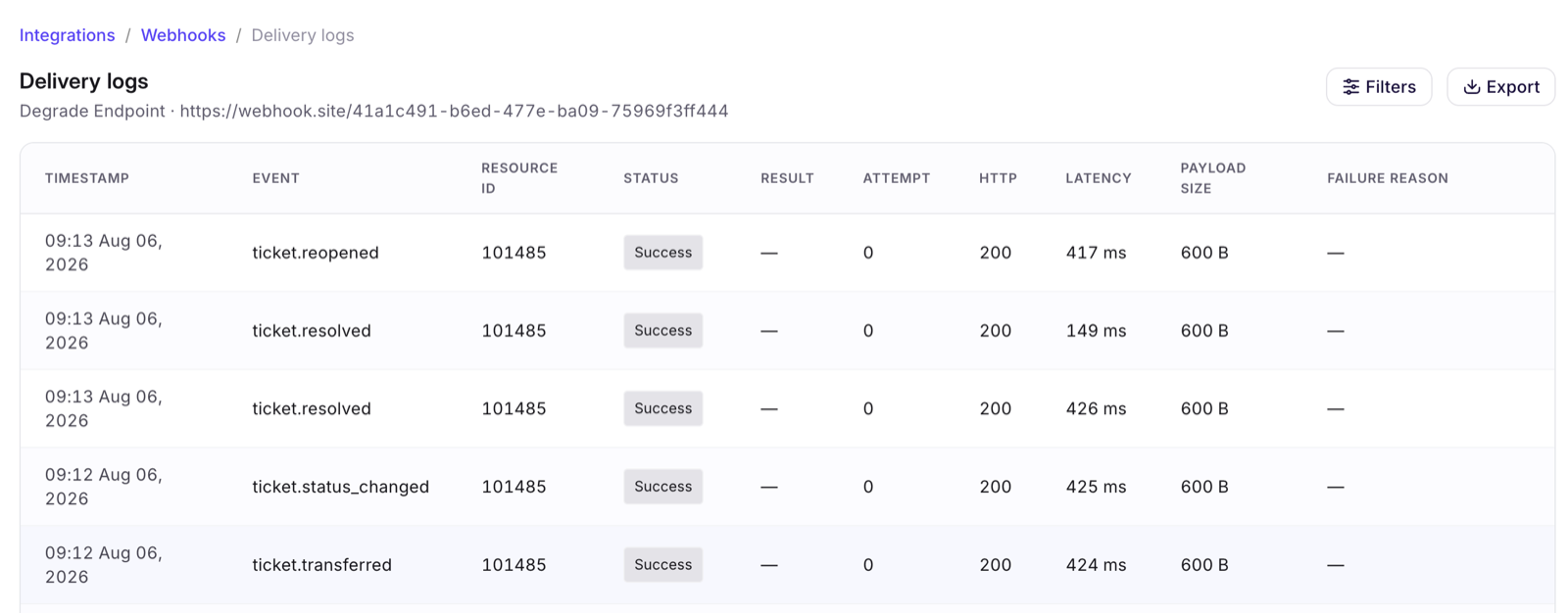
Delivery logs record every attempt: timestamp, event type, resource id, status, result, attempt number, HTTP status, latency, payload size and failure reason. Filter by status or event type, search the failure reason, open a row for detail, or export the current view to CSV.
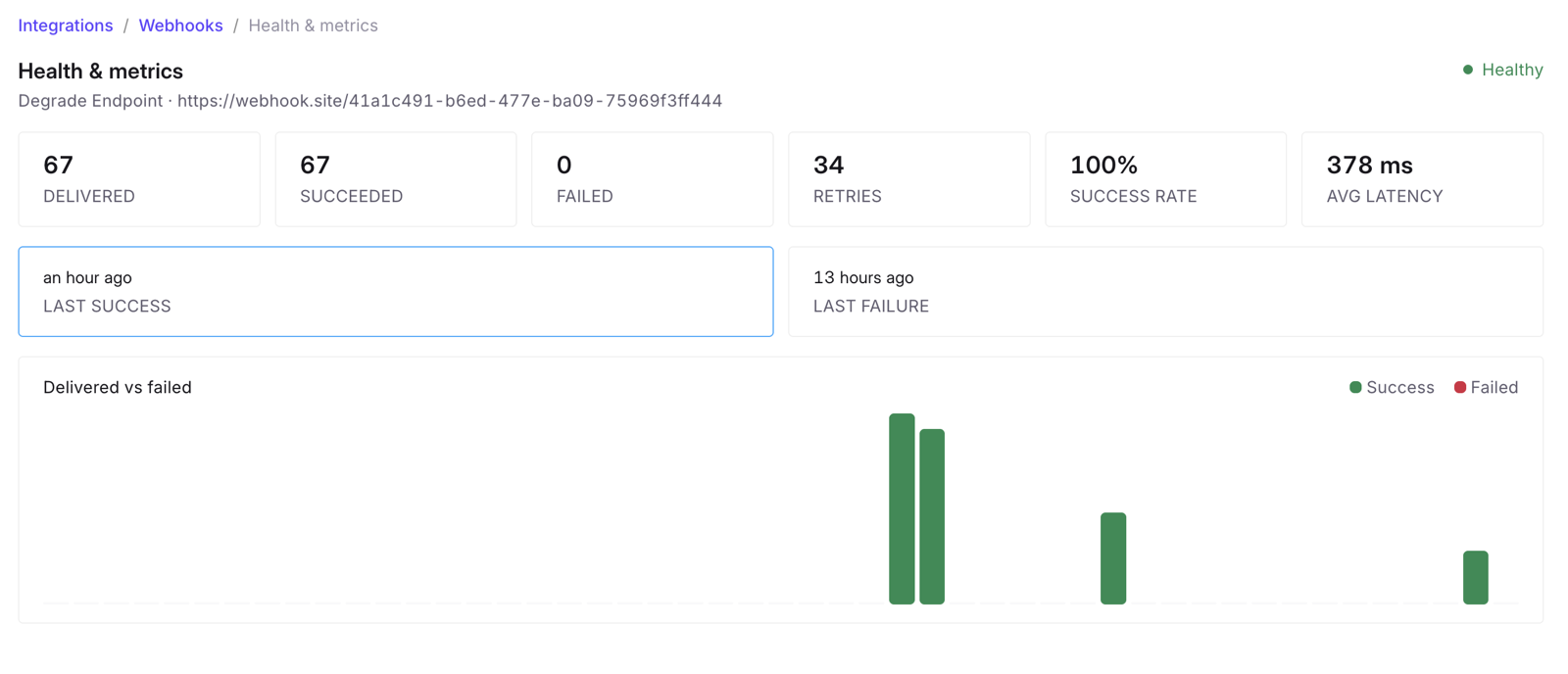
Health metrics shows delivered, succeeded and failed counts, retries, success rate, average latency, last success and last failure, plus a delivered-vs-failed trend.
Logs are retained for 30 days. We do not store the response body your endpoint
returns — only its status code and, where present, resultInfo.
Security
- HTTPS only.
http://URLs are rejected. - Credentials are never returned by the API. Where you supply one, it is shown only as a masked last-4 hint after saving.
- Response bodies from your endpoint are not persisted.
Authentication
| Type | What we send |
|---|---|
| Signature (RSA) | A signature field alongside the payload, plus your clientId and function in head. |
| None | No authentication header. |
| Bearer / Basic / API key | Your credential, as Authorization or X-Api-Key. |
The signature field is present in every payload but currently carries a
placeholder value — there is no public key published to verify it against, so do
not treat it as proof of origin. Until signature verification ships, authenticate
us by allow-listing our egress IPs or by putting an unguessable path segment in
your webhook URL.
Troubleshooting
Nothing is arriving. Check, in order: the endpoint is Enabled; it hasn't been Deregistered; the event you expect is actually ticked in its event list; and Delivery logs for that endpoint. An event that matched no endpoint leaves no trace, so an empty log usually means the subscription didn't match — not that delivery failed.
Deliveries show as failed with 2xx. Your response body contains a
resultInfo with resultStatus: "F". We classify on that, not on the status code.
Duplicates. Expected under at-least-once delivery — deduplicate on
head.reqMsgId.
Timeouts. Raise Request timeout (up to 30,000 ms), or acknowledge immediately and move the work off the request path. Timeouts count against endpoint health and will eventually deregister the endpoint.
The endpoint was disabled on its own. That's the 48-hour deregistration. Fix the cause, then Re-enable — it will only come back if a test event succeeds.
Related
- Inbox Ticketing API — the pull counterpart to these events
- PR: #4342