Fallback
Fallback is what happens when your assistant can't handle a request - a question clearly outside its scope, input it can't parse, or an answer it simply doesn't have. It's project-level, so the recovery you define here applies to every agent, single and multi alike.
A good fallback turns a dead end into a next step. A bad one leaves someone stuck and reaching for a human anyway - having wasted their time first.
Find it at AI agents → Configuration → Fallback.
The two controls
| Control | What it does | Default |
|---|---|---|
| Next steps after failure | An instruction describing how to recover when a request can't be handled | — |
| Retries for information validation failures | How many times to re-ask when input doesn't validate | 3 |
They handle different halves of the same problem. Retries cover the recoverable case — the person just needs another go at a date or an order number. The instruction covers the give-up gracefully case. When the retry budget runs out, the instruction takes over.
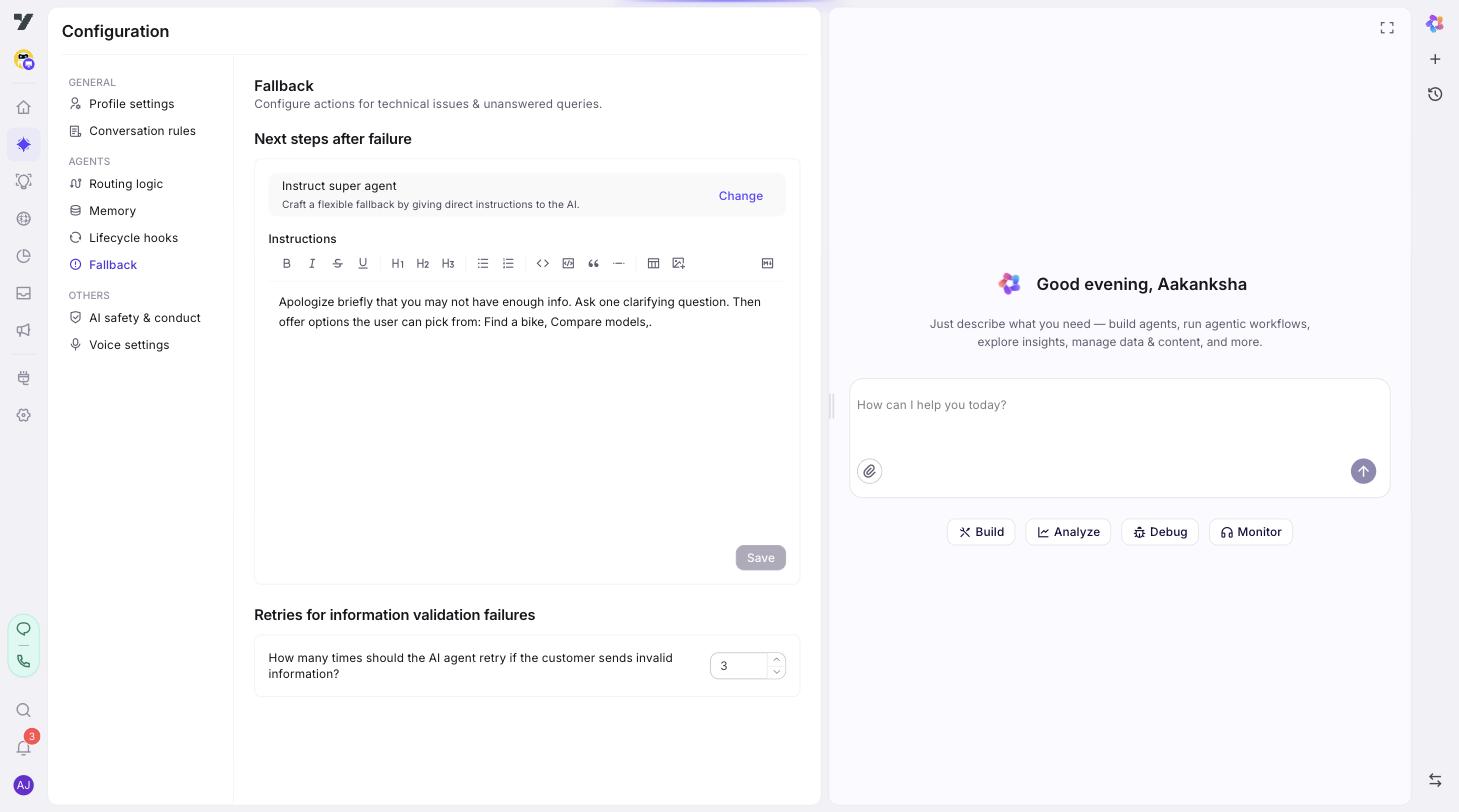
Next steps after failure
You write an instruction, not a fixed message. The assistant composes a reply from it in context, so the recovery fits what the person was actually trying to do rather than being the same apology every time.
Brief it the way you'd brief someone on what to do when they're stuck:
You couldn't handle the request. Apologise briefly, then offer concrete
next steps: ask them to rephrase, point them to the FAQ, or offer to
connect them to a person using @escalate-to-agent. Never invent an
answer. Keep it to two short sentences.
What makes this work:
- Name a specific way out. "Apologise and offer help" produces a dead end dressed as politeness. Naming the escalation tool gives the person somewhere to land.
@-mention the tool rather than describing it. The reference stays bound through renames, and the assistant knows exactly which one you mean.- Cap the length. A fallback is not the moment for a paragraph.
- Say "never invent an answer" explicitly. Not answering is the whole point of a fallback, and it's the instruction most worth making unambiguous.
In regulated work, the safe fallback is usually a person. In finance, healthcare or anything with a compliance surface, an assistant guessing is worse than an assistant handing over. Make escalation the first option, not the last.
Retries for validation failures
How many times the assistant re-asks when input doesn't pass validation — an order ID in the wrong shape, an unparseable date. Three by default.
Keep it low. A fourth attempt at the same question reads as nagging, and someone who has failed three times usually can't succeed on the fourth — they've misunderstood the question, don't have the information, or your validation is stricter than it needs to be.
If you find yourself raising this number, the fix is usually upstream: a clearer prompt, a more forgiving format, or offering the alternative sooner.
Test it deliberately
Fallback is the path least likely to be exercised by accident and most likely to be seen on a bad day. Send obvious gibberish and a question clearly outside scope, and confirm it fires the way you expect — including that the escalation path actually works.
Do it in the Testing Lab before each release, not by hand each time.
Next: AI safety & conduct - content filters on inputs and replies.